5G QoS Flow Establishment Procedure Call Flow
5G QoS Flow Establishment is the procedure that creates the service-specific treatment a packet stream needs inside a PDU session.
It connects policy control, session management, RAN resource activation, and real packet classification into one end-to-end workflow.
Introduction
This is the point where the network turns a service requirement into a concrete QFI, QoS rule set, and radio plus user-plane behavior.
In troubleshooting, the winning pattern is to compare the requested service need with the delivered QFI, filters, and post-setup traffic. That quickly shows whether the flow was really established or only described in signaling.
What Is QoS Flow Establishment in Simple Terms?
- What starts the procedure: A service or policy decision requires dedicated QoS handling.
- What the UE and network want to achieve: Create a usable flow with the right classification and treatment.
- What success looks like: The intended application traffic moves onto the new QFI with the expected behavior.
- What failure means: The flow is rejected, misclassified, or not enforced consistently end to end.
Why this procedure matters
QoS flow establishment is where service promises become measurable network behavior. If the QFI, filters, and bearer mapping do not line up, users feel the failure immediately.
Quick Fact Sheet
| Procedure name | 5G QoS Flow Establishment Procedure |
|---|---|
| Domain | 5G NR + 5GC service differentiation inside an active or newly created PDU session |
| Main trigger | A service needs dedicated QoS treatment beyond the currently active default flow behavior |
| Start state | UE has registration and either an active PDU session or a session setup in progress |
| End state | A QoS flow with the intended QFI, QoS rules, and radio/user-plane treatment becomes active |
| Main nodes | UE, gNB, AMF, SMF, UPF, PCF |
| Main protocols | NAS, NGAP, PFCP, service data flow policy control |
| Main success outcome | Traffic is classified to the intended QoS flow and gets the expected latency, priority, or GBR behavior |
| Main failure outcome | The flow is rejected, mapped incorrectly, or signaled successfully but never behaves correctly in live traffic |
| Most important messages | PDU Session Establishment/Modification Command, NGAP resource setup, PFCP rule installation, QoS rule delivery |
| Main specs | TS 23.501, TS 23.502, TS 24.501, TS 29.244, TS 38.300 |
Preconditions
- The UE has valid 5GS registration and access-side connectivity.
- A PDU session already exists or is being established at the same time.
- The network has enough policy, subscription, and resource information to create the desired flow.
- RAN and UPF can both apply the QoS treatment defined by the SMF.
Nodes and Interfaces
Nodes involved
| Node | Role in this procedure |
|---|---|
| UE | Receives QoS rules, maps uplink packets to the right QFI, and validates whether the intended service can actually use the new flow. |
| gNB | Maps the QoS flow into radio bearers, scheduler treatment, and transport behavior toward the UPF. |
| AMF | Relays NAS signaling and keeps access-side control aligned with the session-management outcome. |
| SMF | Allocates the QoS flow context, installs policy-driven rules, and coordinates user-plane updates. |
| UPF | Applies forwarding, packet-detection, and QoS enforcement rules tied to the flow. |
| PCF | Provides policy that influences whether the flow is allowed and which QoS treatment should be used. |
Interfaces used
| Interface | Path | Role |
|---|---|---|
| N1 | UE <-> AMF | Carries NAS session signaling that delivers the QoS flow context to the UE. |
| N2 | gNB <-> AMF | Carries access-side setup so the RAN can activate resources for the new flow. |
| N11 | AMF <-> SMF | Coordinates the control decision that creates the QoS flow. |
| N4 | SMF <-> UPF | Installs PFCP rules and user-plane enforcement state. |
| N3 / NR-Uu | gNB <-> UPF and UE <-> gNB | Carry the real traffic after the new QoS flow becomes active. |
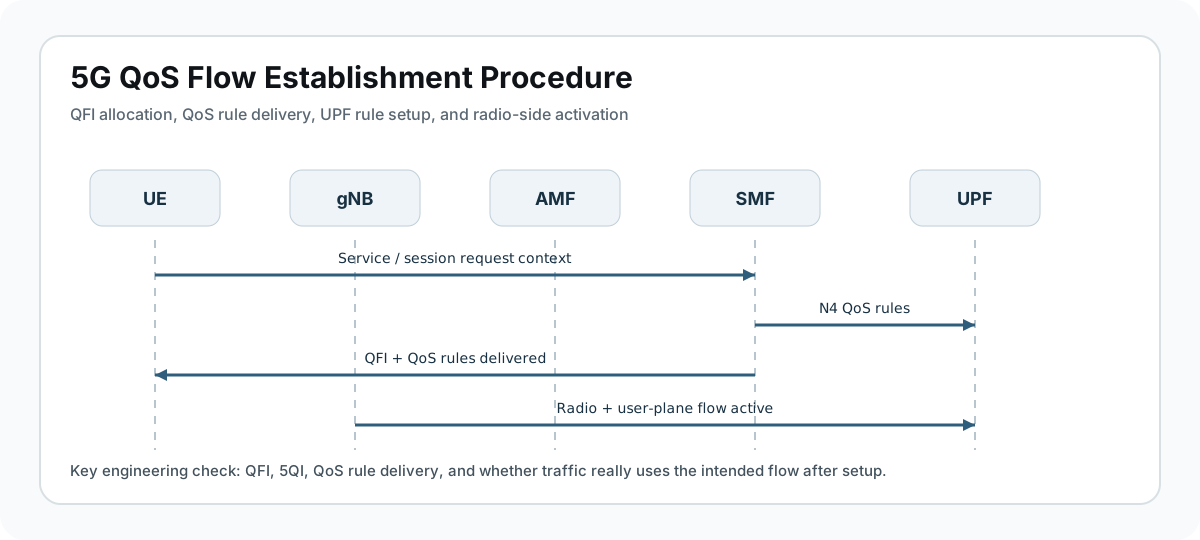
End-to-End Call Flow
UE                gNB                AMF                SMF / PCF           UPF
|                  |                  |                    |                  |
|                  |                  |<-- service trigger / policy ----------|
|                  |                  |------------------->|-- N4 install --->|
|                  |<-- N2 resource setup -----------------|<-- PFCP ack ------|
|<-- QoS rules / accept / modify command ------------------|                  |
|==== application packets now use the intended QFI ==========================>|
Major Phases
| Phase | What happens |
|---|---|
| 1. Service trigger | An application, policy rule, or network event requires a dedicated QoS treatment. |
| 2. Flow design and policy decision | SMF and PCF determine the QFI, 5QI, traffic filters, and whether GBR or priority treatment is needed. |
| 3. Core and access activation | UPF and gNB are prepared so the new flow can be carried end to end. |
| 4. UE rule delivery | The UE receives the QoS rules and session update context. |
| 5. Traffic validation | Real packets confirm that the intended flow is active and carrying the right service. |
Step-by-Step Breakdown
A service requirement triggers dedicated QoS treatment
Sender -> receiver: Application or policy trigger -> SMF / PCF
Message(s): Internal policy trigger, service data flow request, or session update decision
Purpose: Start creation of a new QoS flow or activation of dedicated flow treatment within the session.
State or context change: The session moves from generic connectivity toward service-specific QoS handling.
Note: The most important early question is whether the request came from application behavior, operator policy, or a network-triggered update.
SMF calculates the QoS flow context
Sender -> receiver: SMF <-> PCF <-> UPF context
Message(s): QoS policy evaluation, QFI selection, flow and filter preparation
Purpose: Define exactly how packets should be classified and treated.
State or context change: The network has a target QoS model ready for installation.
Note: QFI, 5QI, ARP, GBR, and packet filters should all align before you trust later success signaling.
User-plane and RAN resources are prepared
Sender -> receiver: SMF -> UPF and AMF -> gNB
Message(s): PFCP updates and NGAP session resource setup
Purpose: Make the data path and radio path ready for the new QoS behavior.
State or context change: Forwarding and radio resources begin matching the requested service treatment.
Note: Many field issues come from a mismatch between successful NAS delivery and incomplete N4 or RAN-side activation.
The UE receives the QoS rule set
Sender -> receiver: SMF -> AMF -> UE
Message(s): PDU Session Establishment Accept or PDU Session Modification Command
Purpose: Tell the UE how to map traffic onto the new flow and which rules are now active.
State or context change: The UE moves from old classification behavior to the new intended QoS flow model.
Note: Inspect whether the QoS rules really match the application traffic you expect to see afterward.
Live traffic proves the flow is active
Sender -> receiver: UE <-> gNB <-> UPF
Message(s): Application packets using the new QFI
Purpose: Validate that the new flow is not just defined in signaling but actually used in service.
State or context change: The new QoS flow becomes operational and measurable in packet traces.
Note: Real packet behavior is the final truth source. Signaling success alone is not enough.
Important Messages in This Flow
| Message | Protocol | Direction | Purpose in this procedure | What to inspect briefly |
|---|---|---|---|---|
| PDU Session Establishment Accept | NAS | SMF -> UE via AMF | Can deliver the initial QoS rules when the flow appears during session setup. | Check authorized QoS rules, session ID, and accepted context. |
| PDU Session Modification Command | NAS | SMF -> UE via AMF | Can add or change QoS flow behavior on an existing session. | Inspect the exact rule delta and affected traffic filters. |
| PDU Session Resource Setup Request | NGAP | AMF -> gNB | Tells the RAN which session and QoS resources must be activated. | Best access-side checkpoint for whether the gNB got the right context. |
| PFCP session update | PFCP | SMF <-> UPF | Installs the forwarding and enforcement rules for the new flow. | Use it to validate the real user-plane state. |
Important Parameters to Inspect
| Parameter | What it is | Where it appears | Why it matters | Common issues |
|---|---|---|---|---|
| QFI | Identifier of the QoS flow inside the PDU session. | NAS rules, UPF state, packet traces | Core value that links signaling intent to packet treatment. | Wrong QFI mapping can make the flow look missing. |
| 5QI / ARP / GBR | QoS profile characteristics applied to the flow. | Policy context and rule payload | Explain latency, priority, and bandwidth expectations. | Unexpected values often explain service complaints immediately. |
| Traffic filters | Packet matching rules that decide which traffic uses the flow. | QoS rule set | Determine whether the intended application packets reach the new flow. | Filter mismatch is one of the most common hidden problems. |
| PDU Session ID | Session containing the flow. | All control-plane messages | Prevents confusion when several sessions are active. | Wrong session correlation makes a healthy flow look broken. |
| RAN bearer mapping | How the gNB maps the flow to radio resources. | NGAP and gNB-side traces | Shows whether radio treatment matches the intended QoS model. | A missing bearer update breaks service even when NAS looks clean. |
Success Criteria
- SMF creates a coherent QoS flow context with the expected QFI and QoS profile.
- UPF and gNB install the matching enforcement and bearer state.
- The UE receives the rule set and classifies traffic correctly.
- Real service packets use the intended QFI and show the expected behavior.
Common Failures and Troubleshooting
| Symptom | Likely cause | Where to inspect | Relevant message(s) | Relevant interface(s) | Likely next step |
|---|---|---|---|---|---|
| The QoS flow is signaled but never carries traffic | The rule set exists, but filters, gNB mapping, or UPF enforcement do not match the real service packets. | Packet filters, QFI use, and user-plane traces. | NAS rules plus post-setup traffic | N1, N3, N4 | This is the classic control-plane success but service failure case. |
| Packets use the default flow instead of the dedicated flow | Classification failed, so traffic fell back to another QoS treatment. | Traffic filters and observed QFI values. | QoS rule set | N1, packet trace | Very common when app identifiers or port matches are incomplete. |
| The network rejects dedicated QoS setup | Policy, subscription, slice, or resource limits block the requested flow. | SMF / PCF policy path and session-reject context. | Session establishment or modification signaling | N11, policy | Start with entitlement and admission rules. |
| Performance is still wrong after flow creation | The flow exists, but its configured 5QI or radio treatment does not match service needs. | 5QI, GBR, ARP, scheduler behavior, and live KPIs. | QoS profile values | NR-Uu, N3 | Treat this as a QoS-design problem, not only a signaling problem. |
What to Check in Logs and Traces
- Record the QFI and PDU Session ID first.
- Compare traffic filters with the real application packet pattern.
- Inspect PFCP updates to confirm the UPF can enforce the flow.
- Check NGAP resource setup to see whether the gNB got matching QoS context.
- Use live packet traces to prove the new flow is actually carrying service.
Related Pages
Related sub-procedures
Related message reference pages
Related troubleshooting pages
FAQ
What is QoS Flow Establishment?
It is the procedure that creates or activates service-specific QoS treatment inside a 5G PDU session.
Is it always part of PDU Session Establishment?
No. It may appear during initial session setup or later as a modification to an existing session.
What proves success?
The correct QFI and rule set appear in signaling and the real application traffic uses that flow correctly.
What should I inspect first?
Start with QFI, 5QI, traffic filters, and whether the expected packets actually use the new flow.
Why is live traffic so important here?
Because a perfectly clean signaling trace can still hide incorrect packet classification or missing user-plane enforcement.