5G Secondary PDU Session Setup Procedure Call Flow
5G Secondary PDU Session Setup creates an additional data session for a UE that already has one or more active PDU sessions.
The engineering challenge is to add the new session cleanly without confusing its identity or destabilizing the sessions already in service.
Introduction
This is the right procedure to study when a UE needs another data path for a different DNN, slice, enterprise service, or operator-controlled traffic profile.
In field analysis, the most useful checkpoints are the new PDU Session ID, the intended DNN and slice, the returned accept contents, and the health of both the new and old sessions after activation.
What Is Secondary PDU Session Setup in Simple Terms?
- What starts the procedure: The UE needs a second or additional data session for another service path.
- What the UE and network want to achieve: Create a new additional session without disturbing active ones.
- What success looks like: The new session works and previously active sessions stay stable.
- What failure means: The added session is rejected, wrong, or operationally harmful to existing sessions.
Why this procedure matters
Secondary session behavior is where session correlation errors become very expensive. If you mix up session IDs, you can diagnose the wrong path for hours.
Quick Fact Sheet
| Procedure name | 5G Secondary PDU Session Setup |
|---|---|
| Domain | 5G NR + 5GC additional data-session setup |
| Main trigger | UE needs another PDU session while one or more sessions already exist |
| Start state | UE already has at least one active PDU session |
| End state | An additional PDU session is active for a different service, DNN, slice, or traffic need |
| Main nodes | UE, gNB, AMF, SMF, UPF |
| Main protocols | NAS, NGAP, PFCP, policy and QoS handling |
| Main success outcome | A new additional session becomes usable without disturbing existing active sessions |
| Main failure outcome | The extra session is rejected, mis-profiled, or collides operationally with existing session context |
| Most important messages | PDU Session Establishment Request, PDU Session Establishment Accept, QoS and address assignment for the new session |
| Main specs | TS 23.502, TS 24.501, TS 23.501, TS 29.244 |
Preconditions
- The UE is already registered and has at least one active PDU session.
- The subscription allows the requested additional service path.
- The target DNN or slice for the new session is known and permitted.
- The network can maintain multiple sessions for the UE without conflict.
Nodes and Interfaces
Nodes involved
| Node | Role in this procedure |
|---|---|
| UE | Requests a new additional session while maintaining existing active sessions. |
| gNB | Supports signaling and access-side bearer treatment for multiple concurrent sessions. |
| AMF | Relays the session request and tracks the new session alongside existing UE context. |
| SMF | Creates the additional session and binds it to the right DNN, slice, and policy profile. |
| UPF | Anchors the new user-plane path without disrupting other active sessions. |
Interfaces used
| Interface | Path | Role |
|---|---|---|
| NR-Uu | UE <-> gNB | Carries signaling and later data for the added session. |
| N1 | UE <-> AMF | Carries the request and final establishment result for the additional session. |
| N2 | gNB <-> AMF | Keeps the access-side context aligned while more than one session exists. |
| N11 | AMF <-> SMF | Creates the additional session in the core. |
| N4 / N3 | SMF <-> UPF and gNB <-> UPF | Installs user-plane rules for the new session alongside existing ones. |
End-to-End Call Flow
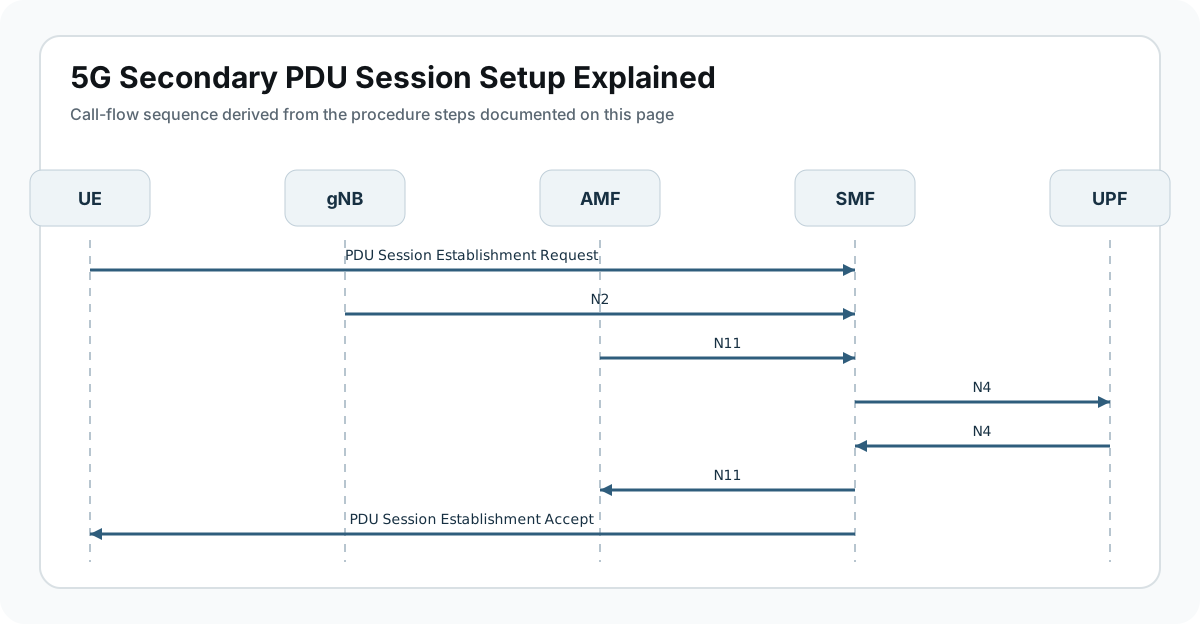
UE                gNB                AMF                SMF                UPF
|                  |                  |                  |                  |
|-- New session request ------------->|----------------->|----------------->|
|                  |                  |                  |-- setup rules --->|
|                  |                  |                  |<-- session ready -|
|<-- Establishment Accept ------------|<-----------------|                  |
|==== traffic on new session while old sessions remain active ==========>|
Major Phases
| Phase | What happens |
|---|---|
| 1. Need for another service path appears | The UE or service requires a second or additional data session. |
| 2. Session request | The UE requests a new session with its own DNN, slice, or service profile. |
| 3. Core selection and setup | The SMF and UPF create the additional session without damaging the existing ones. |
| 4. Acceptance and local activation | The UE receives the new session parameters and activates the additional path. |
| 5. Multi-session validation | Traffic proves the new session works and existing sessions stay healthy. |
Step-by-Step Breakdown
The UE identifies the need for another session
Sender -> receiver: UE application or service logic
Message(s): New service requirement
Purpose: Separate the need for an additional session from modification of an existing one.
State or context change: The UE prepares a new session request while other sessions remain active.
Note: A secondary session is a new session, not a modification of the old one.
The UE sends a new establishment request
Sender -> receiver: UE -> gNB -> AMF -> SMF
Message(s): PDU Session Establishment Request
Purpose: Ask for an additional PDU session with its own service profile.
State or context change: The network begins building another session under the same UE registration context.
Note: Use the new PDU Session ID to keep it separate from already-active sessions in the trace.
The network selects the right profile for the new session
Sender -> receiver: AMF <-> SMF <-> UPF
Message(s): Session creation, policy selection, and PFCP setup
Purpose: Create the new session with the correct DNN, slice, address, and QoS treatment.
State or context change: The additional session gains its own user-plane identity and policy behavior.
Note: This is where wrong DNN or slice choices silently create a valid but incorrect extra session.
The UE receives the acceptance for the new session
Sender -> receiver: SMF -> AMF -> gNB -> UE
Message(s): PDU Session Establishment Accept
Purpose: Deliver the parameters for the additional session and make it active.
State or context change: The UE now has multiple sessions it must track correctly.
Note: Confirm the returned address and QoS belong to the new session, not to a pre-existing one.
Traffic validates all sessions together
Sender -> receiver: UE <-> gNB <-> UPF
Message(s): First packets on the new session and health of existing sessions
Purpose: Prove the added session works and does not break other active sessions.
State or context change: The UE operates in a stable multi-session state.
Note: A good extra session that destabilizes the original session is still a bad outcome.
Important Messages in This Flow
| Message | Protocol | Direction | Purpose in this procedure | What to inspect briefly |
|---|---|---|---|---|
| PDU Session Establishment Request | NAS | UE -> SMF via AMF | Starts creation of the additional session. | Inspect the new PDU Session ID, DNN, slice, and session type. |
| PDU Session Establishment Accept | NAS | SMF -> UE via AMF | Confirms creation of the additional session. | Check address assignment, QoS rules, and session identity carefully. |
| PFCP session setup | PFCP | SMF <-> UPF | Creates the forwarding state for the added session. | Useful for proving the new session got its own user-plane path. |
| Concurrent traffic observation | User plane | UE <-> UPF | Validates that old and new sessions coexist correctly. | Best proof of successful multi-session behavior. |
Important Parameters to Inspect
| Parameter | What it is | Where it appears | Why it matters | Common issues |
|---|---|---|---|---|
| New PDU Session ID | Identifier of the added session. | Request and Accept | Keeps the new session distinct from existing ones. | Wrong correlation is the biggest analysis trap here. |
| DNN | Target service domain of the additional session. | Request and Accept | Explains why another session is needed. | Wrong DNN creates the wrong session cleanly. |
| S-NSSAI | Slice context for the new session. | Request and policy path | Important for enterprise, private, or slice-separated services. | Unexpected slice often explains strange policy behavior. |
| Address and session type | Returned transport identity for the new session. | Accept | Needed for application and routing validation. | Misread addressing causes later service blame-shifting. |
| Existing session health | Status of already-active sessions during and after setup. | Post-establishment validation | Shows whether the new session caused collateral issues. | A new session should not damage the old ones. |
Success Criteria
- A new session is created with a distinct session ID and the intended service profile.
- The returned address, slice, and QoS align with the requested use case.
- The new user-plane path carries real traffic successfully.
- Existing sessions stay stable and correctly correlated.
Common Failures and Troubleshooting
| Symptom | Likely cause | Where to inspect | Relevant message(s) | Relevant interface(s) | Likely next step |
|---|---|---|---|---|---|
| The additional session is rejected | Subscription, DNN, slice, or resource policy does not allow another session. | Reject cause and request profile. | Establishment Request, Reject | N1, N11 | Classify reject cause before blaming radio behavior. |
| The wrong additional session is created | The request resolves to the wrong DNN, slice, or service profile. | Accept contents and service intent. | Establishment Accept | N1, policy | This is a correctness failure, not just a setup failure. |
| The new session works but existing sessions degrade | Resource or policy interaction causes collateral damage. | Traffic on all active sessions after setup. | Post-establishment traffic | N3, policy | Multi-session validation matters more than message success here. |
| Accept arrives but the additional path does not carry traffic | The session exists logically but the user plane is incomplete or wrong. | PFCP state and first packets on the new session. | Establishment Accept | N3, N4 | Treat this as transport validation failure after setup. |
What to Check in Logs and Traces
- Use the new PDU Session ID as the anchor for all analysis.
- Compare DNN and S-NSSAI against the exact reason the new session was needed.
- Inspect the Accept for address, QoS, and session-type correctness.
- Validate PFCP state for the added session rather than assuming the existing path proves anything.
- After setup, verify both the new session and existing sessions with live traffic.
Related Pages
Related sub-procedures
- 5G PDU Session Establishment
- 5G IMS PDU Session Establishment
- 5G Emergency PDU Session Establishment
- 5G Network Slice Selection
Related message reference pages
Related troubleshooting pages
Notes
The extra session must be correct and isolated. In multi-session cases, proving the identity of each session matters almost as much as proving transport success.
FAQ
What is Secondary PDU Session Setup?
It is the procedure used to create an additional PDU session while other sessions already exist for the same UE.
Why would a UE need it?
To reach another DNN, slice, enterprise network, or service domain without reusing the original session.
What proves success?
The added session works with the correct profile and the existing sessions remain healthy.
How is it different from PDU Session Modification?
Modification changes an existing session. Secondary setup creates another one.
What should I inspect first?
Start with the new PDU Session ID and confirm it is distinct from the already-active session IDs.