LTE ANR-Related Neighbor Measurement Flow Call Flow
LTE ANR-related neighbor measurement flow is the optimization-facing measurement path used to discover or validate neighbor relations through UE-side reporting.
This page focuses on neighbor discovery and optimization use rather than direct handover execution.
Introduction
The eNB configures measurement behavior that exposes neighbor-cell observations, the UE reports the result, and the network uses that information for ANR-related optimization and neighbor validation.
Use this page when the trace is about neighbor discovery, missing neighbors, or optimization behavior instead of a single mobility action.
What Is ANR-Related Neighbor Measurement Flow in Simple Terms?
- What starts the procedure: The network needs UE-side measurement help to discover or validate neighbor relations.
- What the UE and network want to achieve: Collect neighbor observations that can improve ANR and later mobility behavior.
- What success looks like: The UE reports the relevant neighbor context and the network can use it for ANR analysis.
- What failure means: The expected neighbor is never reported, is reported incorrectly, or cannot be turned into useful ANR context.
Why this procedure matters
This page is useful when the real issue is missing or bad neighbor context behind later handover behavior.
Quick Fact Sheet
| Procedure name | LTE ANR-Related Neighbor Measurement Flow |
|---|---|
| Domain | Optimization and neighbor discovery |
| Main trigger | The network needs UE-side neighbor visibility |
| Start state | UE is connected with relevant measurement behavior active |
| End state | Neighbor observation is available for ANR use |
| Main nodes | UE, eNB |
| Main protocols | RRC |
| Main success outcome | Useful neighbor observation becomes available |
| Main failure outcome | Missing or misleading neighbor context |
| Most important messages | Measurement Control, Measurement Report |
| Main specs | TS 36.331 plus implementation-specific ANR handling |
Preconditions
- The UE is already in connected LTE service.
- Neighbor discovery or validation is relevant to the current optimization scenario.
- Measurement configuration exposes the needed neighbor scope.
Nodes and Interfaces
Nodes involved
| Node | Role in this procedure |
|---|---|
| UE | Applies measurement rules, performs the configured observations, and sends the relevant result back to the network. |
| eNB | Configures measurement behavior, interprets results, and uses them for mobility, optimization, or analytics decisions. |
Interfaces used
| Interface | Path | Role |
|---|---|---|
| LTE Uu | UE <-> eNB | Carries measurement configuration, reporting, and any later control action based on the result. |
End-to-End Call Flow
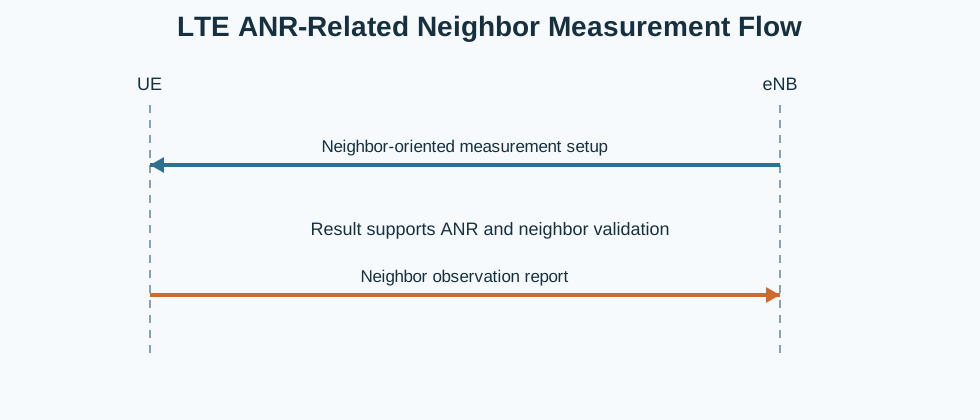
UE                    eNB
|<--neighbor measurement config--|
|--neighbor observation report-->|
|   ANR / optimization use       |
Major Phases
| Phase | What happens |
|---|---|
| 1. Neighbor-oriented setup | The eNB configures the measurement scope needed for neighbor discovery or validation. |
| 2. Neighbor observation | The UE measures the relevant neighbor cells. |
| 3. Reporting | The UE returns the neighbor observation result. |
| 4. ANR use | The network uses the result for neighbor relation analysis or optimization. |
Step-by-Step Breakdown
Step 1: Configure neighbor-oriented measurement
Sender -> receiver: eNB -> UE
Message(s): Measurement Control
Purpose: Enable the measurement scope needed for ANR-related analysis.
State or context change: The UE begins monitoring the neighbor context relevant to the scenario.
Note: This is an optimization-facing use of measurement configuration.
Step 2: Observe the neighbor context
Sender -> receiver: UE
Message(s): Neighbor measurement activity
Purpose: Collect the neighbor-cell observations that ANR logic needs.
State or context change: The UE has the neighbor information required for reporting.
Note: The goal here is visibility into neighbor relations rather than a single immediate handover.
Step 3: Return the observation
Sender -> receiver: UE -> eNB
Message(s): Measurement Report
Purpose: Return the neighbor observation to the eNB.
State or context change: The network now has UE-side evidence about the neighbor relation.
Note: This is the key measurement output for ANR-related analysis.
Step 4: Use the result for ANR
Sender -> receiver: Network
Message(s): ANR or optimization handling
Purpose: Use the reported neighbor information in relation management or analysis.
State or context change: The observation becomes part of the optimization workflow.
Note: The later optimization action is implementation-specific.
Important Messages
| Message | Protocol | Direction | Purpose in this procedure | What to inspect briefly |
|---|---|---|---|---|
| Measurement Report | RRC | UE -> eNB | Returns the neighbor-cell observation that ANR can use. | Check the reported neighbor identity and whether it matches the missing or suspect relation. |
| Measurement Control | RRC | eNB -> UE | Defines the neighbor-oriented observation scope. | Check whether the suspected neighbor was actually included in the active measurement scope. |
Important Parameters to Inspect
| Parameter | What it is | Where it appears | Why it matters | Common issues |
|---|---|---|---|---|
| Neighbor identity | The cell or relation being observed. | Measurement Report | Shows which neighbor the UE actually saw. | The wrong neighbor is assumed from the report. |
| Measurement scope | The configured neighbor layer or cell set. | Measurement Control | Explains whether the missing neighbor was even eligible to be observed. | The suspected neighbor was never part of the scope. |
| Report timing | When the UE returned the neighbor result. | Trace timing | Useful for deciding whether the neighbor was stably visible. | A short-lived observation is treated as a stable ANR candidate. |
| Layer or frequency context | The LTE layer on which the neighbor was seen. | Measurement Report | Important for neighbor planning and later mobility use. | The relation is interpreted without the right layer context. |
| Optimization outcome | The ANR-facing result of the report. | Follow-up analysis | Shows whether the report was actually useful to the network. | The report exists but no later ANR interpretation follows. |
Successful Completion
Success means the UE reports useful neighbor context that can be used for ANR-related analysis or relation validation.
Common Failures and Troubleshooting
| Symptom | Likely cause | Where to inspect | Relevant message(s) | Relevant interface(s) | Likely next step |
|---|---|---|---|---|---|
| Missing neighbor never appears in reports | The neighbor is not measurable in the configured scope or is not actually visible to the UE. | Measurement Control and later reports. | Measurement Report | LTE Uu | Check whether the missing neighbor was included in the configured observation scope. |
What to Check in Logs and Traces
- Check whether the missing neighbor was configured to be observable.
- Read the reported neighbor identity directly from the report instead of inferring it later.
- Correlate the report timing with the optimization scenario being investigated.
Related Pages
Related sub-procedures
Related message reference pages
Related troubleshooting pages
Notes
ANR-related neighbor measurement is optimization-facing. The value of the procedure is in understanding neighbor visibility before later mobility behavior is judged.
FAQ
What is LTE ANR-Related Neighbor Measurement Flow?
It is the LTE measurement path used to discover or validate neighbor relations through UE-side observations.