LTE APN / PDN Connectivity Setup Flow
LTE APN / PDN Connectivity Setup is the end-to-end flow that turns a UE request for PDN service into an actual EPC session tied to an APN and a default EPS bearer. The procedure begins with PDN Connectivity Request and reaches the bearer side through default bearer activation.
This page focuses on the session-building path rather than only the final bearer activation step.
Introduction
The APN / PDN connectivity flow links the UE's requested data service to EPC-side session creation at the SGW and PGW. It is the path that answers which APN is used, which PDN type is selected, and whether a usable packet-data session is created at all.
The main nodes are the UE, MME, SGW, and PGW.
What Is LTE APN / PDN Connectivity Setup in Simple Terms?
- What starts the procedure: The UE asks for PDN connectivity through a NAS request.
- What the UE and network want to achieve: Create a usable EPC session for the requested APN.
- What success looks like: PDN Connectivity Request is accepted, EPC session is created, and default bearer activation follows.
- What failure means: The UE cannot get the APN service it asked for or the EPC session stops before bearer activation.
Why this procedure matters
This flow explains many early data-service failures that are not caused by radio access but by APN policy, PDN type, or session handling in the core.
Quick Fact Sheet
| Procedure name | LTE APN / PDN Connectivity Setup Flow |
|---|---|
| Domain | Initial EPC session creation |
| Main trigger | The UE requests PDN service |
| Start state | UE needs packet-data session context for an APN |
| End state | APN-linked EPC session exists and default bearer activation can proceed |
| Main nodes | UE, MME, SGW, PGW |
| Main protocols | NAS, GTPv2-C |
| Main success outcome | Requested APN and PDN service are created successfully |
| Main failure outcome | PDN request is rejected or EPC session creation fails |
| Most important messages | PDN Connectivity Request, Activate Default EPS Bearer Context Request |
| Main specs | TS 24.301, TS 23.401, TS 29.274 |
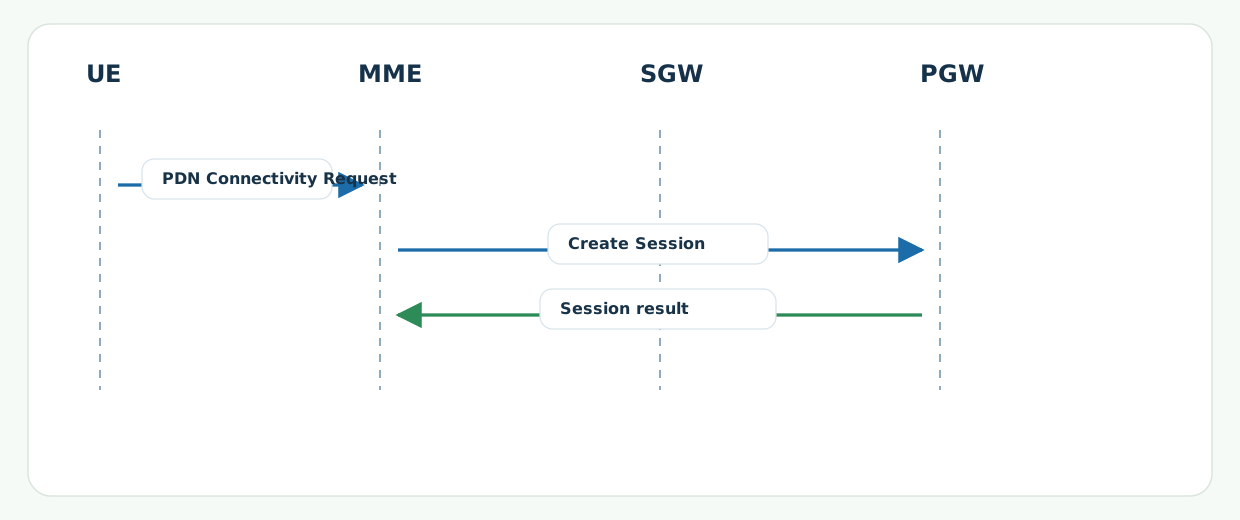
Preconditions
- The UE has already reached the point where NAS session requests can be delivered.
- The network can evaluate APN permission and PDN type policy for the subscriber.
- The EPC can create the required session at SGW and PGW.
Nodes and Interfaces
Nodes involved
| Node | Role in this procedure |
|---|---|
| UE | Requests PDN service for an APN. |
| MME | Processes the NAS request and coordinates EPC session creation. |
| SGW | Acts as serving gateway for the session path. |
| PGW | Provides the PDN-side service context and addressing. |
Interfaces used
| Interface | Path | Role |
|---|---|---|
| NAS | UE <-> MME | Carries PDN Connectivity Request. |
| S11 | MME <-> SGW | Carries EPC session creation signaling. |
| S5/S8 | SGW <-> PGW | Builds the PDN-side session relation. |
End-to-End Call Flow
UE               MME               SGW               PGW
|-- PDN Connectivity Request -->|                 |
|                               |-- Create Session ---->|
|                               |<-- Session result -----|
|<- Default bearer activation follows when accepted    |
Major Phases
| Phase | What happens |
|---|---|
| 1. PDN request | The UE asks for data service for an APN. |
| 2. Session creation | The EPC creates the session path at SGW and PGW. |
| 3. Bearer activation handoff | The session result moves toward default bearer activation. |
Step-by-Step Breakdown
Step 1: PDN Connectivity Request
Sender -> receiver: UE -> MME
Message(s): PDN Connectivity Request
Purpose: Ask the network for PDN service to a selected APN.
State or context change: The network starts session policy and routing checks.
Note: APN, PDN type, and protocol options are the key fields.
Step 2: Create Session
Sender -> receiver: MME -> SGW -> PGW
Message(s): GTPv2-C Create Session Request and Response
Purpose: Build the EPC session for the requested APN service.
State or context change: The core now has the session context needed for default bearer activation.
Note: This is where subscription and APN policy issues often appear.
Step 3: Handoff to default bearer activation
Sender -> receiver: MME -> UE through later NAS delivery
Message(s): Activate Default EPS Bearer Context Request
Purpose: Turn the successful PDN session into an active bearer at the UE side.
State or context change: The flow moves from session creation into bearer activation.
Note: This is the bridge to LTE Default EPS Bearer Establishment.
Important Messages in This Flow
| Message | Protocol | Direction | Purpose in this procedure | What to inspect briefly |
|---|---|---|---|---|
| PDN Connectivity Request | NAS | UE -> MME | Starts APN and PDN session setup. | APN, PDN type, and protocol options. |
| Activate Default EPS Bearer Context Request | NAS | MME -> UE | Begins the bearer side of the accepted session. | Whether the session result really progressed into bearer activation. |
Important Parameters to Inspect
| Parameter | What it is | Where it appears | Why it matters | Common issues |
|---|---|---|---|---|
| APN | The service name the UE is asking to reach. | PDN Connectivity Request | Defines the target packet-data service. | Unknown or blocked APN. |
| PDN type | The requested address-family type. | PDN Connectivity Request | Defines the IP service model to build. | Unsupported IPv4/IPv6 combination. |
| Protocol options | Configuration options requested by the UE. | PDN Connectivity Request and later bearer activation | Explains DNS and IP-related configuration behavior. | Missing or unexpected options. |
Successful Completion
Success means the PDN request is accepted, the EPC session is created, and the flow moves into default bearer activation with usable APN service context.
Common Failures and Troubleshooting
| Symptom | Likely cause | Where to inspect | Relevant message(s) | Relevant interface(s) | Likely next step |
|---|---|---|---|---|---|
| PDN request rejected or stalls | APN policy, subscription issue, or PDN type mismatch. | PDN Connectivity Request and EPC session result. | PDN Connectivity Request | NAS, S11, S5/S8 | Validate APN and subscriber policy first. |
| Core session looks fine, but bearer never activates | The handoff from session creation to bearer activation failed. | Timing between create-session result and default bearer activation request. | Activate Default EPS Bearer Context Request | NAS, S1-MME | Move into default bearer analysis. |
What to Check in Logs and Traces
- Start with APN and PDN type in PDN Connectivity Request.
- Confirm that EPC session creation succeeded before checking bearer activation.
- Use default bearer activation as the handoff point into the next stage.
Related Pages
Related sub-procedures
Related message reference pages
Related troubleshooting pages
Notes
This page covers the full session-creation path. The final UE-side bearer activation is covered in the default bearer page in more detail.
FAQ
What is LTE APN / PDN Connectivity Setup?
It is the EPC session-creation flow that turns a UE PDN request into usable APN service context.
What message starts it?
PDN Connectivity Request starts the flow.