LTE Application Layer Measurement Reporting Call Flow
LTE application layer measurement reporting is the reporting path used when the network needs measurement information that reflects application-layer or service-level behavior rather than only radio-layer conditions.
This page focuses on the reporting path itself and how it fits into LTE optimization workflows.
Introduction
The network enables the relevant reporting behavior, the UE collects the requested application-facing result, and the report is returned to the network for later optimization or analytics use.
Use this page when the trace is optimization-facing and the result is not limited to classic mobility events.
What Is Application Layer Measurement Reporting in Simple Terms?
- What starts the procedure: The network needs application-facing measurement insight from the UE.
- What the UE and network want to achieve: Return application-layer or service-level measurement data for later analysis.
- What success looks like: The expected application-layer measurement result is delivered to the network.
- What failure means: The report is missing, not aligned with the requested context, or not useful for the intended analysis.
Why this procedure matters
This page helps separate application-facing measurement behavior from pure radio event reporting. It is useful when later optimization questions depend on service-level observations rather than only RF conditions.
Quick Fact Sheet
| Procedure name | LTE Application Layer Measurement Reporting |
|---|---|
| Domain | Optimization and analytics |
| Main trigger | The network requests application-facing measurement data |
| Start state | UE is connected with the relevant reporting setup active |
| End state | Application-layer measurement result is available to the network |
| Main nodes | UE, eNB |
| Main protocols | RRC and related higher-layer reporting context |
| Main success outcome | Requested application-facing result is delivered |
| Main failure outcome | Missing or unusable application-facing report |
| Most important messages | Application-layer reporting configuration and result delivery |
| Main specs | TS 36.331 and related reporting behavior |
Preconditions
- The UE is in connected LTE service.
- The scenario requires application-facing or service-level reporting.
- The relevant reporting configuration is active.
Nodes and Interfaces
Nodes involved
| Node | Role in this procedure |
|---|---|
| UE | Applies measurement rules, performs the configured observations, and sends the relevant result back to the network. |
| eNB | Configures measurement behavior, interprets results, and uses them for mobility, optimization, or analytics decisions. |
Interfaces used
| Interface | Path | Role |
|---|---|---|
| LTE Uu | UE <-> eNB | Carries measurement configuration, reporting, and any later control action based on the result. |
End-to-End Call Flow
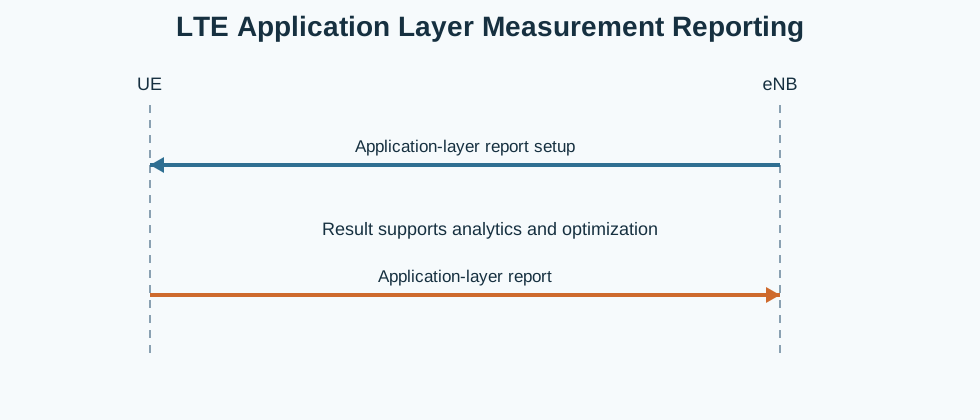
UE                    eNB
|<--app-layer report config--|
|--app-layer result--------->|
|   analytics / optimization |
Major Phases
| Phase | What happens |
|---|---|
| 1. Reporting setup | The network enables the application-facing reporting behavior. |
| 2. Result collection | The UE collects the requested application-facing measurement context. |
| 3. Report delivery | The UE returns the result to the LTE side. |
| 4. Analytics use | The network consumes the result in optimization or analysis workflows. |
Step-by-Step Breakdown
Step 1: Configure application-layer reporting
Sender -> receiver: Network -> UE
Message(s): Application-layer reporting setup
Purpose: Request the application-facing result needed by the network.
State or context change: The UE starts the requested reporting behavior.
Note: This path is broader than classic neighbor-event reporting.
Step 2: Collect the requested result
Sender -> receiver: UE
Message(s): Application-facing observation
Purpose: Generate the requested application-layer measurement context.
State or context change: The UE has the data needed for the report.
Note: The observation focus is service-level rather than only RF-level.
Step 3: Return the report
Sender -> receiver: UE -> Network
Message(s): Application Layer Measurement Report
Purpose: Deliver the requested result to the network.
State or context change: The network now has the application-facing measurement outcome.
Note: The report is usually consumed by an optimization or analytics workflow.
Step 4: Use the result later
Sender -> receiver: Network
Message(s): Optimization or analytics handling
Purpose: Interpret the application-facing result for later analysis.
State or context change: The result becomes part of the higher-layer optimization view.
Note: This page stops at the reporting stage.
Important Messages
| Message | Protocol | Direction | Purpose in this procedure | What to inspect briefly |
|---|---|---|---|---|
| Application Layer Measurement Report | RRC or related reporting context | UE -> Network | Returns the requested application-facing measurement result. | Check whether the report matches the requested service-level context. |
| Reporting configuration | RRC | Network -> UE | Enables the application-facing reporting behavior. | Check the requested reporting scope before interpreting the result. |
Important Parameters to Inspect
| Parameter | What it is | Where it appears | Why it matters | Common issues |
|---|---|---|---|---|
| Reporting scope | The application-facing context the network asked for. | Reporting configuration | Explains why this report exists in the trace. | The report is interpreted without checking what was requested. |
| Result payload | The actual application-level observation returned by the UE. | Application Layer Measurement Report | Shows whether the request produced usable output. | The result is present but read against the wrong service context. |
| Timing | When the report appears relative to the reporting setup. | Trace timing | Useful for missing or delayed reporting analysis. | The report is treated as late without checking the setup time. |
| Service context | The service or application scenario tied to the report. | Configuration and surrounding trace | Needed to interpret the report correctly. | A generic LTE scenario is assumed instead of the real service context. |
| Later analytics use | How the network consumes the result later. | Follow-up analysis | Shows whether the report was useful to the intended workflow. | The report exists but never feeds the expected analysis branch. |
Successful Completion
Success means the requested application-layer measurement result is returned and can be used in the intended optimization or analytics workflow.
Common Failures and Troubleshooting
| Symptom | Likely cause | Where to inspect | Relevant message(s) | Relevant interface(s) | Likely next step |
|---|---|---|---|---|---|
| Expected application-layer report is missing | The reporting behavior was never activated correctly or the requested service context was not present. | Reporting setup and expected result window. | Application Layer Measurement Report | LTE Uu | Check the reporting scope before treating the missing result as a general LTE failure. |
What to Check in Logs and Traces
- Check what application-facing context was requested before reading the report.
- Separate this reporting path from classic radio event reporting.
- Correlate the report with the optimization or analytics scenario being investigated.
Related Pages
Related sub-procedures
Related message reference pages
Related troubleshooting pages
Notes
Application Layer Measurement Reporting is analytics-facing. It should be interpreted in the service context that requested the report.
FAQ
What is LTE Application Layer Measurement Reporting?
It is the LTE reporting path used when the network collects application-facing or service-level measurement results from the UE.