LTE Dedicated Bearer Setup for VoLTE Call Flow
LTE Dedicated Bearer Setup for VoLTE is the dedicated bearer activation path used when IMS voice service needs its own bearer treatment instead of staying only on the default bearer. The underlying NAS signaling still uses the dedicated bearer activation messages, but the service meaning is tied to the voice session.
This page focuses on the voice-specific use of the dedicated bearer branch rather than the generic dedicated bearer procedure alone.
Introduction
The VoLTE dedicated bearer appears after IMS signaling has already progressed to the point where a voice-media bearer is required. It is one of the main checkpoints for understanding whether a VoLTE call really received the expected radio and bearer resources.
The main nodes are the UE, eNB, MME, and the broader IMS and EPC environment behind them.
What Is LTE Dedicated Bearer Setup for VoLTE in Simple Terms?
- What starts the procedure: A voice session needs a dedicated bearer with voice-oriented service handling.
- What the UE and network want to achieve: Add the bearer path that the VoLTE call expects for media service.
- What success looks like: The network sends the dedicated bearer activation request and the UE accepts it.
- What failure means: IMS signaling may exist, but the voice bearer itself is not added cleanly.
Why this procedure matters
This is often the point where signaling success and actual voice-service readiness separate from each other.
Quick Fact Sheet
| Procedure name | LTE Dedicated Bearer Setup for VoLTE |
|---|---|
| Domain | Voice-specific dedicated bearer activation |
| Main trigger | IMS voice session requires the expected dedicated bearer path |
| Start state | IMS and default bearer context already exist |
| End state | VoLTE dedicated bearer is active |
| Main nodes | UE, eNB, MME |
| Main protocols | NAS, IMS support context |
| Main success outcome | The voice session has the expected dedicated bearer |
| Main failure outcome | Voice signaling continues without the expected bearer resources |
| Most important messages | Activate Dedicated EPS Bearer Context Request, Activate Dedicated EPS Bearer Context Accept |
| Main specs | TS 24.301, TS 23.401, VoLTE service deployment context |
Preconditions
- The UE already has packet service and IMS-related progression for the voice call.
- The network has decided to add the voice-oriented dedicated bearer.
- The default bearer is already active.
Nodes and Interfaces
Nodes involved
| Node | Role in this procedure |
|---|---|
| UE | Receives and accepts the voice-related dedicated bearer context. |
| MME / eNB | Deliver and apply the access-side bearer relation used for the voice session. |
Interfaces used
| Interface | Path | Role |
|---|---|---|
| NAS | UE <-> MME | Carries bearer activation. |
| IMS / VoLTE context | Service-side relation | Explains why the dedicated bearer is needed. |
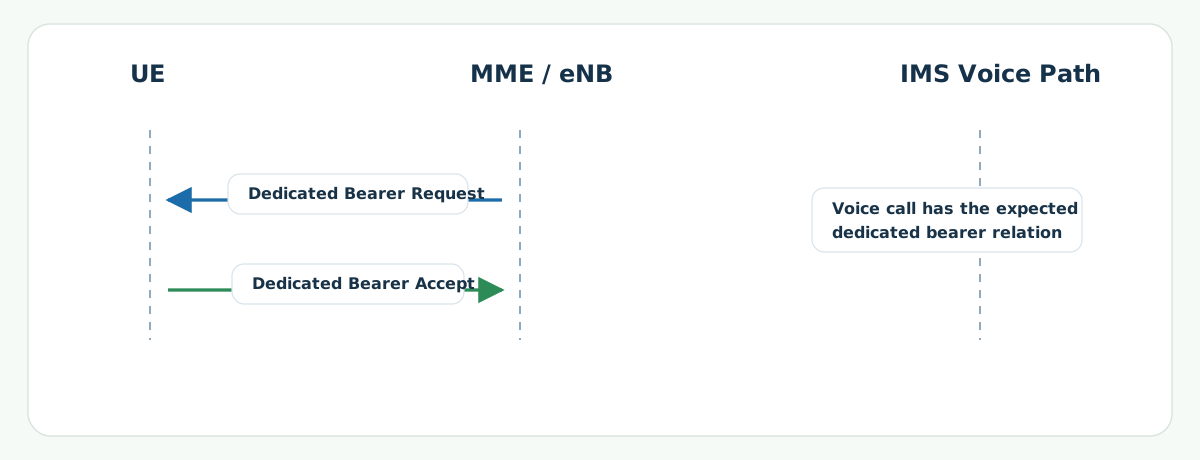
End-to-End Call Flow
UE               MME / eNB          IMS voice path
|<- Dedicated Bearer Req ---------|
|-- Dedicated Bearer Accept ----->|
|   VoLTE media bearer becomes ready |
Major Phases
| Phase | What happens |
|---|---|
| 1. Voice session reaches bearer point | The VoLTE session needs a separate bearer path. |
| 2. Dedicated bearer activation | The bearer parameters are delivered to the UE. |
| 3. UE acceptance | The bearer is accepted for voice use. |
Step-by-Step Breakdown
Step 1: Voice-oriented bearer request
Sender -> receiver: Network -> UE
Message(s): Activate Dedicated EPS Bearer Context Request
Purpose: Add the bearer expected for the voice-media path.
State or context change: The UE now has a dedicated bearer profile tied to the voice scenario.
Note: This is the point where voice-service readiness often becomes visible.
Step 2: Voice bearer accept
Sender -> receiver: UE -> Network
Message(s): Activate Dedicated EPS Bearer Context Accept
Purpose: Confirm the voice bearer activation.
State or context change: The bearer is now ready from the UE side.
Note: If this message is missing, the voice session may still signal while media readiness remains incomplete.
Important Messages in This Flow
| Message | Protocol | Direction | Purpose in this procedure | What to inspect briefly |
|---|---|---|---|---|
| Activate Dedicated EPS Bearer Context Request | NAS | Network -> UE | Starts the voice bearer activation branch. | Bearer identity and service profile. |
| Activate Dedicated EPS Bearer Context Accept | NAS | UE -> Network | Confirms the voice bearer activation. | Whether the voice path received clean UE-side acceptance. |
Important Parameters to Inspect
| Parameter | What it is | Where it appears | Why it matters | Common issues |
|---|---|---|---|---|
| Dedicated bearer EBI | The identity of the voice-related dedicated bearer. | Dedicated bearer activation | Shows which extra bearer belongs to the voice path. | Bearer correlation confusion. |
| QoS relation | The service profile tied to the voice bearer. | Bearer request | Explains why this dedicated bearer exists separately. | Unexpected bearer profile. |
| Voice-session timing | The point in the IMS voice flow where the bearer is added. | Around bearer activation | Confirms whether bearer setup matches call progression. | Bearer too late, too early, or missing entirely. |
Successful Completion
Success means the UE accepts the dedicated bearer and the VoLTE session has the expected bearer resources for the voice path.
Common Failures and Troubleshooting
| Symptom | Likely cause | Where to inspect | Relevant message(s) | Relevant interface(s) | Likely next step |
|---|---|---|---|---|---|
| VoLTE call signaling progresses, but bearer is missing | The voice-dedicated bearer was never activated or failed before accept. | Dedicated bearer request and accept timing around the call flow. | Activate Dedicated EPS Bearer Context Request | NAS and IMS call correlation | Check whether the voice flow stayed on signaling only. |
| Bearer request exists, but media path is still wrong | Bearer signaling completed, but the voice path did not map cleanly afterward. | Accept presence and later media or bearer use. | Dedicated bearer request and accept pair | NAS plus later service correlation | Move forward into media-path analysis once activation is confirmed. |
What to Check in Logs and Traces
- Check where in the voice-session timeline the bearer was added.
- Confirm the dedicated bearer accept returns.
- Separate missing bearer setup from later media-path problems.
Related Pages
Related sub-procedures
- LTE Dedicated EPS Bearer Establishment
- LTE VoLTE Mobile Originated Call Procedure
- LTE VoLTE Mobile Terminated Call Procedure
Related message reference pages
Related troubleshooting pages
Notes
This is the voice-specific use of the dedicated bearer branch. The bearer messages are the same generic NAS bearer messages, but the service meaning is tied to the VoLTE call.
FAQ
Is this different from generic dedicated bearer setup?
Yes. The signaling branch is similar, but this page focuses on the dedicated bearer when it supports a VoLTE call.
What is the main success check?
The dedicated bearer accept is the clearest UE-side confirmation.