LTE Dedicated EPS Bearer Establishment Call Flow
LTE Dedicated EPS Bearer Establishment is the procedure that adds a dedicated bearer after the default bearer already exists. It is used when traffic needs a service profile different from the default bearer, such as separate QoS treatment.
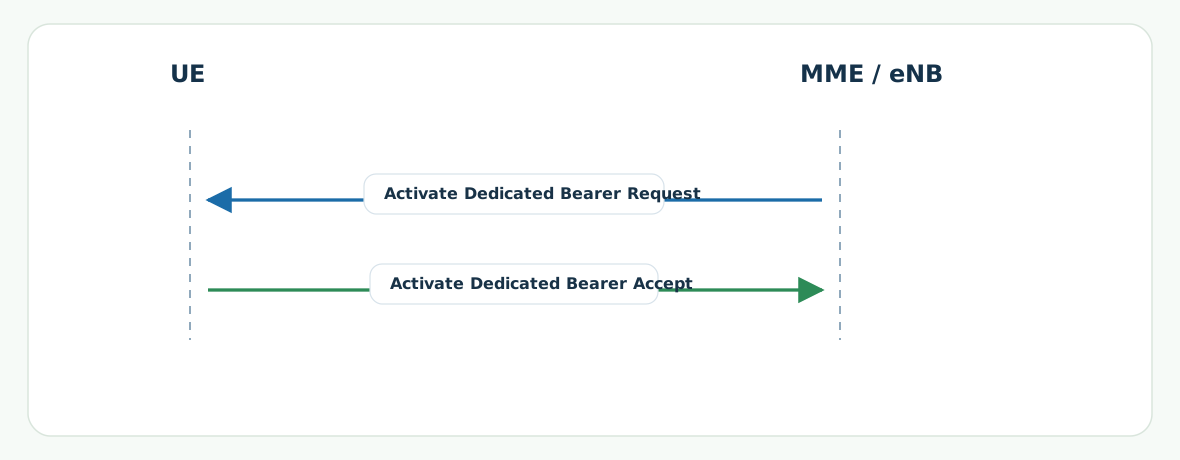
The main NAS pair is Activate Dedicated EPS Bearer Context Request and Activate Dedicated EPS Bearer Context Accept.
Introduction
The dedicated EPS bearer is created on top of an existing PDN session and default bearer. It gives the network a separate bearer identity and service profile for traffic that needs different handling.
The main nodes are the UE, eNB, MME, SGW, and PGW.
What Is LTE Dedicated EPS Bearer Establishment in Simple Terms?
- What starts the procedure: The network decides an existing session needs an additional bearer with its own service handling.
- What the UE and network want to achieve: Add a dedicated bearer without recreating the whole PDN session.
- What success looks like: The UE receives Activate Dedicated EPS Bearer Context Request and returns Activate Dedicated EPS Bearer Context Accept.
- What failure means: The extra bearer cannot be activated or later traffic stays on the default bearer unexpectedly.
Why this procedure matters
This is the bearer path that explains why one session can carry multiple service profiles instead of using only the default bearer.
Quick Fact Sheet
| Procedure name | LTE Dedicated EPS Bearer Establishment |
|---|---|
| Domain | Additional bearer setup on an existing PDN session |
| Main trigger | An existing session needs an extra bearer for separate service handling |
| Start state | UE already has a default bearer and active session context |
| End state | UE has an additional dedicated bearer |
| Main nodes | UE, eNB, MME, SGW, PGW |
| Main protocols | NAS, S1AP |
| Main success outcome | The dedicated bearer becomes active with its own EBI and QoS relation |
| Main failure outcome | The additional bearer is not activated or is rejected |
| Most important messages | Activate Dedicated EPS Bearer Context Request, Activate Dedicated EPS Bearer Context Accept |
| Main specs | TS 24.301, TS 23.401 |
Preconditions
- The default bearer and PDN session already exist.
- The network has a reason to add a separate bearer profile.
- The eNB can apply the related radio-side bearer context.
Nodes and Interfaces
Nodes involved
| Node | Role in this procedure |
|---|---|
| UE | Receives and accepts the dedicated bearer context. |
| MME | Coordinates bearer activation toward the UE. |
| eNB | Applies the radio-side bearer relation. |
| SGW / PGW | Provide the underlying session and traffic anchoring context. |
Interfaces used
| Interface | Path | Role |
|---|---|---|
| NAS | UE <-> MME | Carries the dedicated bearer activation pair. |
| S1-MME | eNB <-> MME | Transports bearer-related context to the access side. |
End-to-End Call Flow
UE               eNB               MME
|<- Activate Dedicated Bearer Req -|
|-- Activate Dedicated Bearer Accept ->|
|   dedicated bearer becomes active  |
Major Phases
| Phase | What happens |
|---|---|
| 1. Bearer decision | The network decides to add a dedicated bearer. |
| 2. Bearer activation | The dedicated bearer context is delivered to the UE. |
| 3. UE acceptance | The UE confirms the added bearer. |
Step-by-Step Breakdown
Step 1: Dedicated bearer request
Sender -> receiver: MME -> UE
Message(s): Activate Dedicated EPS Bearer Context Request
Purpose: Tell the UE to add a dedicated bearer.
State or context change: The UE now has a second bearer context to process.
Note: EBI, TFT, and QoS are the main checks.
Step 2: Dedicated bearer accept
Sender -> receiver: UE -> MME
Message(s): Activate Dedicated EPS Bearer Context Accept
Purpose: Confirm the dedicated bearer activation.
State or context change: The added bearer is now active if the access side also completed correctly.
Note: Accept timing is the fastest success checkpoint.
Important Messages in This Flow
| Message | Protocol | Direction | Purpose in this procedure | What to inspect briefly |
|---|---|---|---|---|
| Activate Dedicated EPS Bearer Context Request | NAS | MME -> UE | Starts dedicated bearer activation. | EBI, TFT, and QoS relation. |
| Activate Dedicated EPS Bearer Context Accept | NAS | UE -> MME | Confirms dedicated bearer activation. | Timing and bearer identity match. |
Important Parameters to Inspect
| Parameter | What it is | Where it appears | Why it matters | Common issues |
|---|---|---|---|---|
| EBI | The identity of the dedicated bearer. | Activation request and accept | Separates the added bearer from the default bearer. | Wrong bearer identity correlation. |
| TFT | Traffic-filter relation for the dedicated bearer. | Activation request | Explains which traffic should use the added bearer. | Wrong filter logic or mismatch. |
| QoS / QCI / ARP | The service profile of the dedicated bearer. | Activation request | Defines why the extra bearer exists at all. | Unexpected service profile. |
Successful Completion
Success is confirmed when the UE returns Activate Dedicated EPS Bearer Context Accept and the added bearer is visible as active in the session context.
Common Failures and Troubleshooting
| Symptom | Likely cause | Where to inspect | Relevant message(s) | Relevant interface(s) | Likely next step |
|---|---|---|---|---|---|
| Request appears, but accept never returns | UE cannot apply the dedicated bearer parameters or uplink return failed. | TFT, QoS, and timing after the request. | Activate Dedicated EPS Bearer Context Request | NAS, LTE Uu | Check bearer profile consistency first. |
| Dedicated bearer exists in signaling, but traffic still stays on default bearer | Filter or access-side handling is incomplete. | TFT relation and later traffic behavior. | Request and accept pair | NAS and later data-path checks | Confirm that the bearer was not only signaled but also used. |
What to Check in Logs and Traces
- Confirm the default bearer already existed before this procedure started.
- Check EBI, TFT, and QoS fields in the activation request.
- Use the accept as the main UE-side success marker.
Related Pages
Related sub-procedures
Related message reference pages
Related troubleshooting pages
Notes
The dedicated bearer is added on top of the default bearer. It does not replace the original bearer.
FAQ
What is LTE Dedicated EPS Bearer Establishment?
It is the procedure that adds an extra bearer to an existing PDN session.
What is the main message pair?
Activate Dedicated EPS Bearer Context Request and Accept.