LTE Default EPS Bearer Establishment Call Flow
LTE Default EPS Bearer Establishment is the procedure that creates the first usable EPS bearer for packet service. It is the bearer path that appears with initial PDN connectivity and gives the UE its first active bearer identity, IP context, and user-plane route.
This bearer is usually established during attach or a related initial PDN setup path.
Introduction
The default EPS bearer is the baseline bearer that anchors packet connectivity for the PDN session. It is activated through NAS signaling and depends on the corresponding EPC session context already being created through MME, SGW, and PGW interaction.
The main nodes are the UE, eNB, MME, SGW, and PGW.
What Is LTE Default EPS Bearer Establishment in Simple Terms?
- What starts the procedure: The network has accepted PDN connectivity and is ready to activate the first bearer.
- What the UE and network want to achieve: Create the first usable bearer for packet service.
- What success looks like: The UE receives Activate Default EPS Bearer Context Request and returns Activate Default EPS Bearer Context Accept.
- What failure means: The first PDN session exists only partially or the UE cannot activate the default bearer cleanly.
Why this procedure matters
This is the first bearer the UE needs before normal LTE packet service becomes usable.
Quick Fact Sheet
| Procedure name | LTE Default EPS Bearer Establishment |
|---|---|
| Domain | Initial EPS bearer and PDN service setup |
| Main trigger | Successful initial PDN session creation |
| Start state | UE is progressing through initial PDN connectivity without an active default bearer |
| End state | UE has an active default EPS bearer for the PDN session |
| Main nodes | UE, eNB, MME, SGW, PGW |
| Main protocols | NAS, S1AP, GTPv2-C |
| Main success outcome | Default bearer is active and packet service can continue |
| Main failure outcome | PDN setup is incomplete or bearer activation fails |
| Most important messages | Activate Default EPS Bearer Context Request, Activate Default EPS Bearer Context Accept |
| Main specs | TS 24.301, TS 23.401, TS 29.274 |
Preconditions
- The UE already has the access-side signaling path needed for NAS continuation.
- The initial PDN session has been accepted at the EPC side.
- The MME has bearer parameters ready to deliver to the UE.
Nodes and Interfaces
Nodes involved
| Node | Role in this procedure |
|---|---|
| UE | Receives and accepts the first bearer context. |
| eNB | Applies the radio-side bearer relation needed for service delivery. |
| MME | Coordinates bearer activation toward the UE. |
| SGW | Provides user-plane anchor relation. |
| PGW | Provides PDN-side session context and addressing. |
Interfaces used
| Interface | Path | Role |
|---|---|---|
| S11 | MME <-> SGW | Carries session creation for the default bearer path. |
| S5/S8 | SGW <-> PGW | Links the bearer to the PDN side. |
| S1-MME | eNB <-> MME | Transports the NAS bearer activation toward the UE. |
End-to-End Call Flow
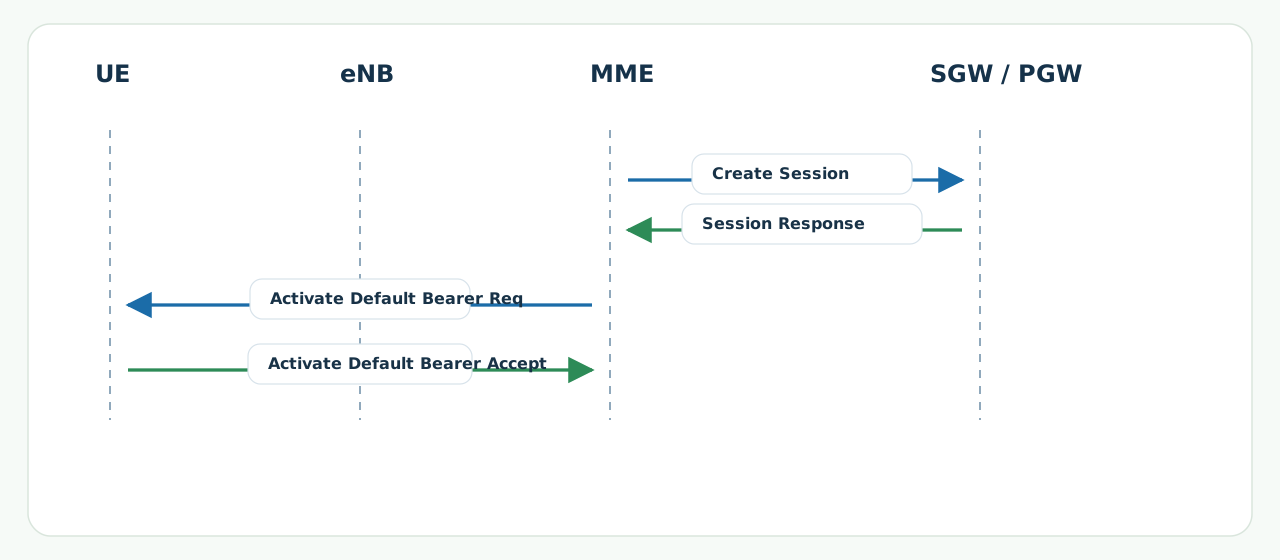
UE               eNB               MME               SGW/PGW
|                 |                 |-- Create Session -->|
|                 |                 |<-- Session result ---|
|<- Activate Default Bearer Req ---|                     |
|-- Activate Default Bearer Accept ->|                    |
|   default bearer becomes active    |                    |
Major Phases
| Phase | What happens |
|---|---|
| 1. EPC session creation | The core creates the initial session context. |
| 2. Bearer activation delivery | The MME sends the default bearer activation to the UE. |
| 3. UE acceptance | The UE confirms the bearer context. |
Step-by-Step Breakdown
Step 1: Create Session
Sender -> receiver: MME -> SGW -> PGW
Message(s): GTPv2-C Create Session Request and Response
Purpose: Build the initial PDN and bearer context in the EPC.
State or context change: The core has the default bearer template ready for activation.
Note: APN and subscription problems often surface here first.
Step 2: Default bearer activation
Sender -> receiver: MME -> eNB -> UE
Message(s): Activate Default EPS Bearer Context Request
Purpose: Tell the UE which bearer context to activate.
State or context change: The UE receives its first active bearer parameters.
Note: EBI, APN, QoS, and PDN address are the main checks.
Step 3: UE accept
Sender -> receiver: UE -> eNB -> MME
Message(s): Activate Default EPS Bearer Context Accept
Purpose: Confirm the bearer is accepted.
State or context change: The default bearer becomes operationally active.
Note: This message is the clearest user-side success proof.
Important Messages in This Flow
| Message | Protocol | Direction | Purpose in this procedure | What to inspect briefly |
|---|---|---|---|---|
| Activate Default EPS Bearer Context Request | NAS | MME -> UE | Activates the first bearer context. | EBI, APN, PDN address, and QoS fields. |
| Activate Default EPS Bearer Context Accept | NAS | UE -> MME | Confirms activation of the first bearer. | Timing and EBI continuity. |
Important Parameters to Inspect
| Parameter | What it is | Where it appears | Why it matters | Common issues |
|---|---|---|---|---|
| APN | The PDN name used for initial service. | Create Session and bearer request | Defines which PDN service is being built. | Unknown APN, wrong APN policy. |
| EPS Bearer ID | The identity of the default bearer. | Bearer activation request and accept | Links the activation to later bearer handling. | EBI mismatch. |
| PDN address | The IP context assigned to the UE. | Default bearer activation | Shows whether packet service has usable addressing. | Wrong address family or missing address. |
| QoS / QCI | The baseline bearer service parameters. | Default bearer activation | Defines the service profile of the default bearer. | Unexpected QCI or policy mismatch. |
Successful Completion
Success is confirmed when the UE returns Activate Default EPS Bearer Context Accept and the default bearer is active for the PDN session.
Common Failures and Troubleshooting
| Symptom | Likely cause | Where to inspect | Relevant message(s) | Relevant interface(s) | Likely next step |
|---|---|---|---|---|---|
| PDN session exists, but bearer activation fails | UE cannot accept the default bearer parameters or radio-side context is incomplete. | Bearer request content and later access-side setup. | Activate Default EPS Bearer Context Request | NAS, S1-MME | Check EBI, APN, and UE-side acceptance. |
| Accept never returns | UE did not finish activation or uplink NAS delivery failed. | Timing and air/core correlation after the request. | Activate Default EPS Bearer Context Accept | LTE Uu, S1-MME | Separate UE-side rejection from transport loss. |
What to Check in Logs and Traces
- Check Create Session success before blaming the UE-side bearer activation.
- Inspect APN, EBI, QoS, and PDN address in the bearer request.
- Confirm that the accept returns to the MME.
Related Pages
Related sub-procedures
Related message reference pages
- Activate Default EPS Bearer Context Request
- Activate Default EPS Bearer Context Accept
- PDN Connectivity Request
Related troubleshooting pages
Notes
The default bearer is the first usable EPS bearer. Later dedicated bearers depend on this baseline bearer context already existing.
FAQ
What is LTE Default EPS Bearer Establishment?
It is the procedure that activates the first usable EPS bearer for packet service.
What confirms success?
Activate Default EPS Bearer Context Accept is the clearest UE-side success message.