LTE Emergency Attach Procedure Call Flow
LTE Emergency Attach is the attach path used when the UE needs emergency service access instead of normal subscriber service. It allows the network to create the minimum EPS context needed for emergency connectivity even when normal service conditions are restricted.
This procedure matters because emergency access rules, subscription handling, and PDN treatment differ from ordinary attach behavior.
Introduction
The LTE Emergency Attach Procedure starts when the UE requests emergency service through LTE and no normal service path is suitable or available. It still uses the attach framework, but the attach type, APN handling, and policy outcome are specific to emergency service treatment.
The main nodes are the UE, eNB, MME, SGW, and PGW.
What Is LTE Emergency Attach in Simple Terms?
- What starts the procedure: The UE requests emergency LTE access.
- What the UE and network want to achieve: Create the emergency EPS context needed for emergency service continuation.
- What success looks like: Emergency attach is accepted and the UE reaches the emergency service path.
- What failure means: The UE does not reach emergency EPS service and another emergency handling path may be needed.
Why this procedure matters
Emergency attach uses attach-like signaling but should not be read as ordinary subscriber onboarding. The highest-value checks are the emergency attach type, emergency APN or PDN treatment, and the final service result.
Quick Fact Sheet
| Procedure name | LTE Emergency Attach Procedure |
|---|---|
| Domain | Emergency EPS access |
| Main trigger | Emergency service request over LTE |
| Start state | UE needs emergency access and does not rely on normal service continuation |
| End state | Emergency EPS context is accepted or the emergency attempt is rejected |
| Main nodes | UE, eNB, MME, SGW, PGW |
| Main protocols | RRC, NAS, S1AP, GTPv2-C |
| Main success outcome | Emergency LTE access and emergency PDN handling are available |
| Main failure outcome | Emergency attach reject or incomplete emergency service setup |
| Most important messages | Attach Request, Authentication, Security Mode, Attach Accept |
| Main specs | TS 23.401, TS 24.301, TS 23.167, TS 36.300 |
Preconditions
- The UE can access an LTE cell and start RRC signaling.
- The network allows emergency-service processing for the scenario.
- The MME can select the emergency service path and PDN handling.
Nodes and Interfaces
Nodes involved
| Node | Role in this procedure |
|---|---|
| UE | Starts the emergency attach and asks for emergency EPS service. |
| eNB | Provides the LTE access leg and forwards the emergency NAS signaling. |
| MME | Controls the emergency attach path and chooses the allowed emergency service outcome. |
| SGW | Participates in the emergency session setup on the user-plane side. |
| PGW | Applies the emergency PDN and packet-service context. |
Interfaces used
| Interface | Endpoints | Role |
|---|---|---|
| LTE Uu | UE <-> eNB | Carries the access leg and first emergency NAS message. |
| S1-MME | eNB <-> MME | Carries emergency attach control signaling. |
| S11 | MME <-> SGW | Carries emergency session creation signaling. |
| S5/S8 | SGW <-> PGW | Carries the emergency PDN path on the EPC side. |
End-to-End Call Flow
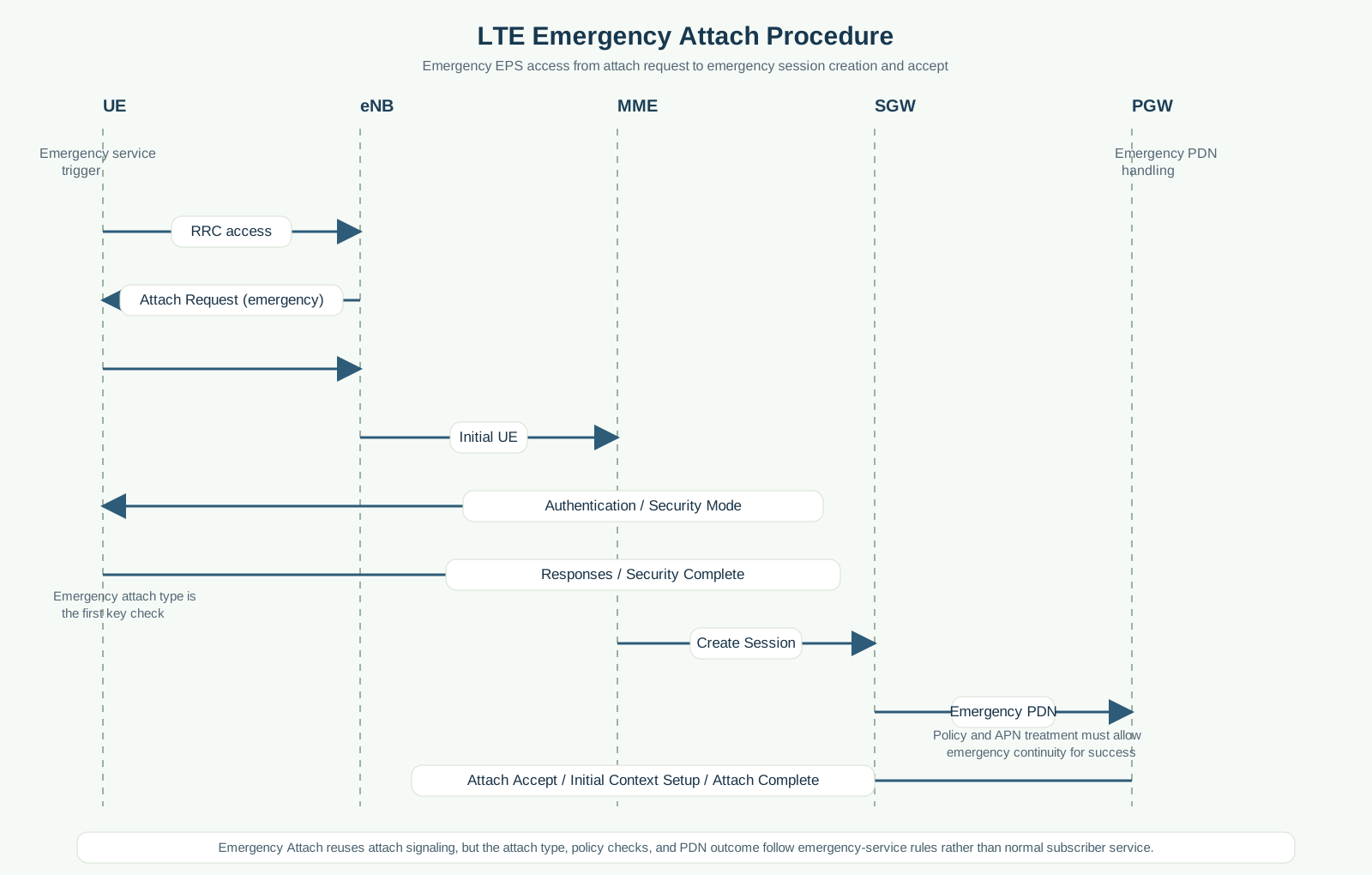
UE               eNB               MME               SGW               PGW
|                 |                 |                 |                 |
|--RRC access---->|                 |                 |                 |
|--Attach Request (emergency)----->|                 |                 |
|                 |--Initial UE Message------------->|                 |
|<--Authentication / Security Mode-|                 |                 |
|--Responses / Security Complete-->|                 |                 |
|                 |                 |--Create Session----------------->|
|                 |                 |                 |--Emergency PDN->|
|                 |                 |<--Create Session Response--------|
|<--Attach Accept / Initial Context Setup-----------|                 |
|--Attach Complete---------------->|                 |                 |
Major Phases
1. Emergency access entry
The UE opens an LTE signaling path and indicates emergency attach intent.
2. Identity, authentication, and security
The network validates the UE as required for the emergency scenario and protects the remaining NAS exchange.
3. Emergency session creation
The EPC creates the minimum session and PDN context needed for emergency service continuation.
4. Accept and completion
The UE receives the emergency attach result and confirms completion.
Step-by-Step Breakdown
Emergency access start
Sender -> receiver: UE -> eNB -> MME
Message(s): Attach Request with emergency attach type
Purpose: Tell the network that the UE needs emergency EPS service.
State or context change: The attach path is handled with emergency rules.
Note: This is the first field to inspect before treating the trace as a normal attach.
Security continuation
Sender -> receiver: MME -> UE -> MME
Message(s): Authentication and Security Mode exchange
Purpose: Protect the emergency NAS path as required by the scenario.
State or context change: Protected NAS continuation becomes active.
Note: Some emergency scenarios still follow the same basic NAS security sequence as ordinary attach.
Emergency session creation
Sender -> receiver: MME -> SGW -> PGW
Message(s): Create Session signaling
Purpose: Build the emergency PDN context.
State or context change: The emergency bearer path becomes available.
Note: Policy or PDN failure here can block emergency continuity even when the early attach looked clean.
Important Messages
Important Parameters to Inspect
| Item | What it is | Where it appears | Why it matters | Common issues |
|---|---|---|---|---|
| Emergency attach type | NAS attach type indicating emergency access. | Attach Request | Shows that this is the emergency procedure, not normal attach. | Wrong attach type, wrong test scenario. |
| Emergency APN or PDN context | Packet-service context used for emergency continuity. | PDN request and session creation | Explains whether the emergency bearer path can be built. | Blocked APN, policy mismatch. |
| Returned attach result | Final NAS outcome for emergency attach. | Attach Accept or Attach Reject | Shows whether emergency EPS service was actually granted. | Ambiguous service result, reject cause confusion. |
Successful Completion
A successful Emergency Attach gives the UE the EPS context needed to continue the emergency service path over LTE.
Common Failures and Troubleshooting
Emergency attach request is rejected
Likely cause: Emergency-service policy, radio failure, or emergency PDN setup failure.
Where to inspect: Attach Request type, reject cause, emergency APN or PDN handling.
Relevant message(s): Attach Request, Attach Reject
Relevant interface(s): NAS, S1-MME, S11
Likely next step: Decide whether the failure is radio-side, policy-side, or emergency PDN-side.
What to Check in Logs and Traces
- Confirm that the UE really sent the emergency attach type.
- Check whether authentication and security followed the expected emergency branch.
- Inspect emergency PDN and session creation results before calling the attempt successful.
- Use the final accept or reject outcome to separate radio access failure from emergency-policy failure.
Related Pages
Related sub-procedures
Related message reference pages
Related troubleshooting pages
Notes
Emergency attach should be read as an emergency-service access path, not a normal attach with a different label. Start with the attach type and the emergency PDN result.
FAQ
Is Emergency Attach the same as normal Attach?
No. It reuses attach signaling but follows emergency-service rules and outcomes.
What is the first field to inspect?
The emergency attach type in Attach Request.
What usually causes failure?
Radio failure, policy restrictions, or emergency PDN setup failure are common break points.