LTE Failure Type Determination Call Flow
LTE Failure Type Determination is the LTE failure-handling branch used when a procedure cannot continue normally and the network or UE has to reject, report, or classify the problem.
This page focuses on the failure path itself rather than the earlier success flow that should have happened before it.
Introduction
Failure type determination is used when the failure is already visible in the trace, but the correct LTE failure family is still not clear. It works as the decision layer that points the trace to the right deeper page.
This page helps sort the trace into the correct branch, such as generic error handling, encoding trouble, missing mandatory content, unknown IE handling, or later UE-side failure reporting.
What Is LTE Failure Type Determination in Simple Terms?
- What starts the procedure: A trace clearly shows a failure, but the analyst still needs to decide which LTE failure family the evidence belongs to.
- What the UE and network want to achieve: Choose the correct failure family before drilling into specific messages or cause values.
- What success looks like: The trace is classified into the right failure family and the next reference page becomes obvious.
- What failure means: The wrong failure family is assumed and the analysis goes into an unrelated branch.
Why this procedure matters
The same visible symptom can come from very different LTE failure families. Correct classification early is often the fastest way to solve the trace.
Quick Fact Sheet
| Procedure name | LTE Failure Type Determination |
|---|---|
| Domain | LTE failure classification and analysis routing |
| Main trigger | A trace clearly shows a failure, but the analyst still needs to decide which LTE failure family the evidence belongs to. |
| Start state | A wider LTE procedure is already in progress and something has gone wrong or become invalid |
| End state | The failure is classified into the correct branch for deeper analysis |
| Main nodes | UE, eNB, MME / network side |
| Main protocols | RRC, NAS, procedure context |
| Main success outcome | The failure branch is clearly identified and the next corrective action is possible |
| Main failure outcome | The real break point stays unclear or the wrong failure branch is assumed |
| Most important messages | Rejects, failure reports, earlier invalid conditions |
| Main specs | Editorial analysis layer built on LTE failure handling behavior |
Preconditions
- A wider LTE procedure is already underway or has just failed.
- The network and UE still have enough context to reject, report, or classify the failure.
- The trace includes the messages immediately before and after the failure branch.
Nodes and Interfaces
Nodes involved
| Node | Role in this procedure |
|---|---|
| UE | Detects the condition, rejects the invalid branch, or reports failure context after the earlier problem. |
| eNB | Carries the LTE radio side and receives failure or reject behavior from the UE. |
| MME / network side | Interprets the reject, timeout, or failure report and decides the next correction or release step. |
Interfaces used
| Interface | Path | Role |
|---|---|---|
| LTE Uu | UE <-> eNB | Carries the reject or failure-report signaling seen on the radio side. |
| S1-MME | eNB <-> MME | Carries the wider procedure context behind the failure or reject branch. |
End-to-End Call Flow
Observed failure
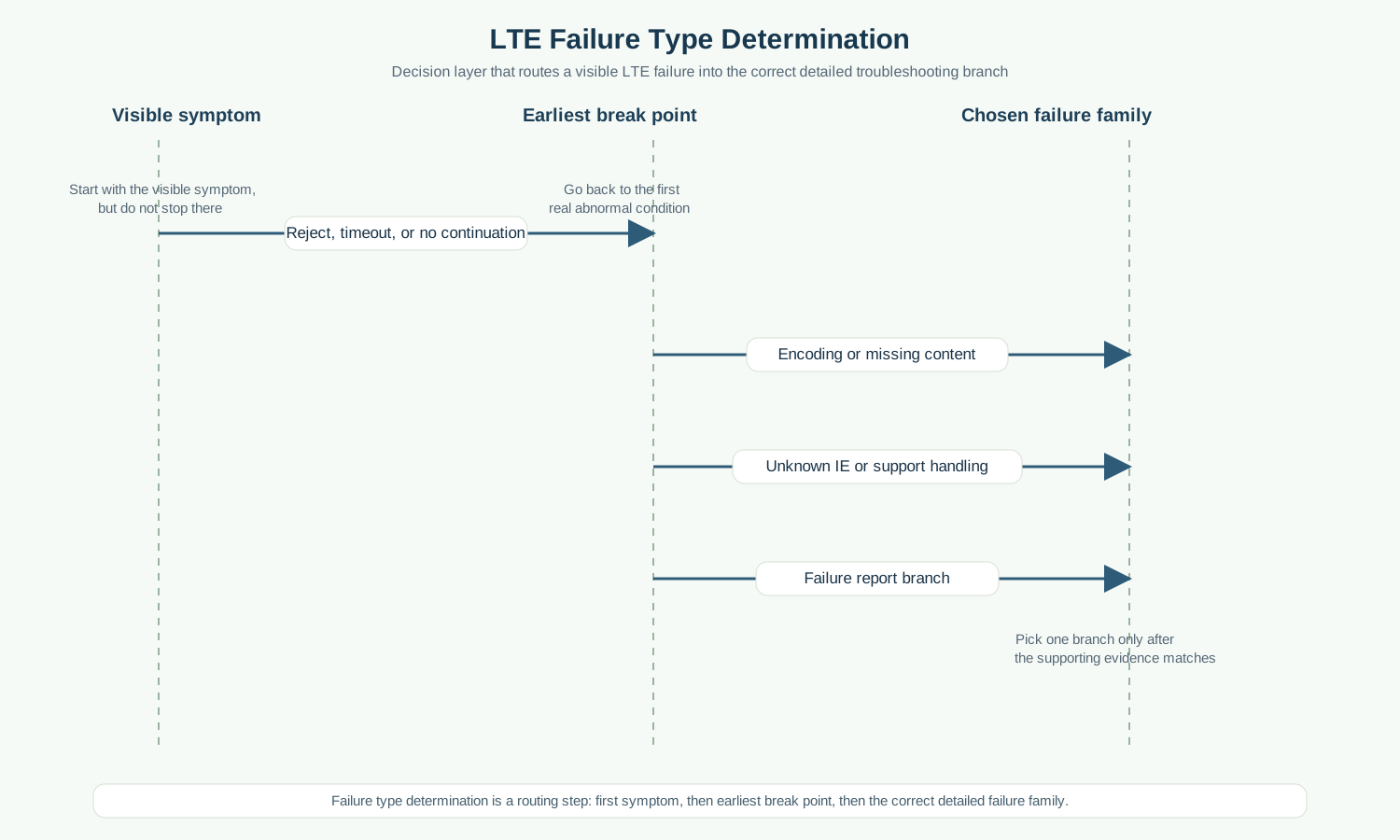
|--classify symptom----> generic / encode / missing / unknown / report
|--open correct branch->|
Major Phases
| Phase | What happens |
|---|---|
| 1. Observe the visible symptom | The trace already shows that something failed or drifted away from normal progression. |
| 2. Locate the first real break point | The analysis moves backward to the earliest invalid condition. |
| 3. Classify the failure family | The trace is assigned to the most accurate LTE failure category. |
| 4. Open the right detailed page | The next deeper branch can now be read with confidence. |
Step-by-Step Breakdown
Step 1: Identify the visible symptom
Sender -> receiver: Trace review
Message(s): Reject, timeout, missing continuation, or later failure report
Purpose: Start from the visible break point in the trace.
State or context change: The failure is visible, but not yet classified.
Note: The visible symptom is not always the first real break point.
Step 2: Go backward to the first abnormal condition
Sender -> receiver: Trace review
Message(s): Earlier message or missing expected message
Purpose: Find the earliest point where the branch stopped being normal.
State or context change: The failure now has a real origin point instead of just a visible symptom.
Note: This is the most important step in any failure-classification workflow.
Step 3: Map to the right failure family
Sender -> receiver: Analysis layer
Message(s): Failure-family classification
Purpose: Decide whether the trace belongs to generic handling, encoding, missing fields, unknown IEs, or later failure reporting.
State or context change: The next detailed troubleshooting page is now obvious.
Note: If this step is wrong, later deep analysis will usually be wasted effort.
Step 4: Confirm with the supporting evidence
Sender -> receiver: Trace review
Message(s): Supporting message or report
Purpose: Check that the detailed evidence actually matches the chosen failure family.
State or context change: The classification is either confirmed or corrected.
Note: This is where the earlier visible symptom, the real break point, and the supporting evidence all come together.
Important Messages
| Message | Protocol | Direction | Purpose in this procedure | What to inspect briefly |
|---|---|---|---|---|
| Attach Reject | NAS | Network -> UE | Useful visible symptom when the actual failure family still needs to be determined. | Check whether the reject is the origin or only the visible outcome. |
| Security Mode Reject | NAS | UE -> Network | Useful visible symptom for classification between content, security, or earlier branch failure. | Check whether the reject came from the immediate command or from earlier branch invalidity. |
| Failure Information r15/r16 | RRC | UE -> Network | Useful later evidence when the failure family includes explicit UE-side reporting. | Check whether the report is evidence about an earlier failure rather than the original break itself. |
Important Parameters to Inspect
| Parameter | What it is | Where it appears | Why it matters | Common issues |
|---|---|---|---|---|
| Visible symptom | The first failure sign noticed by the analyst. | Start of analysis | Useful starting point, but not always the true origin. | The analysis stops at the symptom and never goes backward. |
| Earliest break point | The first real abnormal condition in the trace. | Earlier in the same procedure | This is the best anchor for correct classification. | The wrong message is used as the failure start. |
| Failure family choice | The category chosen for deeper analysis. | Classification step | Determines which detailed page should be read next. | The trace is sent into the wrong failure branch. |
| Supporting evidence | The message, missing message, or report that confirms the classification. | Around the break point | Turns a guess into a confirmed classification. | A category is assumed without evidence. |
| Later reaction | What happened after the failure family took effect. | Later messages | Useful for checking whether the chosen category fits the downstream behavior. | The later behavior does not match the chosen failure family, but no one revisits the classification. |
Successful Completion
Success means the trace is placed into the right failure family quickly enough that the deeper troubleshooting page becomes obvious.
Common Failures and Troubleshooting
| Symptom | Likely cause | Where to inspect | Relevant message(s) | Relevant interface(s) | Likely next step |
|---|---|---|---|---|---|
| The same trace seems to fit multiple failure families | The earliest real break point was not found first. | Go back before the visible symptom and find the first abnormal condition. | Visible reject or missing continuation | Procedure-specific | Re-run the classification using the earliest break point instead of the latest symptom. |
| The chosen detailed page does not match the evidence | The failure family was chosen too quickly or from the wrong symptom. | Supporting evidence around the origin point. | Supporting message or absence of expected message | Procedure-specific | Reclassify before going deeper. |
What to Check in Logs and Traces
- Start from the visible symptom, but do not stop there.
- Go backward to the earliest abnormal condition before choosing the failure family.
- Use one supporting message or one clear missing-message pattern to confirm the chosen category.
Related Pages
Related sub-procedures
- LTE Generic Error Handling Procedure
- LTE ASN.1 / Encoding Error Handling
- LTE Mandatory Field Missing Handling
- LTE Unknown / Not-Comprehended IE Handling
- LTE Failure Information Procedure
Related message reference pages
Related troubleshooting pages
Notes
This page is a decision layer for troubleshooting. It does not replace the deeper failure pages; it helps choose the right one quickly.
FAQ
What is LTE failure type determination?
It is the classification step used to decide which LTE failure family a trace really belongs to.
Why not start directly with cause values?
Because cause values often appear later than the real break and can be misleading if the failure family is wrong from the start.