LTE Measurement Configuration Procedure Call Flow
LTE measurement configuration is the procedure that tells the UE what to measure, which event rules to apply, and when to report the result back to the eNB.
This page is the setup layer behind later pages such as Measurement Reporting and the individual event procedures.
Introduction
The eNB sends the measurement configuration while the UE is already in connected mode. That configuration defines the measurement objects, report criteria, event triggers, and reporting identities used later in Measurement Report.
The main nodes are the UE and eNB. This is the reference page to use when the later report exists but the first question is whether the configuration itself was correct.
What Is Measurement Configuration Procedure in Simple Terms?
- What starts the procedure: The eNB needs the UE to begin or update connected-mode measurements.
- What the UE and network want to achieve: Create a valid measurement framework for later reporting and mobility or optimization decisions.
- What success looks like: The UE receives the configuration and later reports the expected event or measurement result.
- What failure means: The UE never reports, reports the wrong target, or later mobility behavior does not match the configured rule set.
Why this procedure matters
Most later measurement analysis depends on this setup stage. If the configuration is wrong, the later report can look surprising even when the UE followed the network instructions correctly.
Quick Fact Sheet
| Procedure name | LTE Measurement Configuration Procedure |
|---|---|
| Domain | Connected-mode measurement setup |
| Main trigger | The eNB needs fresh or updated measurement behavior |
| Start state | UE is in RRC_CONNECTED |
| End state | UE has active measurement objects and report rules |
| Main nodes | UE, eNB |
| Main protocols | RRC |
| Main success outcome | Measurement behavior is configured correctly for later reporting |
| Main failure outcome | Wrong or missing measurement behavior |
| Most important messages | Measurement Control, later Measurement Report |
| Main specs | TS 36.331 |
Preconditions
- The UE already has a connected LTE signaling context.
- The eNB has a reason to start or update measurement behavior.
- The serving scenario includes candidate cells, frequencies, or RATs relevant to the configured objects.
Nodes and Interfaces
Nodes involved
| Node | Role in this procedure |
|---|---|
| UE | Applies measurement rules, performs the configured observations, and sends the relevant result back to the network. |
| eNB | Configures measurement behavior, interprets results, and uses them for mobility, optimization, or analytics decisions. |
Interfaces used
| Interface | Path | Role |
|---|---|---|
| LTE Uu | UE <-> eNB | Carries measurement configuration, reporting, and any later control action based on the result. |
End-to-End Call Flow
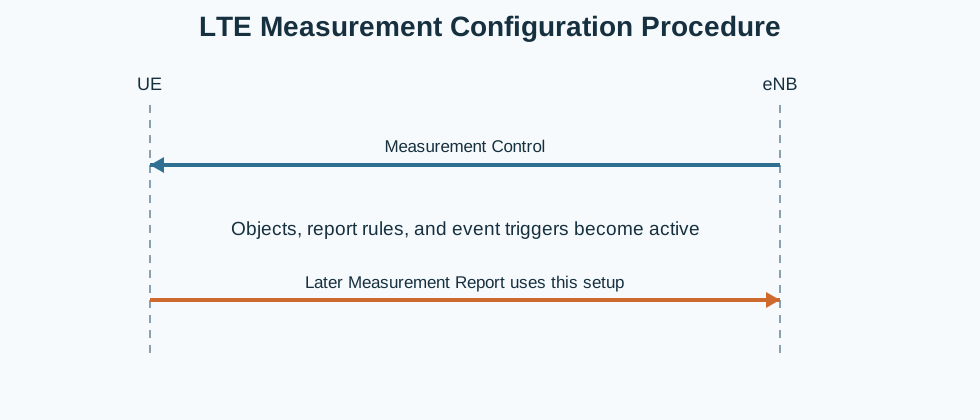
UE                    eNB
|<--Measurement Control--|
|   apply objects/events |
|--later Measurement Report-->
Major Phases
| Phase | What happens |
|---|---|
| 1. Measurement object setup | The eNB defines what the UE should measure. |
| 2. Report configuration setup | The eNB defines when and how the UE should report. |
| 3. Measurement identity mapping | The eNB binds measurement objects to report rules. |
| 4. Active monitoring | The UE begins the configured measurement behavior. |
Step-by-Step Breakdown
Step 1: Send measurement configuration
Sender -> receiver: eNB -> UE
Message(s): Measurement Control
Purpose: Activate or update the connected-mode measurement framework.
State or context change: The UE receives the objects, report rules, and identity mapping needed for later reporting.
Note: This is the starting point for almost every later LTE measurement event.
Step 2: Apply the configuration
Sender -> receiver: UE
Message(s): Internal measurement setup
Purpose: Store the configured objects and begin monitoring according to the rule set.
State or context change: Measurement behavior becomes active on the UE side.
Note: The later report only makes sense if this step was applied cleanly.
Step 3: Evaluate later conditions
Sender -> receiver: UE
Message(s): Event or report-condition evaluation
Purpose: Check whether the configured threshold or event criteria become true.
State or context change: The UE waits until reporting conditions are met.
Note: No Measurement Report appears until the configured rule becomes true.
Step 4: Report the result later
Sender -> receiver: UE -> eNB
Message(s): Measurement Report
Purpose: Deliver the first result that uses the configured rule set.
State or context change: The eNB can now use the configured measurement path in real control logic.
Note: This page treats that later report as the output of the configuration stage.
Important Messages
| Message | Protocol | Direction | Purpose in this procedure | What to inspect briefly |
|---|---|---|---|---|
| Measurement Control | RRC | eNB -> UE | Creates the measurement objects, report configuration, and identities used later. | Check objects, report rules, event thresholds, hysteresis, time-to-trigger, and identity mapping. |
| Measurement Report | RRC | UE -> eNB | Shows that the configured rule was later used by the UE. | Check whether the reported result matches the configuration that was delivered earlier. |
Important Parameters to Inspect
| Parameter | What it is | Where it appears | Why it matters | Common issues |
|---|---|---|---|---|
| Measurement object | Defines what the UE should measure. | Measurement Control | Explains whether the UE was looking at the correct cells, frequencies, or RATs. | The expected target was never part of the configured object set. |
| Report configuration | Defines the event rule and reporting behavior. | Measurement Control | Shows exactly when the UE should report. | The expected event is not actually configured. |
| Measurement identity | Binds the measurement object to the report configuration. | Measurement Control | Needed to understand which rule belongs to which object. | The later report is interpreted against the wrong identity. |
| Hysteresis / time-to-trigger | Stability controls behind event reporting. | Measurement Control | Help explain why a report was delayed or suppressed. | A short radio change is mistaken for a valid trigger. |
| Quantity and trigger scope | Defines what measurement quantity is used and on which cells or RATs. | Measurement Control | Explains why a specific event path later appeared. | Wrong quantity assumption leads to wrong interpretation. |
Successful Completion
Success means the UE receives a valid measurement configuration and later produces the expected measurement result or event report.
Common Failures and Troubleshooting
| Symptom | Likely cause | Where to inspect | Relevant message(s) | Relevant interface(s) | Likely next step |
|---|---|---|---|---|---|
| Later report never appears | The configuration did not include the expected object or report rule, or the condition never became true. | Measurement Control and later radio conditions. | Measurement Control, Measurement Report | LTE Uu | Check the configuration before treating the missing report as a UE fault. |
| Later report looks wrong | The measurement identity, object, or event rule was misunderstood. | Measurement Control identity mapping and the later report. | Measurement Control, Measurement Report | LTE Uu | Match the later report to the exact configuration entry that created it. |
What to Check in Logs and Traces
- Read the full Measurement Control before interpreting any later event page.
- Match the later report to the correct measurement identity.
- Confirm whether the expected target cell, layer, or RAT was actually configured.
Related Pages
Related sub-procedures
Related message reference pages
Related troubleshooting pages
Notes
Measurement configuration is the setup layer. The later report is often only understandable when the original configuration is read first.
FAQ
What is LTE Measurement Configuration?
It is the connected-mode RRC procedure that tells the UE what to measure and when to report.
Does this page explain one specific event?
No. This page explains the setup that enables many later event-specific pages.