LTE Measurement Reporting Procedure Call Flow
LTE measurement reporting is the general procedure that returns connected-mode radio results from the UE to the eNB after the configured trigger becomes true.
This page is the umbrella view of Measurement Report before you move into one specific event such as A3 or B1/B2.
Introduction
The eNB first configures measurement behavior, the UE monitors the configured cells or systems, and then the UE sends Measurement Report once the reporting rule is satisfied.
Use this page when the main question is how the generic reporting path works rather than what one exact event means.
What Is Measurement Reporting Procedure in Simple Terms?
- What starts the procedure: A valid measurement configuration is already active in connected mode.
- What the UE and network want to achieve: Return a radio result that the eNB can use for mobility, optimization, or analytics.
- What success looks like: Measurement Report appears with the expected identity, target, and timing.
- What failure means: The report never appears, appears with the wrong target, or appears at the wrong time.
Why this procedure matters
This is the general measurement result path behind many LTE handovers and optimization actions. It is often the fastest place to confirm whether the UE really reported what the network needed.
Quick Fact Sheet
| Procedure name | LTE Measurement Reporting Procedure |
|---|---|
| Domain | Connected-mode measurement result delivery |
| Main trigger | Configured report condition becomes true |
| Start state | UE is in connected mode with active measurement setup |
| End state | Measurement result is delivered to the eNB |
| Main nodes | UE, eNB |
| Main protocols | RRC |
| Main success outcome | Expected Measurement Report is delivered correctly |
| Main failure outcome | Missing or misleading report |
| Most important messages | Measurement Report |
| Main specs | TS 36.331 |
Preconditions
- A valid measurement configuration is already active.
- The UE is still in connected LTE service.
- The relevant radio condition can be observed in the live scenario.
Nodes and Interfaces
Nodes involved
| Node | Role in this procedure |
|---|---|
| UE | Applies measurement rules, performs the configured observations, and sends the relevant result back to the network. |
| eNB | Configures measurement behavior, interprets results, and uses them for mobility, optimization, or analytics decisions. |
Interfaces used
| Interface | Path | Role |
|---|---|---|
| LTE Uu | UE <-> eNB | Carries measurement configuration, reporting, and any later control action based on the result. |
End-to-End Call Flow
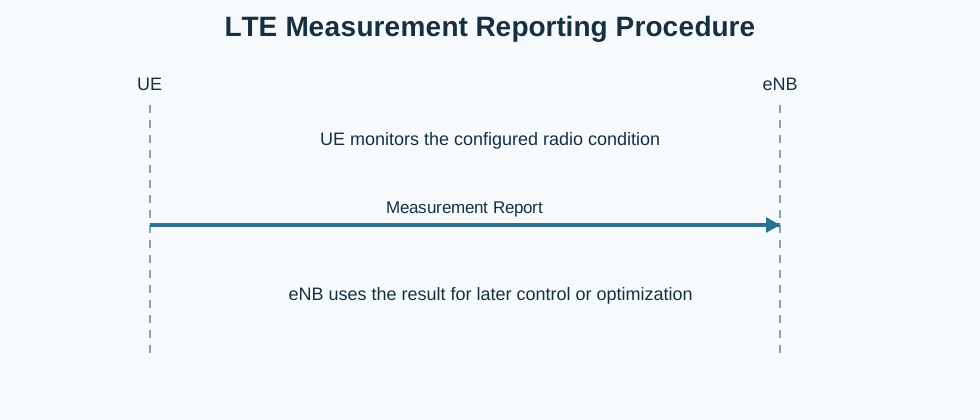
UE                    eNB
|   monitor condition     |
|--Measurement Report---->|
|   later control use     |
Major Phases
| Phase | What happens |
|---|---|
| 1. Active monitoring | The UE follows the previously configured measurement rules. |
| 2. Trigger satisfaction | The report condition becomes true. |
| 3. Report delivery | The UE sends Measurement Report to the eNB. |
| 4. Result use | The eNB uses the result for later control logic. |
Step-by-Step Breakdown
Step 1: Monitor the configured scope
Sender -> receiver: UE
Message(s): Measurement monitoring
Purpose: Watch the serving cell, neighbors, frequency layers, or RATs included in the active configuration.
State or context change: The UE is evaluating whether the report trigger becomes true.
Note: This is still configuration-driven behavior rather than a standalone message exchange.
Step 2: Detect a valid trigger
Sender -> receiver: UE
Message(s): Event or threshold satisfaction
Purpose: Reach the reporting condition defined by the active measurement rule.
State or context change: The UE is now eligible to send the report.
Note: Trigger timing must still satisfy the configured stability controls.
Step 3: Send Measurement Report
Sender -> receiver: UE -> eNB
Message(s): Measurement Report
Purpose: Return the measurement result to the eNB.
State or context change: The eNB now has a usable radio observation for later decisions.
Note: This is the main message to correlate with later mobility behavior.
Step 4: Use the report
Sender -> receiver: eNB
Message(s): Later control or analytics action
Purpose: Use the report for handover, optimization, or analysis.
State or context change: The result becomes input to the next control step.
Note: This page stops before the later action becomes a separate procedure.
Important Messages
| Message | Protocol | Direction | Purpose in this procedure | What to inspect briefly |
|---|---|---|---|---|
| Measurement Report | RRC | UE -> eNB | Carries the connected-mode measurement result. | Inspect measurement identity, target identity, event result, and timing. |
| Measurement Control | RRC | eNB -> UE | Defines the rule that made the report possible. | Check the configuration that produced the report. |
Important Parameters to Inspect
| Parameter | What it is | Where it appears | Why it matters | Common issues |
|---|---|---|---|---|
| Measurement identity | Identifies which configured report rule was used. | Measurement Report | Links the result back to the correct configuration. | The report is mapped to the wrong configuration entry. |
| Reported target | Cell, frequency, or RAT named by the result. | Measurement Report | Shows what the UE actually observed. | The target is assumed incorrectly from later mobility only. |
| Trigger timing | When the report appeared relative to the radio condition. | Measurement Report and surrounding trace timing | Important for early or late mobility analysis. | A valid report is treated as wrong because its timing was not checked. |
| Serving context | The UE radio condition at the time of reporting. | Trace around the report | Helps explain why the report became true. | The reported target is read without the serving context. |
| Report repetition pattern | Whether the same result repeated or oscillated. | Multiple reports in one trace | Useful for detecting instability before later mobility. | Repeated reporting is mistaken for a single isolated trigger. |
Successful Completion
Success means Measurement Report appears with the expected identity, target context, and timing for the configured scenario.
Common Failures and Troubleshooting
| Symptom | Likely cause | Where to inspect | Relevant message(s) | Relevant interface(s) | Likely next step |
|---|---|---|---|---|---|
| Report missing | The trigger was never satisfied, the configuration is wrong, or the trace does not include the needed interval. | Configuration plus the expected event window. | Measurement Report | LTE Uu | Check the active report rule before assuming the UE failed to report. |
| Report present but later action looks wrong | The report itself is valid, but the later interpretation or target selection is incorrect. | Measurement Report versus the later control branch. | Measurement Report | LTE Uu | Separate report correctness from later decision correctness. |
What to Check in Logs and Traces
- Read Measurement Report together with the earlier Measurement Control.
- Confirm the reported identity and target before linking the report to later mobility.
- Check whether repeated reporting shows instability before the later control action.
Related Pages
Related sub-procedures
Related message reference pages
Related troubleshooting pages
Notes
Measurement Reporting is the result-delivery stage. It explains how the UE returns the configured radio observation to the eNB.
FAQ
What is LTE Measurement Reporting?
It is the general procedure in which the UE sends Measurement Report after the configured trigger becomes true.
Does this page replace the event pages?
No. This page explains the generic reporting path, while the event pages explain individual trigger meanings.