LTE VoLTE Call Hold / Resume Call Flow
LTE VoLTE call hold and resume is the in-dialog SIP procedure used to change media direction during an already-active VoLTE call.
This page follows the mid-call signaling usually carried by re-INVITE or UPDATE and explains how hold and resume states appear in traces.
Introduction
Hold and resume happen after the original SIP dialog is already active. The UE or remote side sends a new in-dialog SIP request, the other side returns progress or success, and the active media direction changes without starting a brand-new call.
The main nodes remain the UE and the IMS path, while the LTE bearer context usually stays active underneath.
What Is VoLTE Call Hold / Resume in Simple Terms?
- What starts the procedure: One side of an already-active VoLTE call requests hold or resume.
- What the UE and network want to achieve: Update the active call state without tearing down the existing SIP dialog.
- What success looks like: The in-dialog request succeeds and the call moves to hold or back to active state.
- What failure means: The request is rejected, times out, or the media state does not match the SIP state.
Why this procedure matters
Mid-call state changes often look small in the user interface but they are still full SIP state changes, so this page is useful when a call stays active yet the media behavior is wrong.
Quick Fact Sheet
| Procedure name | LTE VoLTE Call Hold / Resume |
|---|---|
| Domain | In-dialog VoLTE service update |
| Main trigger | An active VoLTE call needs hold or resume behavior |
| Start state | VoLTE call is already established |
| End state | Call is placed on hold or restored to active media state |
| Main nodes | UE, IMS |
| Main protocols | SIP, SDP |
| Main success outcome | Hold or resume is reflected correctly in the active dialog |
| Main failure outcome | Call stays in the wrong media state or rejects the request |
| Most important messages | re-INVITE or UPDATE, 200 OK, ACK |
| Main specs | TS 24.229 |
Preconditions
- The VoLTE call is already established.
- The SIP dialog remains active and routable.
- Media state can be updated without losing LTE packet continuity.
Nodes and Interfaces
Nodes involved
| Node | Role in this procedure |
|---|---|
| UE | Starts or receives the LTE voice or messaging service and exchanges SIP signaling with IMS. |
| eNB | Carries the LTE radio side used for IMS-capable packet service. |
| MME / EPC | Preserve LTE access, bearer, and paging continuity behind the IMS transaction. |
| P-CSCF / S-CSCF | Handle the SIP signaling path used for registration, call control, and service continuity. |
Interfaces used
| Interface | Path | Role |
|---|---|---|
| LTE Uu | UE <-> eNB | Carries the radio access needed before and during IMS service use. |
| S1-MME | eNB <-> MME | Carries LTE control-plane continuation behind paging, service request, or bearer handling. |
| Gm | UE <-> P-CSCF | Carries SIP requests and responses between the UE and IMS. |
End-to-End Call Flow
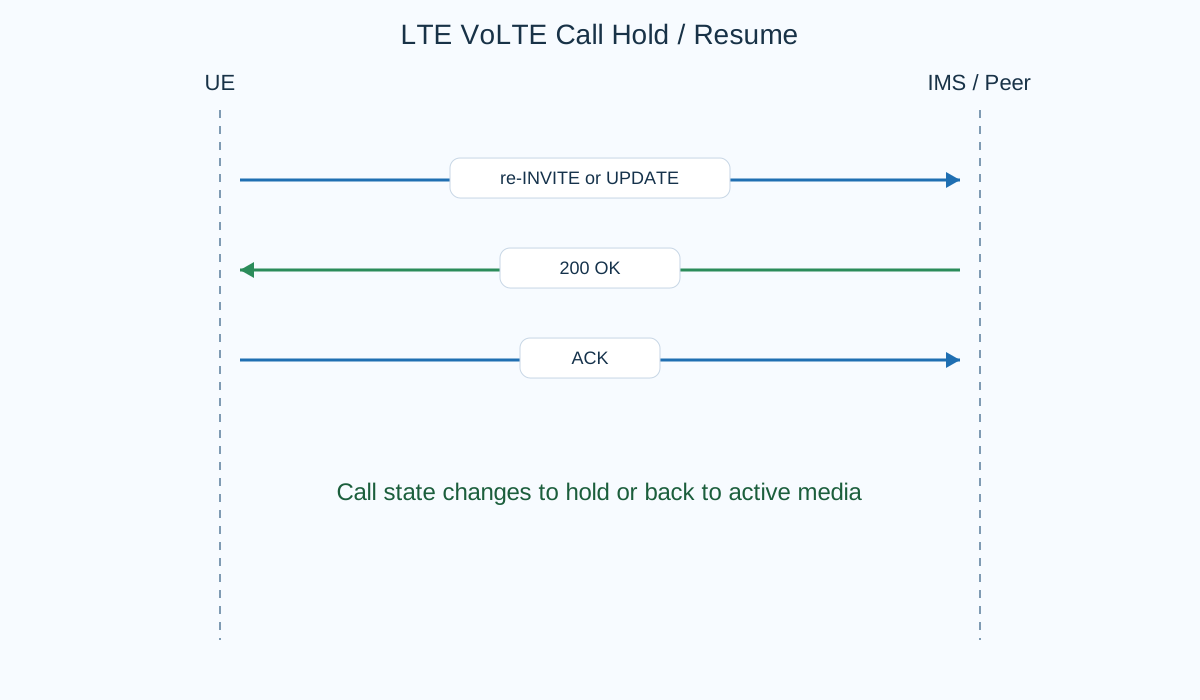
UE                 IMS / peer
|--re-INVITE / UPDATE------------>|
|<--200 OK------------------------|
|--ACK--------------------------->|
|   hold or resume state active   |
Major Phases
| Phase | What happens |
|---|---|
| 1. In-dialog update request | One side requests hold or resume within the existing SIP dialog. |
| 2. Session answer | The peer returns the updated session result. |
| 3. Dialog confirmation | ACK confirms the successful state change when INVITE is used. |
| 4. Active media-state change | The call now behaves as held or resumed. |
Step-by-Step Breakdown
Step 1: Send the mid-call update
Sender -> receiver: UE or peer -> other side
Purpose: Request a change in media direction while keeping the same dialog.
State or context change: The call stays established but enters a temporary update stage.
Note: Treat this as a dialog update, not a brand-new call attempt.
Step 2: Return the updated session answer
Sender -> receiver: Peer -> requesting side
Message(s): 200 OK
Purpose: Accept the hold or resume request and return the new session state.
State or context change: The call state can now be changed on both sides.
Note: If the update is accepted, the media direction change should be visible afterward.
Step 3: Confirm the update
Sender -> receiver: Requesting side -> peer
Message(s): ACK when INVITE is used
Purpose: Finalize the successful update transaction.
State or context change: The in-dialog state change is complete.
Note: If ACK is missing after re-INVITE success, the update is not cleanly finalized.
Step 4: Observe hold or resume state
Sender -> receiver: Active dialog
Message(s): Updated media state
Purpose: Show that the call is now held or resumed.
State or context change: The user-visible media state matches the SIP update result.
Note: This is where SIP state and user-perceived media state should align.
Important Messages
| Message | Protocol | Direction | Purpose in this procedure | What to inspect briefly |
|---|---|---|---|---|
| INVITE | SIP | UE or peer -> other side | Updates the established dialog when re-INVITE is used for hold or resume. | Check whether the request is in-dialog and whether the media change is clearly requested. |
| UPDATE | SIP | UE or peer -> other side | Alternative in-dialog update method for hold or resume behavior. | Check whether UPDATE rather than re-INVITE is being used in this network. |
| 200 OK | SIP | Peer -> requesting side | Confirms the requested hold or resume change. | Check whether the accepted state matches the requested media behavior. |
| ACK | SIP | Requesting side -> peer | Finalizes successful re-INVITE based hold or resume. | Check whether ACK completes the update when INVITE was used. |
Important Parameters to Inspect
| Parameter | What it is | Where it appears | Why it matters | Common issues |
|---|---|---|---|---|
| Dialog identifiers | The existing SIP dialog values. | In-dialog requests and responses | Confirm that the update belongs to the already-active call. | The update is confused with a new dialog. |
| SDP direction attributes | Media direction such as sendonly, recvonly, inactive, or sendrecv. | re-INVITE / UPDATE and 200 OK | Show whether the call is being held or resumed. | The SIP state says hold, but the media direction does not match. |
| Update method | Whether the network uses re-INVITE or UPDATE. | In-dialog request | Explains which response pattern should follow. | The expected ACK or update pattern is checked against the wrong method. |
| Confirmation timing | The time between update request and final answer. | In-dialog ladder | Useful when hold or resume feels delayed. | The call state changes late because the update flow is slow or incomplete. |
| Media continuity | What the bearer and media path do after the state change. | After 200 OK / ACK | Separates SIP state success from actual media behavior. | The SIP update succeeds, but audio state is wrong. |
Successful Completion
Success means the established dialog is updated cleanly and the user-visible call state matches the SIP hold or resume result.
Common Failures and Troubleshooting
| Symptom | Likely cause | Where to inspect | Relevant message(s) | Relevant interface(s) | Likely next step |
|---|---|---|---|---|---|
| Hold or resume request is rejected | The peer or IMS path does not accept the requested dialog change. | In-dialog request and the returned response. | INVITE or UPDATE, 4xx/5xx response | Gm | Check whether the update method and media change are supported. |
| SIP update succeeds but media state is wrong | The media path did not reflect the accepted SIP state. | 200 OK, ACK, and the media state after them. | 200 OK, ACK | Gm and media path | Separate dialog success from actual media continuity. |
| Trace shows the update, but dialog correlation is unclear | The in-dialog request is being mixed with another dialog or another re-INVITE. | Call-ID and dialog tags across the active call. | INVITE, UPDATE, 200 OK | Gm | Correlate the update strictly within the existing dialog identifiers. |
What to Check in Logs and Traces
- Confirm whether hold or resume used re-INVITE or UPDATE in this network.
- Check the media direction change rather than only the message names.
- Correlate the in-dialog update inside the existing call identifiers.
Related Pages
Related sub-procedures
- LTE SIP Session Establishment over IMS
- LTE VoLTE Mobile Originated Call Procedure
- LTE VoLTE Call Release Procedure
Related message reference pages
Related troubleshooting pages
Notes
Hold and resume are in-dialog state changes. They should be read as updates to an existing VoLTE call, not as a second independent call setup.
FAQ
Is hold or resume always done with re-INVITE?
Not always. Some networks or scenarios use UPDATE instead.
What should match after hold or resume success?
The SIP update result and the user-perceived media direction should match each other.