LTE VoLTE Emergency Call Procedure Call Flow
LTE VoLTE emergency call is the IMS-based emergency voice procedure used when the UE places an emergency call over LTE and IMS service is available for that path.
This page follows the LTE and SIP branches that matter most for emergency service routing, call establishment, and emergency-specific troubleshooting.
Introduction
The emergency voice path may reuse the existing LTE context or may depend on emergency-specific access handling before the SIP dialog begins. Once IMS emergency routing is available, the SIP dialog still follows the normal emergency call setup pattern built around INVITE and the related responses.
The main nodes are the UE, eNB, MME / EPC, and the IMS emergency routing side.
What Is VoLTE Emergency Call Procedure in Simple Terms?
- What starts the procedure: The UE places an emergency voice call over LTE.
- What the UE and network want to achieve: Route the emergency call quickly and correctly through the LTE and IMS path that supports emergency service.
- What success looks like: The emergency call reaches stable session establishment and the emergency voice path is active.
- What failure means: Emergency-specific access, routing, or session establishment breaks before service is active.
Why this procedure matters
Emergency procedures are less tolerant of misrouting, delay, or partial success, so this page is useful when the emergency path must be checked end to end rather than as a normal VoLTE call with different wording.
Quick Fact Sheet
| Procedure name | LTE VoLTE Emergency Call Procedure |
|---|---|
| Domain | Emergency voice service over LTE and IMS |
| Main trigger | UE starts an emergency call over LTE |
| Start state | UE has emergency-capable LTE or IMS access context |
| End state | Emergency voice session is established |
| Main nodes | UE, eNB, MME / EPC, IMS emergency routing |
| Main protocols | SIP, LTE access support |
| Main success outcome | Emergency call is routed and established correctly |
| Main failure outcome | Emergency routing or setup fails before active service |
| Most important messages | Emergency INVITE, 183 Session Progress, 200 OK |
| Main specs | TS 23.167, TS 24.229 |
Preconditions
- The UE has emergency-capable LTE or IMS access for the emergency call path.
- Emergency service routing is provisioned in the network.
- The UE can reach the IMS emergency path directly or after emergency access handling.
Nodes and Interfaces
Nodes involved
| Node | Role in this procedure |
|---|---|
| UE | Starts or receives the LTE voice or messaging service and exchanges SIP signaling with IMS. |
| eNB | Carries the LTE radio side used for IMS-capable packet service. |
| MME / EPC | Preserve LTE access, bearer, and paging continuity behind the IMS transaction. |
| P-CSCF / S-CSCF | Handle the SIP signaling path used for registration, call control, and service continuity. |
Interfaces used
| Interface | Path | Role |
|---|---|---|
| LTE Uu | UE <-> eNB | Carries the radio access needed before and during IMS service use. |
| S1-MME | eNB <-> MME | Carries LTE control-plane continuation behind paging, service request, or bearer handling. |
| Gm | UE <-> P-CSCF | Carries SIP requests and responses between the UE and IMS. |
End-to-End Call Flow
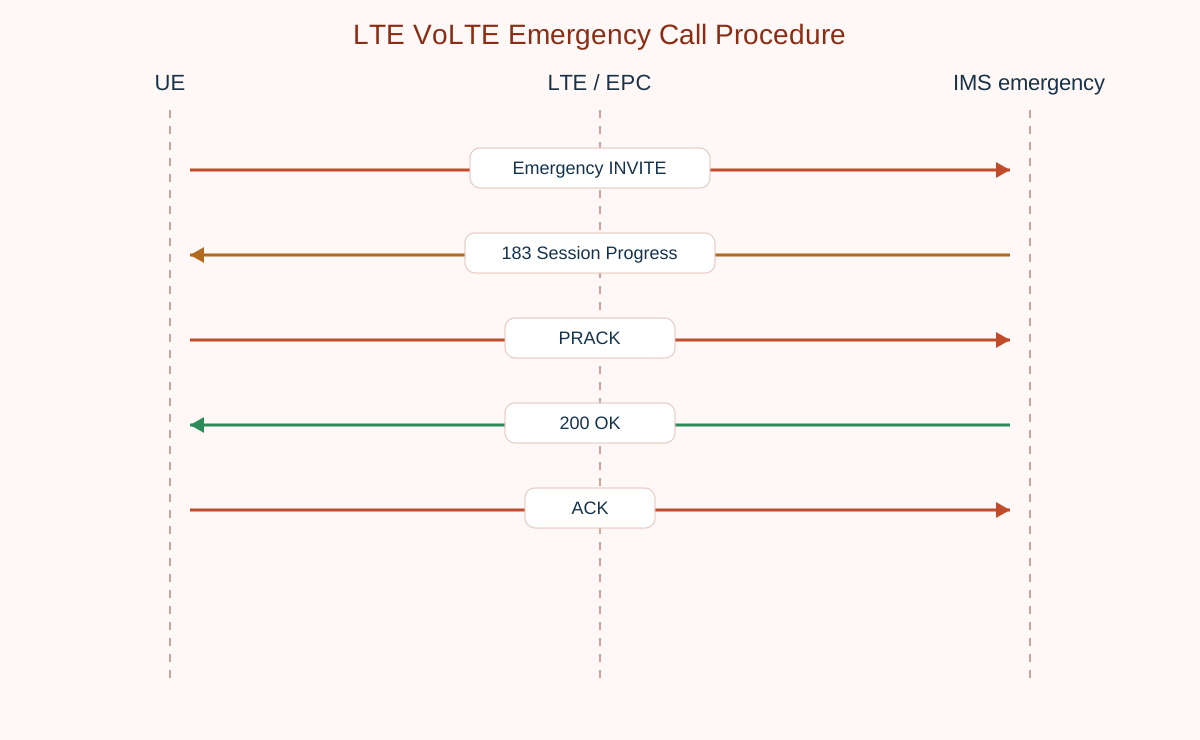
UE             LTE / EPC             IMS emergency
|--Emergency INVITE---------------------->|
|<-183 Session Progress-------------------|
|--PRACK--------------------------------->|
|<-200 OK--------------------------------|
|--ACK----------------------------------->|
Major Phases
| Phase | What happens |
|---|---|
| 1. Emergency access readiness | The LTE and IMS path for emergency service is made available. |
| 2. Emergency session start | The UE sends the emergency call request through IMS. |
| 3. Provisional progress | IMS returns progress while routing the emergency call. |
| 4. Final establishment | The emergency session reaches final success and active state. |
Step-by-Step Breakdown
Step 1: Prepare the emergency path
Sender -> receiver: UE and LTE access
Message(s): Emergency-capable LTE context
Purpose: Ensure the emergency service branch is available before or during SIP setup.
State or context change: The UE can now route the call into the correct emergency service path.
Note: This is where emergency setup differs most from a normal VoLTE call.
Step 2: Start the emergency call
Sender -> receiver: UE -> IMS emergency routing
Message(s): INVITE
Purpose: Start the emergency SIP dialog.
State or context change: IMS emergency routing now handles the call attempt.
Note: Treat the emergency INVITE as the start of the emergency service-specific SIP branch.
Step 3: Follow emergency call progress
Sender -> receiver: IMS -> UE
Message(s): 183 Session Progress and related responses
Purpose: Show that the emergency call is progressing through IMS routing and establishment.
State or context change: The call is not yet fully established but is moving through the emergency path.
Note: Emergency routing delay here is often a high-priority issue.
Important Messages
| Message | Protocol | Direction | Purpose in this procedure | What to inspect briefly |
|---|---|---|---|---|
| INVITE | SIP | UE -> IMS emergency path | Starts the emergency call dialog. | Check whether the emergency call was routed into the expected emergency IMS path. |
| 183 Session Progress | SIP | IMS -> UE | Shows emergency call progress before final answer. | Check whether provisional progress appears and whether emergency routing looks delayed. |
| PRACK | SIP | UE -> IMS | Acknowledges reliable provisional emergency signaling when used. | Check whether reliable provisional handling completed. |
| 200 OK | SIP | IMS -> UE | Confirms the emergency call was answered successfully. | Check whether final success arrived quickly and cleanly. |
Important Parameters to Inspect
| Parameter | What it is | Where it appears | Why it matters | Common issues |
|---|---|---|---|---|
| Emergency service indication | The context that marks the call as emergency service. | Emergency call setup context | Explains why the call should take the emergency branch instead of a normal voice route. | The call is treated like a normal VoLTE call. |
| Emergency route path | The IMS path used for emergency handling. | INVITE and IMS routing | Shows whether the call used the correct emergency routing. | The call reaches IMS but not the emergency branch. |
| Location-related support | Any location or access context required by the emergency path. | Emergency service context | Important for emergency routing and service handling. | Emergency routing fails because required context is missing. |
| Provisional timing | How quickly the emergency call shows progress. | 183 and related responses | Useful when emergency setup seems delayed. | The call starts but emergency routing is too slow. |
| Final answer timing | The point where the emergency session becomes active. | 200 OK | Important for emergency-service performance analysis. | Final answer arrives too late or not at all. |
Successful Completion
Success means the emergency call enters the correct emergency IMS path and reaches final established voice state.
Common Failures and Troubleshooting
| Symptom | Likely cause | Where to inspect | Relevant message(s) | Relevant interface(s) | Likely next step |
|---|---|---|---|---|---|
| Emergency call never enters the correct route | Emergency access or emergency routing context is wrong or incomplete. | The access state before INVITE and the first IMS routing step. | INVITE | LTE access, Gm | Confirm the call was actually treated as an emergency service attempt. |
| Emergency setup stalls in provisional progress | IMS emergency routing or downstream service handling is delayed or broken. | 183 Session Progress and the gap before final answer. | 183 Session Progress, PRACK | Gm | Check whether the emergency path is being routed and acknowledged cleanly. |
| Emergency call setup looks like normal VoLTE setup | The emergency-specific branch is not being distinguished during analysis. | Emergency call markers and route selection. | INVITE, 183 Session Progress | LTE access, Gm | Re-check whether the trace actually shows emergency call handling. |
What to Check in Logs and Traces
- Confirm that the call was treated as emergency service from the start.
- Use INVITE and 183 as the main early emergency path checkpoints.
- Compare emergency routing timing separately from normal VoLTE call timing.
Related Pages
Related sub-procedures
- LTE Emergency Attach Procedure
- LTE SIP Session Establishment over IMS
- LTE VoLTE Call Release Procedure
Related message reference pages
Related troubleshooting pages
Notes
The emergency SIP ladder can look similar to a normal VoLTE call, but the routing, policy, and access prerequisites around it are not the same.
FAQ
Is an LTE VoLTE emergency call the same as a normal VoLTE call?
No. The SIP dialog is similar, but the access path, routing, and service treatment are emergency-specific.
What is the main emergency call success point?
The main SIP success point is still the final 200 OK followed by the normal dialog confirmation.