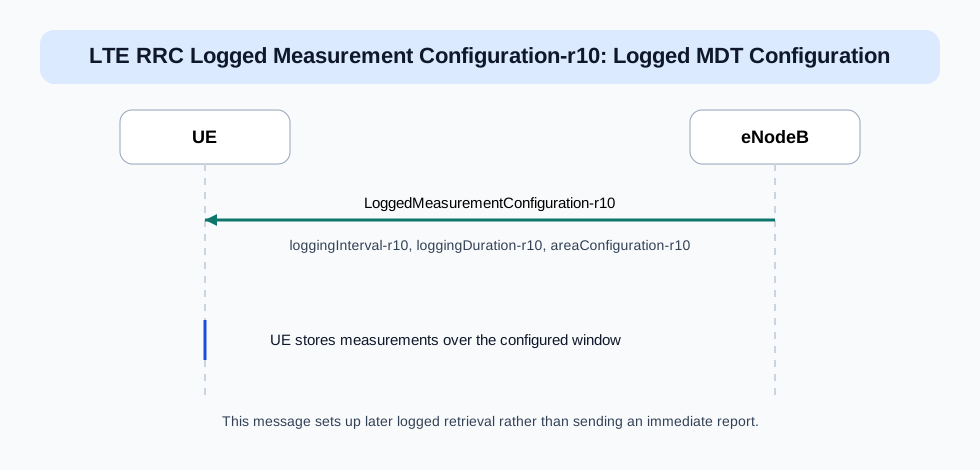
Then read logging interval and duration because they explain how much data the UE will collect.
Important Information Elements
IE
Required
Description
traceReference-r10
Yes
Identifies the trace and logging context used by the network.
traceRecordingSessionRef-r10
Yes
Session reference for the logged measurement collection instance.
loggingInterval-r10
Yes
Tells the UE how often measurements should be logged.
loggingDuration-r10
Yes
Defines how long the logging session should continue.
areaConfiguration-r10
Yes
Defines the area scope where logging applies.
Detailed field explanation
traceReference-r10
Identifies the trace and logging context used by the network.
Presence: Required
In practice: In practice, compare this field with the original request and with any later release-dependent optional fields so you can see whether the network accepted the same service model the UE asked for.
traceRecordingSessionRef-r10
Session reference for the logged measurement collection instance.
Presence: Required
In practice: In practice, compare this field with the original request and with any later release-dependent optional fields so you can see whether the network accepted the same service model the UE asked for.
loggingInterval-r10
Tells the UE how often measurements should be logged.
Presence: Required
In practice: In practice, compare this field with the original request and with any later release-dependent optional fields so you can see whether the network accepted the same service model the UE asked for.
loggingDuration-r10
Defines how long the logging session should continue.
Presence: Required
In practice: In practice, compare this field with the original request and with any later release-dependent optional fields so you can see whether the network accepted the same service model the UE asked for.
areaConfiguration-r10
Defines the area scope where logging applies.
Presence: Required
In practice: In practice, compare this field with the original request and with any later release-dependent optional fields so you can see whether the network accepted the same service model the UE asked for.
What to check in logs and traces
Check the trace and session identifiers.
Check the logging interval and duration.
Confirm whether later UE information retrieval matches the configured logging window.
Common Issues and Troubleshooting
The network expects logged MDT data but nothing useful is returned later.
Likely cause: The logging scope, duration, or collection window may not match the later retrieval expectation.
What to inspect: Check the logging interval, duration, and the configured area against the later retrieval attempt.
Next step: Compare the configuration against a known-good MDT logging case.
FAQ
What is Logged Measurement Configuration-r10 in LTE?
It is the LTE RRC message used to configure logged MDT-style measurement collection at the UE.
Does it send measurements immediately?
No. It configures later logged collection and later retrieval rather than an immediate live report.
Decode this message with the 3GPP Decoder, inspect the related message database, or open the matching call flow to see where this signaling step fits in the full procedure.