Telecom engineering reference for protocols, messages, call flows, troubleshooting, releases, and tools.
Menu
LTE RRCLTEUE -> eNodeB3GPP TS 36.331
LTE RRC Measurement Report
Uplink LTE RRC message sent by the UE when configured measurement conditions are met so the network can make mobility and radio-control decisions.
Message Fact Sheet
Protocol
lte-rrc
Network
lte
Spec
3GPP TS 36.331
Spec Section
5.5, 6.2.2
Direction
UE -> eNodeB
Message Type
Mobility / Measurement
Full message name
LTE RRC Measurement Report
Protocol
LTE-RRC
Technology
LTE
Direction
UE -> eNodeB
Interface
Uu
Signaling bearer / channel
SRB1 / UL-DCCH
Typical trigger
Sent when an event-based or periodic measurement condition configured by the network is satisfied, such as A3, A5, or periodic reporting.
Main purpose
Carries measured radio results for serving and neighbor cells after LTE measurement configuration has been applied, allowing the network to decide on handover, reconfiguration, or continued monitoring.
What is LTE RRC Measurement Report in simple terms?
Uplink LTE RRC message sent by the UE when configured measurement conditions are met so the network can make mobility and radio-control decisions.
Carries measured radio results for serving and neighbor cells after LTE measurement configuration has been applied, allowing the network to decide on handover, reconfiguration, or continued monitoring.
Why this message matters
MeasurementReport is the LTE message the UE sends to tell the network what radio conditions it is seeing.
Where this message appears in the call flow
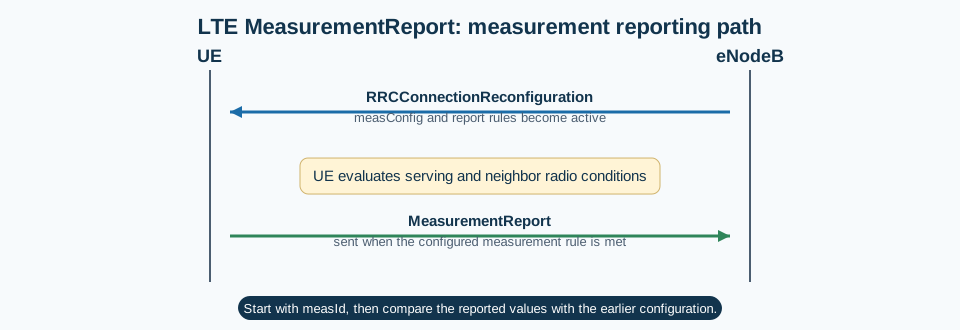
Measurement reporting
In the main reporting path, MeasurementReport appears after measurement configuration is already active and the configured rule is met.
Call flow position: UE report sent after the configured measurement condition is met.
Typical state: UE is in RRC_CONNECTED and actively evaluating serving-cell and neighbor-cell conditions.
Preconditions:
The UE has valid measurement configuration.
The relevant event or periodic rule is active.
The measurement condition has been satisfied.
Next likely message: RRCConnectionReconfiguration or mobility-related continuation
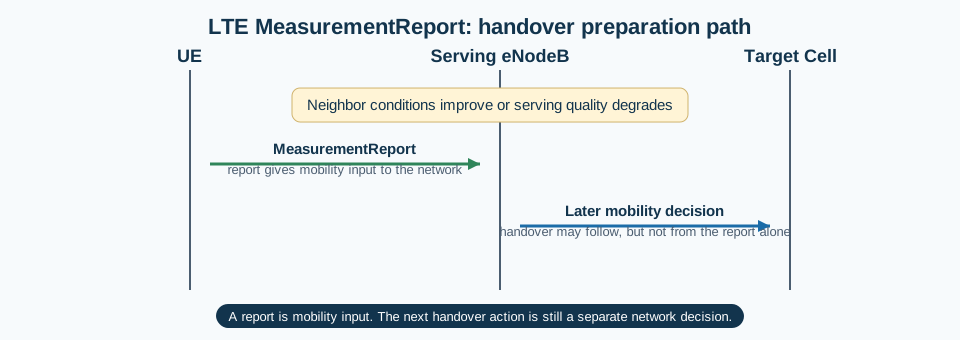
LTE handover preparation
In handover preparation, MeasurementReport gives the network the radio evidence it uses before the next mobility decision.
Call flow position: Measurement input sent before the network decides whether to continue with handover-related action.
Typical state: UE is in connected mode and mobility logic is tracking serving and neighbor quality.
Preconditions:
The network has configured the UE to measure serving and neighbor cells.
A mobility-relevant condition such as A3 or threshold crossing exists.
Next likely message: Handover-related reconfiguration or continued monitoring
The top-level structure is simple. In practice, the main reading path is the measResults content together with the earlier measConfig and the measurement identity that triggered reporting.
Start with measId because it tells you which configured reporting rule triggered the report.
Serving and neighbor results make sense only when read against the earlier measurement configuration.
A stronger neighbor does not by itself mean handover must happen next.
Important Information Elements
IE
Required
Description
measResults
Yes
Main container carrying serving-cell and neighbor-cell measurement results.
measId
Yes
Measurement identity telling the network which configured reporting rule triggered the report.
measResultPCell
Optional
Serving-cell measurement values used to understand the current radio condition on the primary cell.
measResultNeighCells
Optional
Neighbor-cell measurement results used for mobility and radio comparison.
rsrp / rsrq related values
Optional
Operationally important radio values that help explain why the configured trigger fired.
Detailed field explanation
measResults
Main container carrying serving-cell and neighbor-cell measurement results.
Presence: Required
In practice: In practice, compare this field with the original request and with any later release-dependent optional fields so you can see whether the network accepted the same service model the UE asked for.
measId
Measurement identity telling the network which configured reporting rule triggered the report.
Presence: Required
In practice: In practice, compare this field with the original request and with any later release-dependent optional fields so you can see whether the network accepted the same service model the UE asked for.
measResultPCell
Serving-cell measurement values used to understand the current radio condition on the primary cell.
Presence: Optional
In practice: In practice, compare this field with the original request and with any later release-dependent optional fields so you can see whether the network accepted the same service model the UE asked for.
measResultNeighCells
Neighbor-cell measurement results used for mobility and radio comparison.
Presence: Optional
In practice: In practice, compare this field with the original request and with any later release-dependent optional fields so you can see whether the network accepted the same service model the UE asked for.
rsrp / rsrq related values
Operationally important radio values that help explain why the configured trigger fired.
Presence: Optional
In practice: In practice, compare this field with the original request and with any later release-dependent optional fields so you can see whether the network accepted the same service model the UE asked for.
What to check in logs and traces
Check which RRCConnectionReconfiguration delivered the relevant measurement configuration.
Verify that measId matches the event or periodic rule you expect.
Inspect serving and neighbor values together around the configured trigger condition.
If no report appears, check event thresholds, hysteresis, time-to-trigger, and measurement-gap support.
Correlate the report with the next network action instead of treating the report as the final decision.
Common Issues and Troubleshooting
The network expected a report, but no MeasurementReport appears.
Likely cause: The event criteria may not have been met, the configuration may be wrong, or the UE may not have the right measurement opportunity.
What to inspect: Check measId setup, event thresholds, time-to-trigger, hysteresis, and measurement-gap context.
Next step: Compare live radio behavior with the configured trigger logic before assuming UE failure.
MeasurementReport appears, but handover does not follow.
Likely cause: The report may be valid, but the network may choose not to hand over.
What to inspect: Check the reported values, mobility policy, and the following RRC decisions.
Next step: Treat this as a mobility-decision issue unless the report content itself is inconsistent.
Reports appear too often or look unstable.
Likely cause: The reporting configuration may be too sensitive or the radio environment may be fluctuating.
What to inspect: Check hysteresis, time-to-trigger, report interval, and serving-versus-neighbor stability.
Next step: Compare repeated reports instead of looking at a single report in isolation.
LTE / 5G / Variant Comparison
Compared with RRCConnectionReconfiguration
RRCConnectionReconfiguration tells the UE what to measure and when to report. MeasurementReport is the UE feedback after those conditions are met.
Compared with handover signaling
MeasurementReport informs the network. It does not itself command handover. The later mobility action is a separate network decision.
FAQ
What is MeasurementReport in LTE?
It is the uplink LTE RRC message the UE sends when configured measurement conditions are satisfied.
What should I inspect first in MeasurementReport?
Start with measId, then read the serving and neighbor results against the earlier measurement configuration.
Does MeasurementReport mean handover will happen?
No. It provides radio information to the network, but handover is a later network decision.
Why is MeasurementReport important?
It is one of the main mobility-input messages in LTE, so missing, late, or unstable reports directly affect handover and radio-control behavior.
Decode this message with the 3GPP Decoder, inspect the related message database, or open the matching call flow to see where this signaling step fits in the full procedure.