Telecom engineering reference for protocols, messages, call flows, troubleshooting, releases, and tools.
Menu
LTE RRCLTEeNodeB -> UE3GPP TS 36.331
LTE - SecurityModeCommand
Downlink LTE RRC message sent by the eNodeB to activate access-stratum security for the UE.
Message Fact Sheet
Protocol
lte-rrc
Network
lte
Spec
3GPP TS 36.331
Spec Section
5.3.10, 6.2.2
Direction
eNodeB -> UE
Message Type
Security Control
Full message name
LTE - SecurityModeCommand
Protocol
LTE-RRC
Technology
LTE
Direction
eNodeB -> UE
Interface
Uu
Signaling bearer / channel
SRB1 / DL-DCCH
Typical trigger
The network has completed the early access and NAS security steps needed to begin AS security activation on the radio side.
Main purpose
Activates LTE AS security by selecting the ciphering and integrity algorithms and providing the security configuration needed before later dedicated signaling continues.
Main specification
3GPP TS 36.331, 5.3.10, 6.2.2
Release added
Release 8
Procedures where used
RRC Connection Establishment, Initial Access, AS Security Activation
Related timers
T304 is not the main timer here; correlate the message with the surrounding access and security sequence
Related cause values
Algorithm selection and security capability mismatch are the main practical decision points
What is SecurityModeCommand in simple terms?
Downlink LTE RRC message sent by the eNodeB to activate access-stratum security for the UE.
Activates LTE AS security by selecting the ciphering and integrity algorithms and providing the security configuration needed before later dedicated signaling continues.
Why this message matters
SecurityModeCommand is the LTE RRC message the network uses to turn on radio-layer security for the UE.
Where this message appears in the call flow
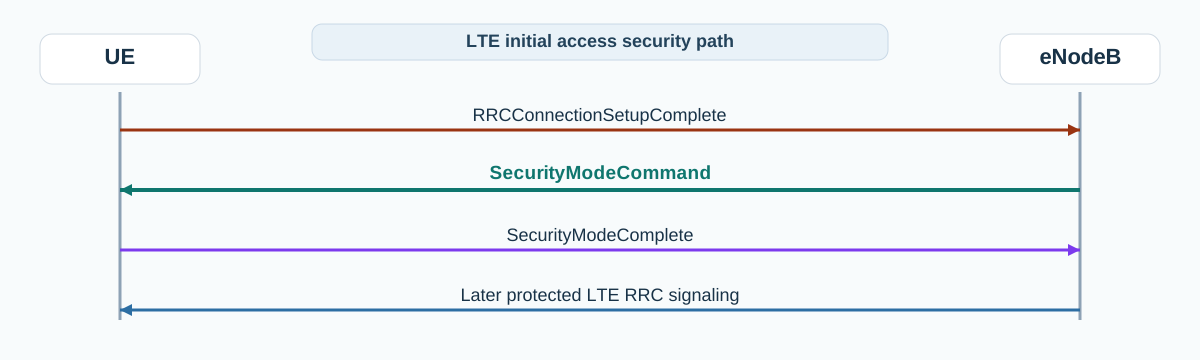
LTE initial access
In the initial access path, SecurityModeCommand activates AS security after setup complete and before later protected signaling continues.
Call flow position: Security activation step after early setup and NAS-side security preparation.
Typical state: UE is already connected on SRB1 and is about to move into protected dedicated signaling.
Preconditions:
RRCConnectionSetupComplete has already been sent.
The network has the security context needed for AS security activation.
Next likely message: SecurityModeComplete
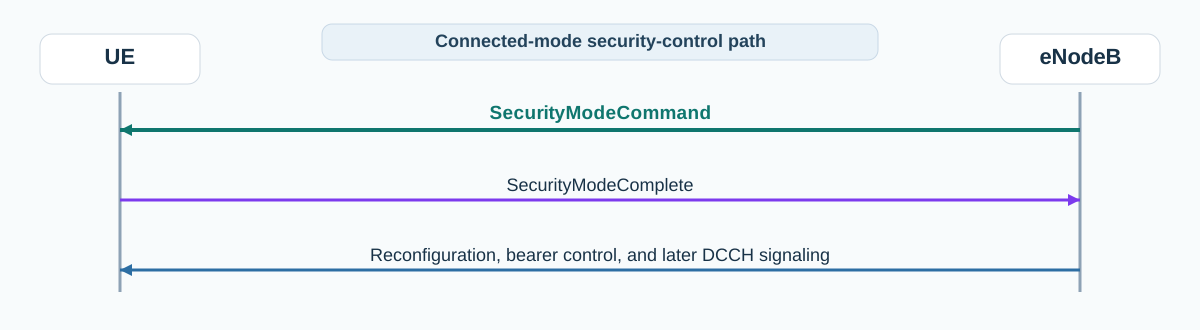
Connected-mode continuation
In connected-mode continuation, SecurityModeCommand is the security-control checkpoint before later dedicated LTE RRC signaling.
Call flow position: Security-control checkpoint before later reconfiguration, bearer changes, or other dedicated LTE RRC signaling.
Typical state: UE is in connected mode and later DCCH signaling depends on successful AS security activation.
Preconditions:
SRB1 is active.
The UE and network security capabilities are available.
Next likely message: SecurityModeComplete or SecurityModeFailure
Transport / encapsulation: RRC over DCCH on SRB1 after initial connection establishment
Security context: This is the message that activates the LTE AS security path, so it sits at the boundary between pre-security and protected dedicated signaling.
Message Structure Overview
SecurityModeCommand is compact and operationally focused. Its main job is to activate AS security before later dedicated control continues.
The key reading path is the selected security configuration and whether the UE can accept it.
Later dedicated LTE RRC signaling should be read differently once this step succeeds.
Start by checking the selected ciphering and integrity algorithms.
Correlate the message with UE security capability support and the following SecurityModeComplete.
If the security path breaks here, later dedicated RRC signaling should not be assumed valid.
Important Information Elements
IE
Required
Description
securityConfigSMC
Yes
Carries the security configuration used for Security Mode Command.
securityAlgorithmConfig
Yes
Contains the selected ciphering and integrity algorithms for LTE AS security.
cipheringAlgorithm
Yes
Selected LTE AS ciphering algorithm.
integrityProtAlgorithm
Yes
Selected LTE AS integrity protection algorithm.
nonCriticalExtension
Optional
Release-extension branch for later additions.
Detailed field explanation
securityConfigSMC
Carries the security configuration used for Security Mode Command.
Presence: Required
In practice: In practice, compare this field with the original request and with any later release-dependent optional fields so you can see whether the network accepted the same service model the UE asked for.
securityAlgorithmConfig
Contains the selected ciphering and integrity algorithms for LTE AS security.
Presence: Required
In practice: In practice, compare this field with the original request and with any later release-dependent optional fields so you can see whether the network accepted the same service model the UE asked for.
cipheringAlgorithm
Selected LTE AS ciphering algorithm.
Presence: Required
In practice: In practice, compare this field with the original request and with any later release-dependent optional fields so you can see whether the network accepted the same service model the UE asked for.
integrityProtAlgorithm
Selected LTE AS integrity protection algorithm.
Presence: Required
In practice: In practice, compare this field with the original request and with any later release-dependent optional fields so you can see whether the network accepted the same service model the UE asked for.
nonCriticalExtension
Release-extension branch for later additions.
Presence: Optional
In practice: In practice, compare this field with the original request and with any later release-dependent optional fields so you can see whether the network accepted the same service model the UE asked for.
What to check in logs and traces
Confirm the message follows the early setup and NAS-side security preparation stages.
Check the selected ciphering and integrity algorithms.
Compare the algorithm choices with UE security capabilities and expected operator policy.
Confirm the next message is SecurityModeComplete or SecurityModeFailure.
If later dedicated signaling looks unprotected or inconsistent, verify whether security activation really succeeded here.
Common Issues and Troubleshooting
The UE never answers SecurityModeCommand.
Likely cause: Algorithm selection, capability mismatch, or security context preparation may be wrong.
What to inspect: Check securityAlgorithmConfig, UE security capability support, and the earlier NAS-side security context handling.
Next step: Compare against a known-good access trace and verify the chosen algorithms.
SecurityModeFailure appears.
Likely cause: The UE rejected the selected security configuration or could not continue with the provided context.
What to inspect: Check the preceding setup-complete path, security capabilities, and any mismatch between UE and network expectations.
Next step: Walk backward into the security preparation path rather than reading only the failure message.
Later reconfiguration or bearer setup fails unexpectedly.
Likely cause: The issue may start at security activation rather than at the later configuration message.
What to inspect: Confirm SecurityModeCommand and SecurityModeComplete completed cleanly before debugging later DCCH content.
Next step: Validate that protected signaling begins where expected.
LTE / 5G / Variant Comparison
Compared with SecurityModeComplete
SecurityModeCommand selects and delivers the LTE AS security configuration. SecurityModeComplete is the UE confirmation that the activation step succeeded.
Compared with 5G NR SecurityModeCommand
LTE and NR both use SecurityModeCommand to activate access-stratum security, but the surrounding access flow and exact field structures differ between TS 36.331 and TS 38.331.
FAQ
What is SecurityModeCommand in LTE?
It is the downlink LTE RRC message the eNodeB sends to activate access-stratum security for the UE.
What comes after SecurityModeCommand?
The UE responds with SecurityModeComplete if activation succeeds or SecurityModeFailure if it cannot continue.
What should I inspect first in SecurityModeCommand?
Start with the selected ciphering and integrity algorithms in the security configuration.
Why is SecurityModeCommand important in troubleshooting?
It is the step that activates protected LTE RRC signaling, so later dedicated failures often need to be checked back against this point.
Decode this message with the 3GPP Decoder, inspect the related message database, or open the matching call flow to see where this signaling step fits in the full procedure.