Telecom engineering reference for protocols, messages, call flows, troubleshooting, releases, and tools.
Menu
NASLTEMME to UE3GPP TS 24.301
LTE Activate Dedicated EPS Bearer Context Request
Activate Dedicated EPS Bearer Context Request is the EPS session-management message the network sends when it wants the UE to activate a dedicated bearer linked to an already active default bearer.
Message Fact Sheet
Protocol
nas
Network
lte
Spec
3GPP TS 24.301
Spec Section
6.4.2.2, 8.3.3
Direction
MME to UE
Message Type
ESM signaling
Full message name
LTE Activate Dedicated EPS Bearer Context Request
Protocol
NAS
Technology
LTE
Direction
MME to UE
Interface
N1 over LTE access / S1-MME control path
Signaling bearer / channel
NAS signaling / Commonly carried in downlink NAS transport after PDN connectivity is already active and the network wants to add a dedicated bearer for a specific service flow.
Typical trigger
Sent when the network wants to establish a dedicated bearer for a specific traffic flow, often after policy/QoS decisions or a UE-requested bearer resource procedure.
Main purpose
Carries the dedicated bearer definition, linked default bearer identity, TFT, and QoS parameters the UE needs to activate a dedicated EPS bearer for a specific service flow.
What is LTE Activate Dedicated EPS Bearer Context Request in simple terms?
Activate Dedicated EPS Bearer Context Request is the EPS session-management message the network sends when it wants the UE to activate a dedicated bearer linked to an already active default bearer.
Carries the dedicated bearer definition, linked default bearer identity, TFT, and QoS parameters the UE needs to activate a dedicated EPS bearer for a specific service flow.
Why this message matters
Activate Dedicated EPS Bearer Context Request is the network telling the UE to create a service-specific bearer linked to an already active default bearer.
Where this message appears in the call flow
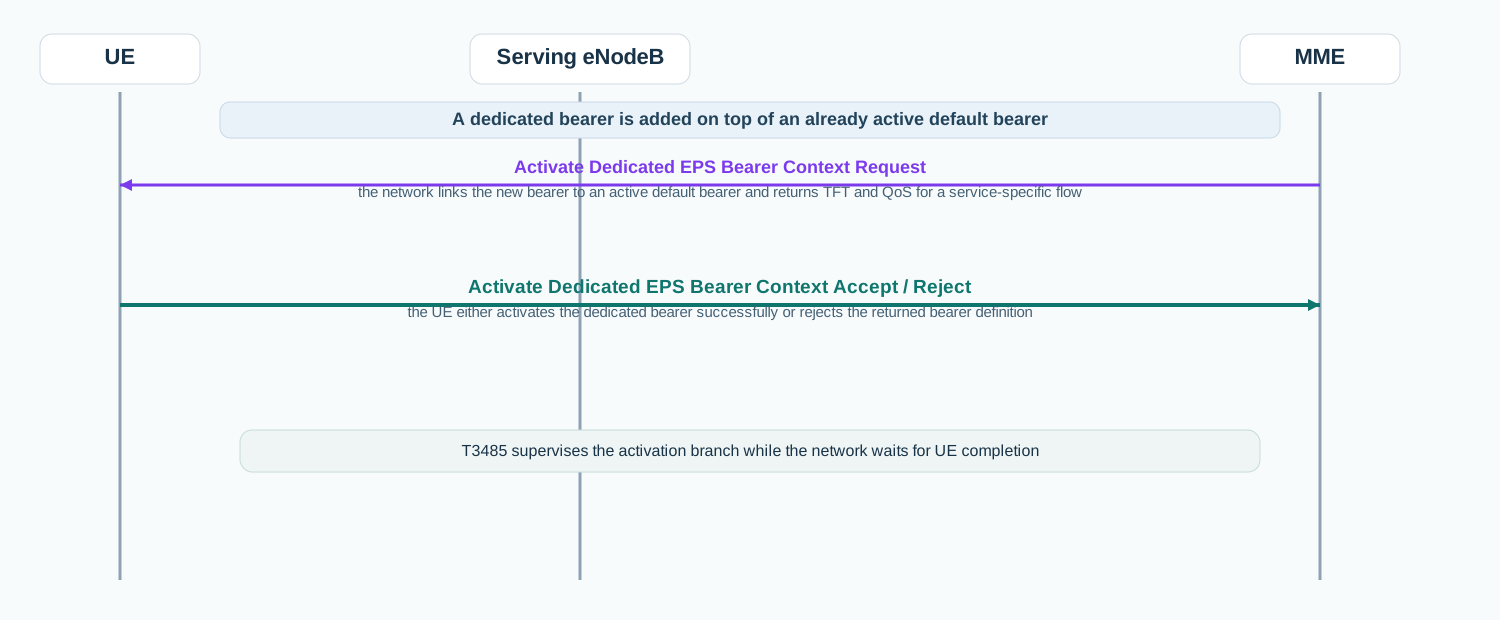
Dedicated bearer activation for an active PDN
Once the default bearer is already active, the network can send Activate Dedicated EPS Bearer Context Request to create a service-specific bearer linked to that PDN connection.
Call flow position: Network-initiated ESM activation message sent after the default bearer is already active for the PDN connection.
Typical state: The UE already has an active default bearer and the network is now adding a dedicated bearer for a specific traffic flow.
Preconditions:
A linked default EPS bearer is already active.
The network has dedicated-bearer policy and QoS information ready.
Next likely message: Activate Dedicated EPS Bearer Context Accept or Reject
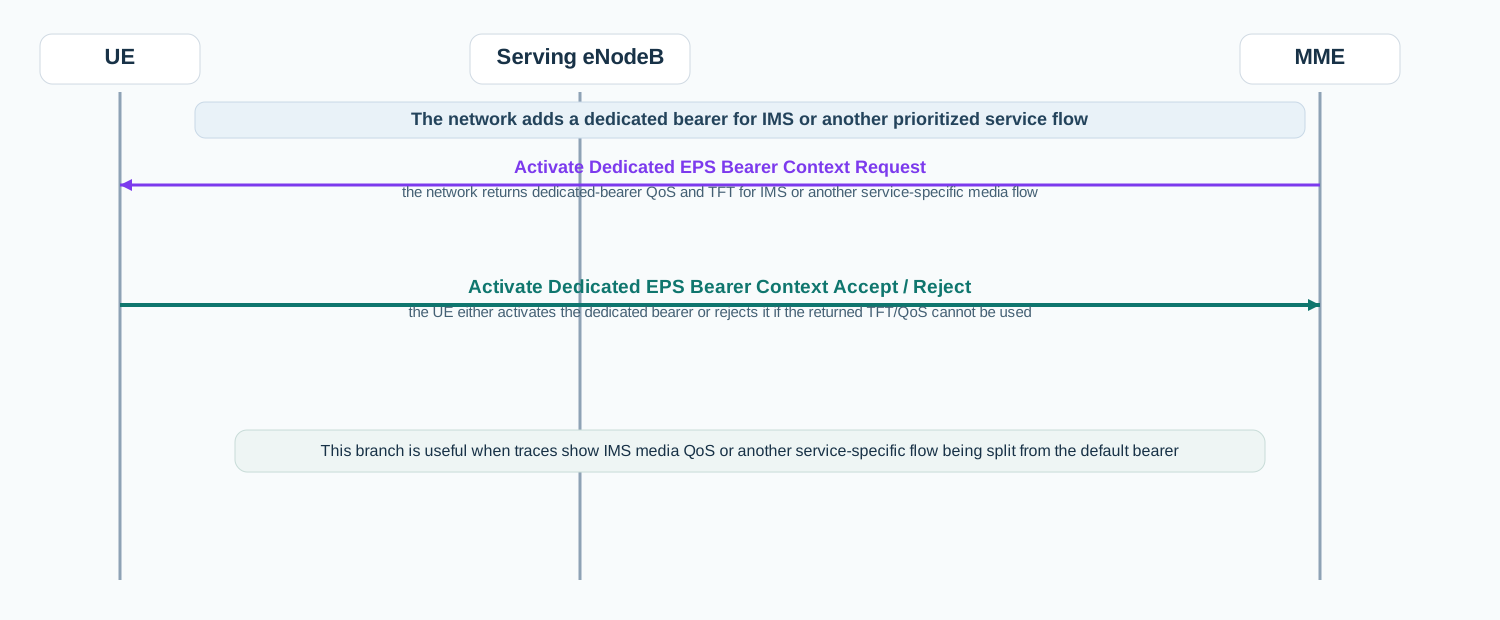
IMS or service-specific QoS bearer activation
For IMS or another service-specific flow, Activate Dedicated EPS Bearer Context Request shows the network-side bearer definition returned for that dedicated QoS branch.
Call flow position: Dedicated bearer activation used when the network creates a service-specific bearer, such as for IMS-related traffic or another prioritized flow.
Typical state: The UE already has PDN connectivity, but the network wants a separate bearer for a specific service treatment.
Preconditions:
The relevant PDN connection is active.
The network decided that a dedicated bearer is needed for the requested traffic flow.
Next likely message: Activate Dedicated EPS Bearer Context Accept or Reject
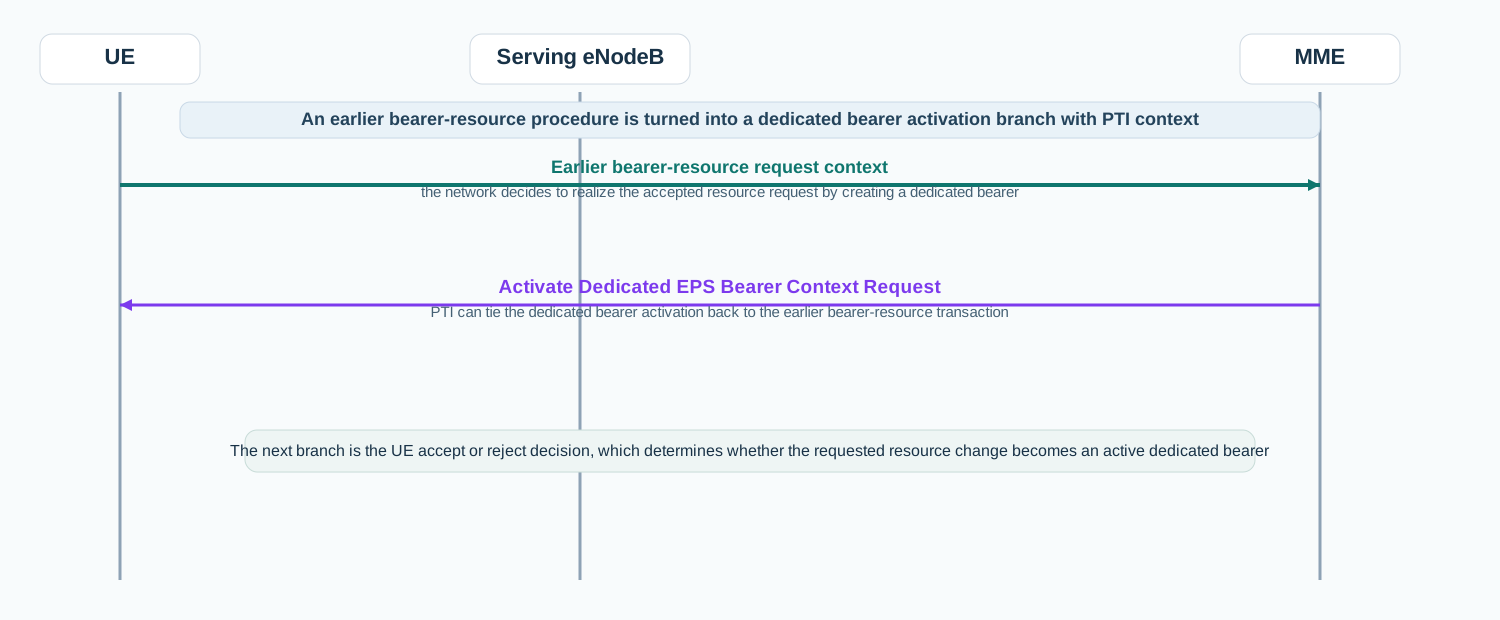
UE requested bearer resource continuation
After a bearer resource procedure, the network may convert the accepted resource change into Activate Dedicated EPS Bearer Context Request with PTI linking back to that earlier transaction.
Call flow position: Network response branch used after a UE-requested bearer resource allocation or modification procedure leads to dedicated bearer creation.
Typical state: The network is turning the earlier resource request into a dedicated bearer definition the UE can activate.
Preconditions:
A UE-requested bearer resource procedure is in progress or has just been accepted.
The network prepared the dedicated bearer parameters and linked bearer identity.
Next likely message: Activate Dedicated EPS Bearer Context Accept or Reject
Interface: N1 over LTE access / S1-MME control path
Domain: Core-side EPS session management signaling used to add service-specific bearer handling on top of an existing default bearer.
Signaling bearer: NAS signaling
Logical channel: Commonly carried in downlink NAS transport after PDN connectivity is already active and the network wants to add a dedicated bearer for a specific service flow.
Transport / encapsulation: EPS NAS ESM message sent by the MME and delivered to the UE through the eNodeB as part of dedicated bearer activation.
Security context: Activate Dedicated EPS Bearer Context Request appears after a PDN connection is already active, so it is normally seen in protected NAS continuation rather than in early access signaling.
Message Structure Overview
Activate Dedicated EPS Bearer Context Request is an EPS session-management message rather than an ASN.1 LTE RRC structure.
The practical reading path starts with the linked default bearer, EPS QoS, and the traffic flow template.
In real traces, this message explains how the network is carving a service-specific bearer out of an already active PDN connection.
Activate Dedicated EPS Bearer Context Request is a NAS layer-3 ESM message, not an ASN.1 LTE RRC message. Read it from the linked default bearer and TFT first, because those fields define how the dedicated bearer relates to the already active PDN connection.
LTE Activate Dedicated EPS Bearer Context Request - Example Dump
Start with the linked default bearer identity because it tells you which active PDN connection this dedicated bearer belongs to.
EPS QoS and TFT are the highest-value fields because they define the service treatment and traffic binding.
If the network keeps retransmitting the request, move quickly to T3485-style supervision and the missing accept or reject branch.
Important Information Elements
IE
Required
Description
Linked EPS bearer identity
Yes
Identifies the already active default bearer to which the new dedicated bearer is linked.
EPS QoS
Yes
Defines the QoS characteristics the network wants for the dedicated bearer.
Traffic flow template
Yes
Defines the packet filters that bind the dedicated bearer to the intended traffic flow.
Transaction identifier
Optional
May tie the dedicated bearer activation back to a UE-requested bearer resource procedure.
Protocol configuration options
Optional
May carry additional configuration information associated with the dedicated bearer activation.
Detailed field explanation
Linked EPS bearer identity
Identifies the already active default bearer to which the new dedicated bearer is linked.
Presence: Required
In practice: In practice, compare this field with the original request and with any later release-dependent optional fields so you can see whether the network accepted the same service model the UE asked for.
EPS QoS
Defines the QoS characteristics the network wants for the dedicated bearer.
Presence: Required
In practice: QoS rules are the real service profile of the session. Inspect the QFI mapping, packet filters, and precedence because those values explain how user traffic will actually be classified and forwarded.
Traffic flow template
Defines the packet filters that bind the dedicated bearer to the intended traffic flow.
Presence: Required
In practice: In practice, compare this field with the original request and with any later release-dependent optional fields so you can see whether the network accepted the same service model the UE asked for.
Transaction identifier
May tie the dedicated bearer activation back to a UE-requested bearer resource procedure.
Presence: Optional
In practice: In practice, compare this field with the original request and with any later release-dependent optional fields so you can see whether the network accepted the same service model the UE asked for.
Protocol configuration options
May carry additional configuration information associated with the dedicated bearer activation.
Presence: Optional
In practice: In practice, compare this field with the original request and with any later release-dependent optional fields so you can see whether the network accepted the same service model the UE asked for.
What to check in logs and traces
Confirm which active default bearer the request is linked to.
Check EPS QoS and the traffic flow template first.
Inspect PTI when the branch appears related to bearer resource allocation or modification.
Correlate the message with the later dedicated bearer accept or reject response.
Check whether repeated request retransmissions point to missing UE completion.
Common Issues and Troubleshooting
IMS or service-specific media does not get the expected QoS treatment.
Likely cause: The network may have returned a dedicated bearer definition the UE did not accept, or the TFT/QoS may not match the intended service flow.
What to inspect: Check the linked default bearer, EPS QoS, TFT, and the later accept or reject branch.
Next step: Treat it as a dedicated bearer activation issue before blaming only user-plane transport.
The network keeps sending dedicated bearer activation requests.
Likely cause: The branch may still be under T3485 supervision because the UE did not complete the dedicated bearer activation cleanly.
What to inspect: Check whether Activate Dedicated EPS Bearer Context Accept or Reject appears and whether the request repeats on the same linked bearer.
Next step: Read the trace as a bearer-activation completion problem rather than only a policy-control issue.
A UE-requested bearer resource change does not lead to usable dedicated bearer activation.
Likely cause: The network may have accepted the resource request conceptually but the dedicated bearer activation branch may still fail or stall.
What to inspect: Compare the earlier bearer-resource request context with the returned PTI, linked bearer identity, and later UE response.
Next step: Follow the dedicated bearer activation branch end to end before concluding the problem is elsewhere.
LTE / 5G / Variant Comparison
Compared with Activate Default EPS Bearer Context Request
Activate Default EPS Bearer Context Request defines the first bearer for a PDN connection. Activate Dedicated EPS Bearer Context Request adds another bearer linked to that existing default bearer.
Compared with PDN Connectivity Request
PDN Connectivity Request asks for PDN access and default bearer setup. Activate Dedicated EPS Bearer Context Request comes later when the network adds a service-specific bearer on top of that PDN connection.
Compared with Service Request
Service Request restores access using existing EPS context. Activate Dedicated EPS Bearer Context Request creates a new dedicated bearer for a specific service flow inside that already active context.
FAQ
What is Activate Dedicated EPS Bearer Context Request in LTE?
It is the EPS NAS session-management message the network sends to activate a dedicated bearer linked to an already active default bearer.
What should I inspect first in this message?
Start with linked EPS bearer identity, EPS QoS, and the traffic flow template.
Why is this message important in troubleshooting?
Because it shows exactly how the network tried to build a service-specific bearer for an existing PDN connection.
What usually comes after this message?
The UE normally replies with Activate Dedicated EPS Bearer Context Accept or Reject depending on whether it can activate the returned bearer definition.
Decode this message with the 3GPP Decoder, inspect the related message database, or open the matching call flow to see where this signaling step fits in the full procedure.