Telecom engineering reference for protocols, messages, call flows, troubleshooting, releases, and tools.
Menu
NASLTEUE to MME3GPP TS 24.301
LTE Activate Default EPS Bearer Context Accept
Activate Default EPS Bearer Context Accept is the EPS session-management message the UE sends to confirm that the default bearer requested by the network was accepted and activated.
Message Fact Sheet
Protocol
nas
Network
lte
Spec
3GPP TS 24.301
Spec Section
6.4.1.3, 8.3.4
Direction
UE to MME
Message Type
ESM signaling
Full message name
LTE Activate Default EPS Bearer Context Accept
Protocol
NAS
Technology
LTE
Direction
UE to MME
Interface
N1 over LTE access / S1-MME control path
Signaling bearer / channel
NAS signaling / Commonly carried in the ESM message container of Attach Complete during initial attach, or later in uplink NAS transport when the default bearer was activated after standalone PDN-connectivity handling.
Typical trigger
Sent after the UE receives Activate Default EPS Bearer Context Request and successfully activates the requested default bearer.
Main purpose
Confirms successful UE-side processing of the returned default bearer definition so the network can mark the bearer active and continue normal PDN service handling.
What is LTE Activate Default EPS Bearer Context Accept in simple terms?
Activate Default EPS Bearer Context Accept is the EPS session-management message the UE sends to confirm that the default bearer requested by the network was accepted and activated.
Confirms successful UE-side processing of the returned default bearer definition so the network can mark the bearer active and continue normal PDN service handling.
Why this message matters
Activate Default EPS Bearer Context Accept is the UE telling the network that the default bearer was accepted and activated successfully.
Where this message appears in the call flow
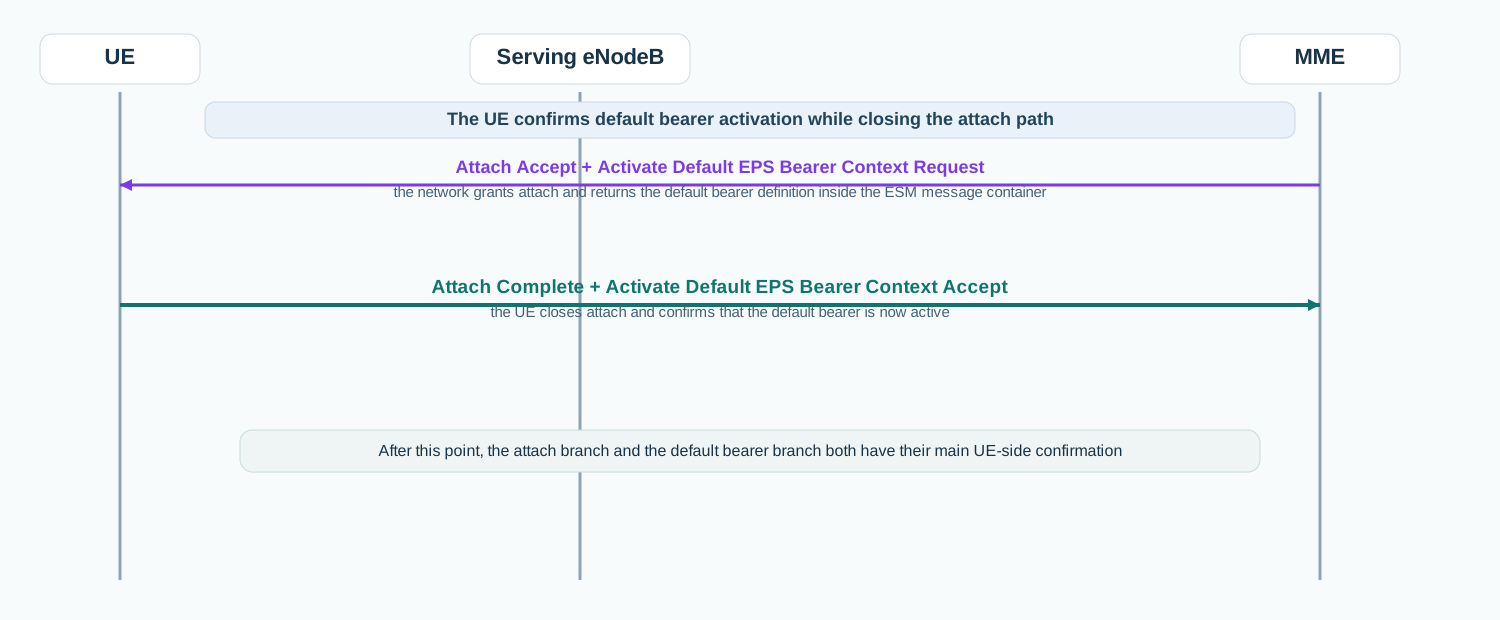
Initial attach default bearer acceptance
In the initial attach path, Activate Default EPS Bearer Context Accept is usually carried inside Attach Complete and confirms successful default bearer activation.
Call flow position: Embedded ESM acceptance returned together with Attach Complete when the UE accepts the default bearer that came with Attach Accept.
Typical state: The attach branch is closing and the UE is confirming that the returned default bearer definition was applied successfully.
Preconditions:
The UE received Attach Accept with embedded Activate Default EPS Bearer Context Request.
The UE could activate the requested default bearer.
Next likely message: Attach completion finalization and registered EPS service continuation
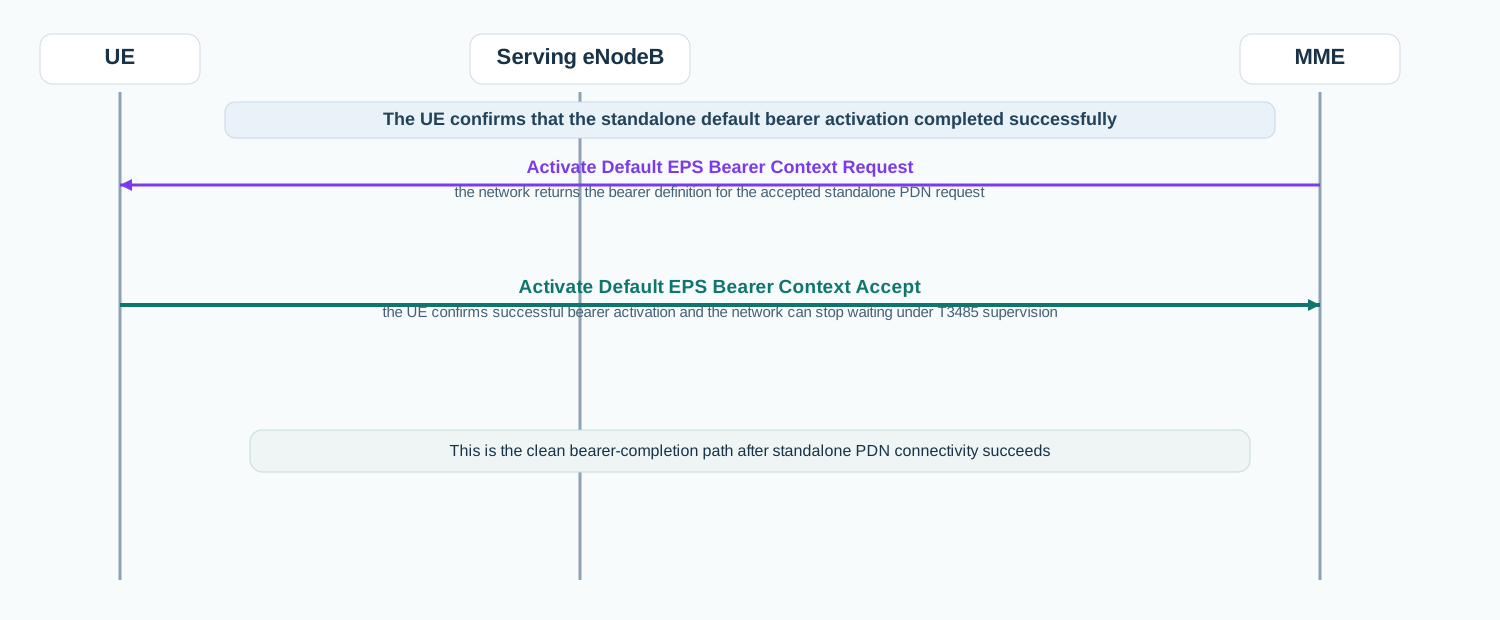
Standalone PDN connectivity bearer acceptance
After standalone PDN setup, Activate Default EPS Bearer Context Accept is the UE confirmation that the returned default bearer definition was applied successfully.
Call flow position: Standalone ESM accept message sent after the UE receives Activate Default EPS Bearer Context Request outside the attach path.
Typical state: The UE already has EPS registration and is confirming successful activation of the default bearer for the requested PDN.
Preconditions:
The network accepted the standalone PDN Connectivity Request.
The UE could apply the returned default bearer definition.
Next likely message: Bearer active service continuation
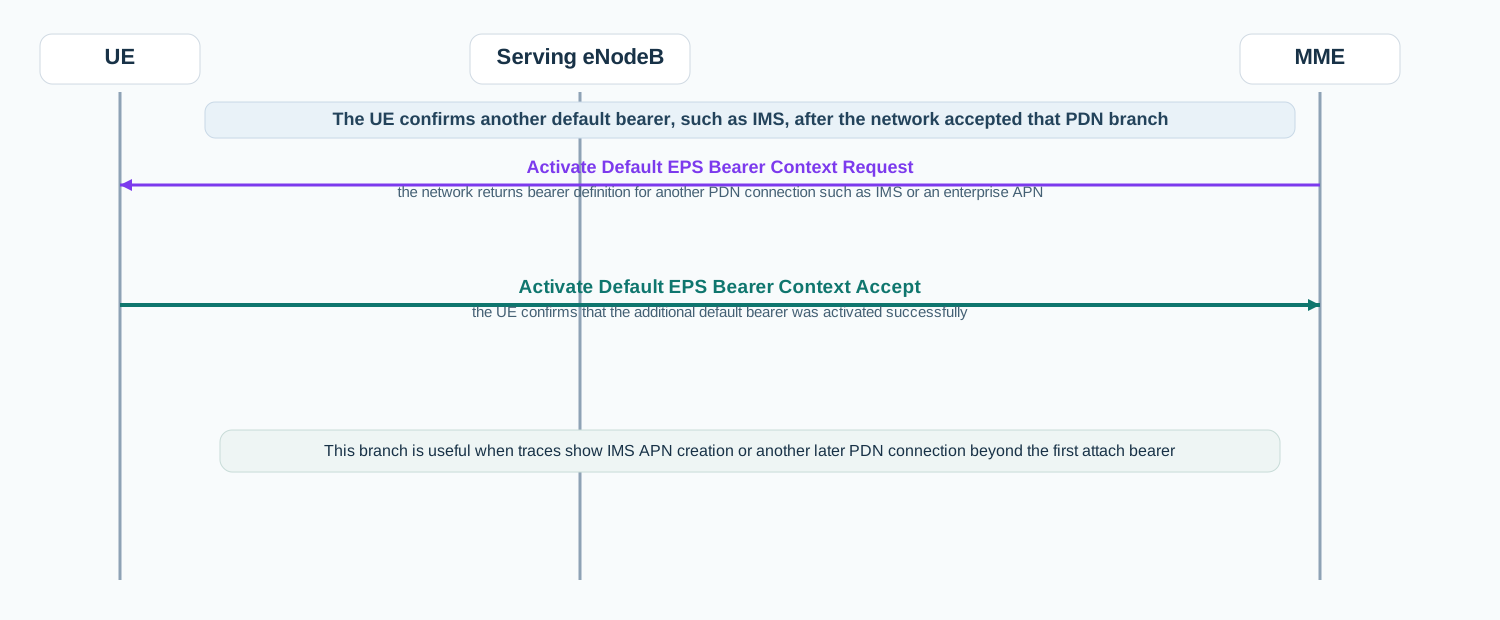
Additional APN or IMS default bearer acceptance
For IMS or another APN, Activate Default EPS Bearer Context Accept confirms that the UE activated the additional default bearer returned by the network.
Call flow position: UE acceptance sent when another PDN connection such as IMS has been activated successfully.
Typical state: The UE already has one EPS context and is confirming successful activation of another default bearer for a different APN or service path.
Preconditions:
The network returned Activate Default EPS Bearer Context Request for another PDN connection.
The UE accepted the new bearer definition.
Next likely message: Additional APN service continuation
Next message(s):Attach Complete, EPS bearer active service continuation, Protected user-plane service
Message direction and transport
Sender and receiver: UE to MME
Interface: N1 over LTE access / S1-MME control path
Domain: Core-side EPS session management signaling that confirms UE acceptance of the default bearer context.
Signaling bearer: NAS signaling
Logical channel: Commonly carried in the ESM message container of Attach Complete during initial attach, or later in uplink NAS transport when the default bearer was activated after standalone PDN-connectivity handling.
Transport / encapsulation: EPS NAS ESM message sent by the UE and delivered to the MME through the eNodeB as part of default bearer activation completion.
Security context: Activate Default EPS Bearer Context Accept is normally sent after the wider NAS branch is already accepted, so it commonly appears in protected continuation rather than in early unauthenticated access.
Message Structure Overview
Activate Default EPS Bearer Context Accept is an EPS session-management message rather than an ASN.1 LTE RRC structure.
The practical reading path starts with procedure context: embedded in Attach Complete or sent alone after standalone PDN-connectivity handling.
In real traces, this message is the UE-side confirmation that the returned default bearer is now active.
Activate Default EPS Bearer Context Accept is a NAS layer-3 ESM message, not an ASN.1 LTE RRC message. It is structurally small, so the main value is its timing, presence, and relation to the earlier bearer-activation request.
LTE Activate Default EPS Bearer Context Accept - Example Dump
Start by deciding whether the accept is embedded in Attach Complete or sent as a standalone ESM reply.
The highest-value fields are usually EPS bearer identity and PTI because they tie the accept back to the earlier bearer-activation branch.
If the network keeps retransmitting the request, this message is one of the first checkpoints to verify.
What to check in logs and traces
Confirm the accept follows the expected Activate Default EPS Bearer Context Request.
Check whether it is embedded in Attach Complete or sent as a standalone ESM message.
Correlate the message with the earlier PDN Connectivity Request when relevant.
Check whether repeated request retransmissions stopped after this message.
If missing, compare the branch with reject handling or lower-layer uplink problems.
Common Issues and Troubleshooting
Attach looks accepted, but the network keeps waiting or retransmitting bearer setup.
Likely cause: The embedded Activate Default EPS Bearer Context Accept may be missing, delayed, or not reaching the network through the uplink attach-completion path.
What to inspect: Check Attach Accept, Activate Default EPS Bearer Context Request, Attach Complete, and whether the ESM acceptance is actually present.
Next step: Read the attach-closeout branch as mobility plus bearer completion, not only as attach signaling.
A standalone PDN setup reaches bearer activation but does not become stable.
Likely cause: The UE may not have returned Activate Default EPS Bearer Context Accept cleanly, or the network may still be supervising the branch under T3485.
What to inspect: Check the earlier PDN Connectivity Request, the bearer-activation request, and whether the accept appeared once or after retransmissions.
Next step: Decide first whether the issue is missing acceptance, uplink delivery, or a later user-plane problem.
IMS or another additional APN setup works intermittently.
Likely cause: The additional default bearer branch may be accepted in some cases and fail or restart in others.
What to inspect: Compare the returned bearer request and the presence or absence of Activate Default EPS Bearer Context Accept across working and failing traces.
Next step: Treat the problem as a bearer-activation completion issue before assuming the APN policy alone is at fault.
LTE / 5G / Variant Comparison
Compared with Activate Default EPS Bearer Context Request
Activate Default EPS Bearer Context Request is the network instruction. Activate Default EPS Bearer Context Accept is the UE confirmation that the default bearer is now active.
Compared with Attach Complete
Attach Complete closes the LTE attach path. Activate Default EPS Bearer Context Accept is the ESM confirmation that is often carried inside that attach-completion message.
Compared with PDN Connectivity Request
PDN Connectivity Request asks for PDN connectivity. Activate Default EPS Bearer Context Accept confirms that the accepted default bearer for that PDN was activated successfully.
FAQ
What is Activate Default EPS Bearer Context Accept in LTE?
It is the EPS NAS session-management message the UE sends to confirm that the requested default bearer was accepted and activated.
Is this message always sent by itself?
No. During initial attach it is often carried inside Attach Complete. After standalone PDN connectivity it is usually sent alone.
What should I inspect first in this message?
Start with its timing and procedure context, then verify which bearer-activation request it answers.
Why is this message important in troubleshooting?
Because it confirms whether the UE actually completed default bearer activation, which is often the difference between an accepted PDN branch and a retransmitting one.
Decode this message with the 3GPP Decoder, inspect the related message database, or open the matching call flow to see where this signaling step fits in the full procedure.