Telecom engineering reference for protocols, messages, call flows, troubleshooting, releases, and tools.
Menu
NASLTEMME to UE3GPP TS 24.301
LTE Attach Accept
Attach Accept is the EPS NAS message the MME uses to grant LTE attach and deliver the accepted EPS mobility context to the UE.
Message Fact Sheet
Protocol
nas
Network
lte
Spec
3GPP TS 24.301
Spec Section
5.5.1, 8.2.1
Direction
MME to UE
Message Type
EMM signaling
Full message name
LTE Attach Accept
Protocol
NAS
Technology
LTE
Direction
MME to UE
Interface
N1 over LTE access / S1-MME control path
Signaling bearer / channel
NAS signaling / Commonly carried in downlink NAS transport after LTE RRC connection establishment
Typical trigger
Sent after the network accepts Attach Request and finishes the required identity, authentication, and security handling for the attach procedure.
Main purpose
Confirms successful attach, provides the accepted mobility-management parameters, and commonly carries the embedded default-bearer activation request needed for service continuity after attach.
Main specification
3GPP TS 24.301, 5.5.1, 8.2.1
Release added
Release 8
Procedures where used
LTE Attach Procedure, Initial Access, Combined EPS Attach, Re-attach after Context Loss
Attach Accept is the EPS NAS message the MME uses to grant LTE attach and deliver the accepted EPS mobility context to the UE.
Confirms successful attach, provides the accepted mobility-management parameters, and commonly carries the embedded default-bearer activation request needed for service continuity after attach.
Why this message matters
Attach Accept is the network telling the UE that the LTE attach procedure succeeded and returning the accepted EPS context.
Where this message appears in the call flow
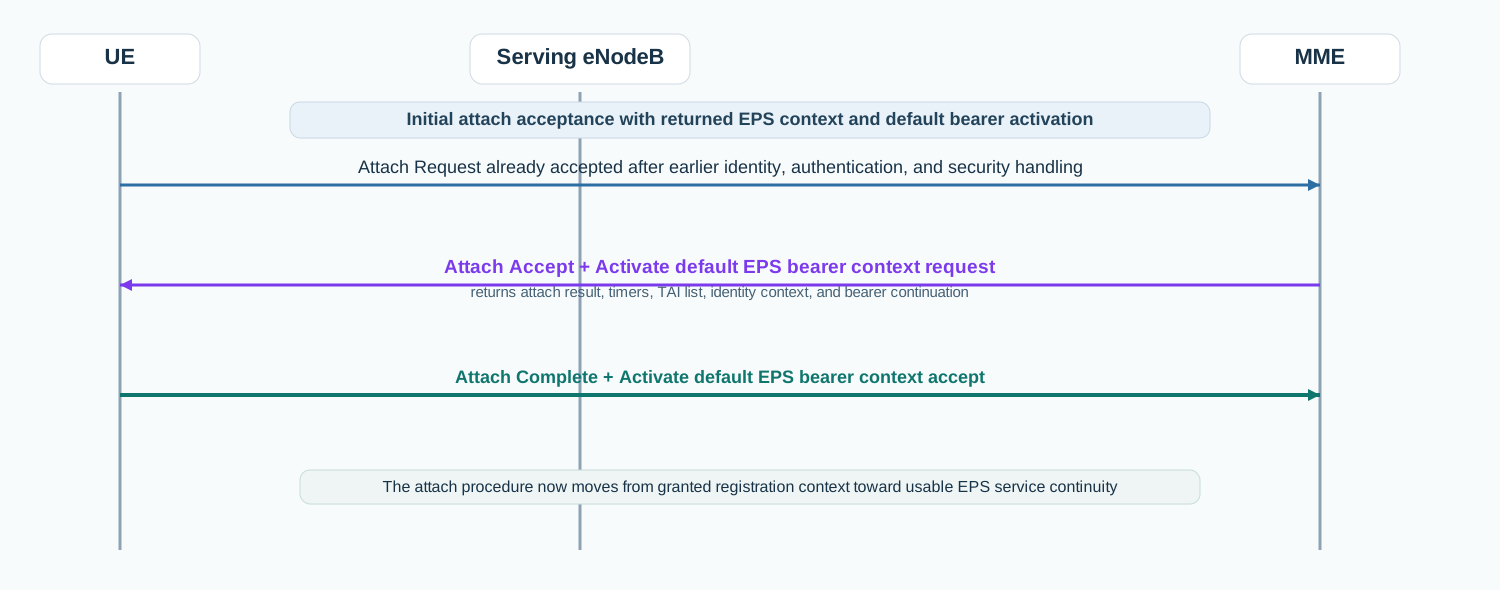
Initial LTE attach acceptance
In the initial LTE attach path, Attach Accept returns the granted EPS context and commonly carries the embedded default bearer activation request before the UE replies with Attach Complete.
Call flow position: Network acceptance message sent after the MME has decided to grant the attach procedure.
Typical state: UE has passed the key identification, authentication, and security checkpoints and is ready to receive accepted EPS context.
Preconditions:
The MME accepted the attach procedure.
The required security stage for attach continuation has completed.
Next likely message: Attach Complete and default bearer acceptance continuation
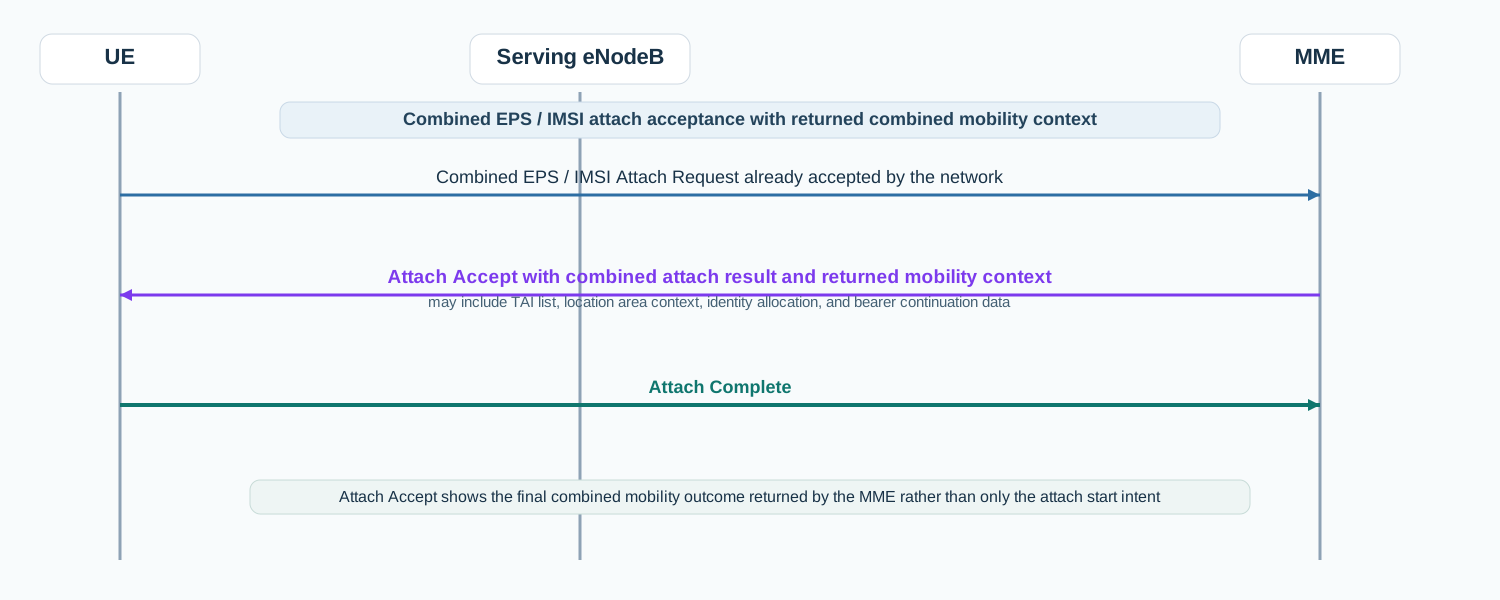
Combined EPS / IMSI attach acceptance
In a combined EPS / IMSI attach acceptance scenario, Attach Accept shows the final accepted mobility context returned by the MME.
Call flow position: Attach-grant message sent when the combined attach request is accepted and the network returns the accepted mobility context.
Typical state: UE is receiving the final accepted context for the combined mobility path rather than only a basic EPS attach.
Preconditions:
The combined attach request was accepted.
The MME prepared the mobility context to return to the UE.
Next likely message: Attach Complete
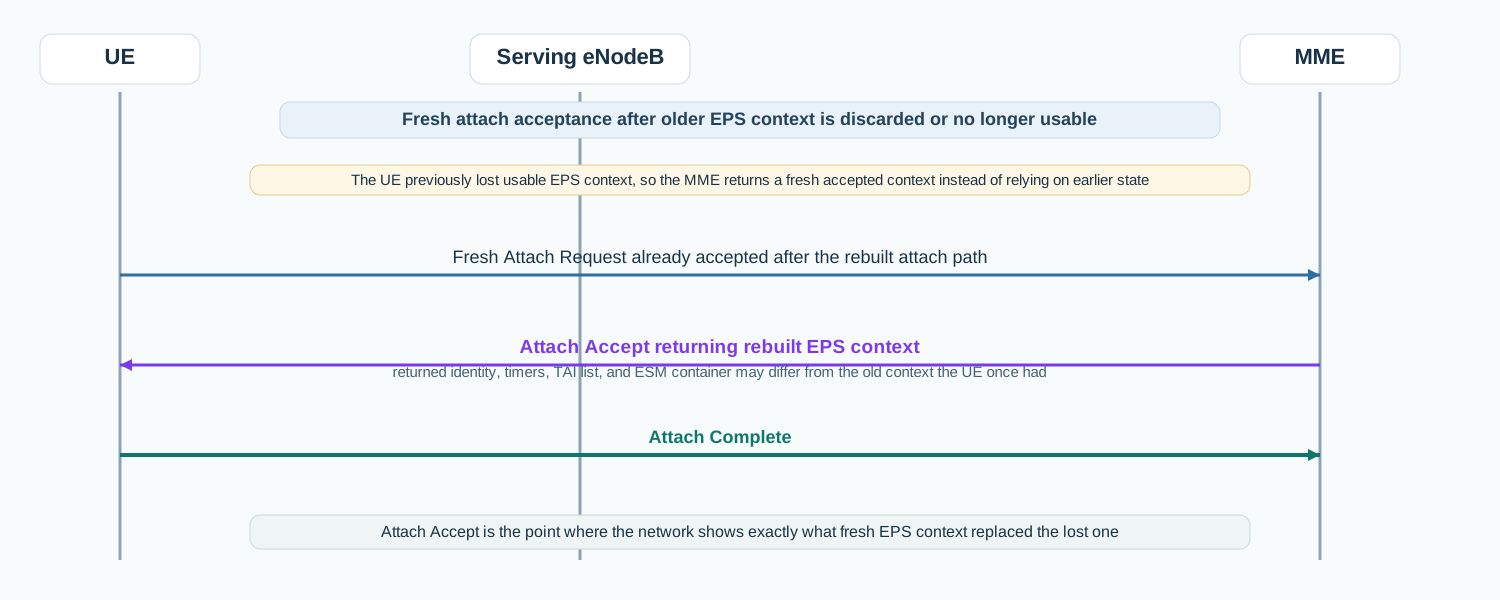
Re-attach after context loss
When older EPS context was no longer usable, a fresh Attach Accept returns the rebuilt EPS context after the successful re-attach path.
Call flow position: Fresh attach-grant message used when older EPS context was no longer usable and the network accepted the rebuilt attach path.
Typical state: UE is receiving new accepted EPS context instead of relying on earlier stored context.
Interface: N1 over LTE access / S1-MME control path
Domain: Core-side EPS mobility management signaling with direct impact on later bearer and service activation
Signaling bearer: NAS signaling
Logical channel: Commonly carried in downlink NAS transport after LTE RRC connection establishment
Transport / encapsulation: EPS NAS message sent by the MME and delivered to the UE through the eNodeB, often alongside the attach-side default bearer activation context
Security context: Normally sent after EPS NAS security has been activated for the attach procedure, so the message is commonly integrity protected and ciphered.
Message Structure Overview
Attach Accept is an EPS mobility-management message rather than an ASN.1 LTE RRC structure.
The practical reading path starts with attach result, TAI list, T3412, and the embedded ESM message container.
In real traces, this is the point where the network shows exactly what EPS context and default-bearer continuation it granted.
ASN.1 Message Syntax for LTE Attach Accept
Attach Accept
  EPS attach result
  T3412 value
  TAI list
  ESM message container
  GUTI                                OPTIONAL
  location area identification        OPTIONAL
  MS identity                         OPTIONAL
  EMM cause                           OPTIONAL
  T3402 value                         OPTIONAL
  T3423 value                         OPTIONAL
  equivalent PLMNs                    OPTIONAL
  emergency number list               OPTIONAL
  EPS network feature support         OPTIONAL
  additional update result            OPTIONAL
  T3412 extended value                OPTIONAL
  T3324 value                         OPTIONAL
  extended DRX parameters             OPTIONAL
  DCN-ID                              OPTIONAL
  SMS service status                  OPTIONAL
  non-3GPP NW provided policies       OPTIONAL
  T3448 value                         OPTIONAL
  network policy                      OPTIONAL
How to read this message syntax
Attach Accept is a NAS layer-3 message, not an ASN.1 LTE RRC message. Read this NAS syntax from the granted attach result downward, then move into returned mobility timers, TAI context, and the embedded ESM container.
May be returned in context-dependent mobility handling.
Detailed field explanation
EPS attach result
Tells the UE what attach result the network granted.
Presence: Required
In practice: In practice, compare this field with the original request and with any later release-dependent optional fields so you can see whether the network accepted the same service model the UE asked for.
T3412 value
Provides the periodic tracking area update timer context returned to the UE.
Presence: Required
In practice: In practice, compare this field with the original request and with any later release-dependent optional fields so you can see whether the network accepted the same service model the UE asked for.
TAI list
Gives the set of tracking areas in which the UE is currently registered.
Presence: Required
In practice: In practice, compare this field with the original request and with any later release-dependent optional fields so you can see whether the network accepted the same service model the UE asked for.
ESM message container
Carries the embedded default bearer activation request or related session-management content returned together with attach acceptance.
Presence: Required
In practice: In practice, compare this field with the original request and with any later release-dependent optional fields so you can see whether the network accepted the same service model the UE asked for.
GUTI
Provides the temporary EPS identity allocated by the network when relevant.
Presence: Optional
In practice: In practice, compare this field with the original request and with any later release-dependent optional fields so you can see whether the network accepted the same service model the UE asked for.
Location area identification
Appears for combined mobility handling where legacy mobility context also matters.
Presence: Optional
In practice: In practice, compare this field with the original request and with any later release-dependent optional fields so you can see whether the network accepted the same service model the UE asked for.
MS identity
Provides returned identity information when required by the accepted attach result.
Presence: Optional
In practice: In practice, compare this field with the original request and with any later release-dependent optional fields so you can see whether the network accepted the same service model the UE asked for.
T3402 value
May be returned in context-dependent mobility handling.
Presence: Optional
In practice: In practice, compare this field with the original request and with any later release-dependent optional fields so you can see whether the network accepted the same service model the UE asked for.
What to check in logs and traces
Confirm the message appears only after the attach procedure passed the required identity, authentication, and security checkpoints.
Check the EPS attach result first.
Inspect TAI list, T3412, and any returned GUTI.
Inspect the ESM message container because default bearer activation often starts here.
Correlate the message with Attach Complete and any later bearer acceptance path.
Common Issues and Troubleshooting
Attach appears accepted but usable service still does not come up.
Likely cause: The attach itself may be granted, but the embedded ESM container or later completion path may not finish cleanly.
What to inspect: Check Attach Accept together with the ESM message container and the following Attach Complete.
Next step: Read the attach grant and the default bearer continuation as one combined story, not as isolated messages.
The UE gets accepted context that does not match the expected mobility behavior.
Likely cause: The returned attach result, TAI list, timer values, or identity allocation may differ from the assumed network outcome.
What to inspect: Check EPS attach result, T3412, TAI list, and any returned GUTI.
Next step: Compare the Attach Accept against a known-good cell or subscriber case.
Attach works differently after restart or context reset.
Likely cause: A fresh attach grant may return different accepted context compared with a previous stored-context scenario.
What to inspect: Compare the old and new Attach Accept contents, especially returned identity, timers, and ESM container behavior.
Next step: Treat it as a new attach-context story rather than a simple continuation of the old one.
LTE / 5G / Variant Comparison
Compared with Attach Request
Attach Request is the UE's start of the attach procedure. Attach Accept is the network response when EPS attach is granted.
Compared with Attach Complete
Attach Accept grants the attach and returns accepted EPS context. Attach Complete is the UE confirming that it received and processed that grant.
Compared with LTE NAS Service Accept
Attach Accept creates fresh EPS attach context. Service Accept restores service using context that is already valid.
FAQ
What is Attach Accept in LTE?
It is the EPS NAS message the MME sends to grant attach and return the accepted EPS mobility context to the UE.
What usually comes after Attach Accept?
The UE normally responds with Attach Complete, and the bearer-side continuation also depends on the embedded ESM message container returned in Attach Accept.
What should I inspect first in Attach Accept?
Start with EPS attach result, then inspect T3412, TAI list, returned identity, and the ESM message container.
Why is Attach Accept important in troubleshooting?
Because it shows exactly what EPS context and default bearer continuation the network granted to the UE.
Decode this message with the 3GPP Decoder, inspect the related message database, or open the matching call flow to see where this signaling step fits in the full procedure.