Telecom engineering reference for protocols, messages, call flows, troubleshooting, releases, and tools.
Menu
NASLTEUE to MME3GPP TS 24.301
LTE Attach Request
Attach Request is the EPS NAS message the UE uses to start the LTE attach procedure and ask the network to create EPS mobility-management context.
Message Fact Sheet
Protocol
nas
Network
lte
Spec
3GPP TS 24.301
Spec Section
5.5.1, 8.2.4
Direction
UE to MME
Message Type
EMM signaling
Full message name
LTE Attach Request
Protocol
NAS
Technology
LTE
Direction
UE to MME
Interface
N1 over LTE access / S1-MME control path
Signaling bearer / channel
NAS signaling / Commonly carried inside RRCConnectionSetupComplete during fresh access, or later inside UL Information Transfer when dedicated NAS transport already exists
Typical trigger
UE powers on, has no usable EPS mobility context for service, needs EPS registration, or must re-attach after context loss or mobility-related reset.
Main purpose
Lets the UE request EPS attach, identify itself with available old context or subscriber identity, and carry the initial mobility and session information the MME needs to continue the procedure.
Main specification
3GPP TS 24.301, 5.5.1, 8.2.4
Release added
Release 8
Procedures where used
LTE Attach Procedure, Initial Access, Combined EPS Attach, Re-attach after Context Loss
Attach Request is the EPS NAS message the UE uses to start the LTE attach procedure and ask the network to create EPS mobility-management context.
Lets the UE request EPS attach, identify itself with available old context or subscriber identity, and carry the initial mobility and session information the MME needs to continue the procedure.
Why this message matters
Attach Request is the UE asking the LTE/EPS network to start the attach procedure and create usable EPS registration context.
Where this message appears in the call flow
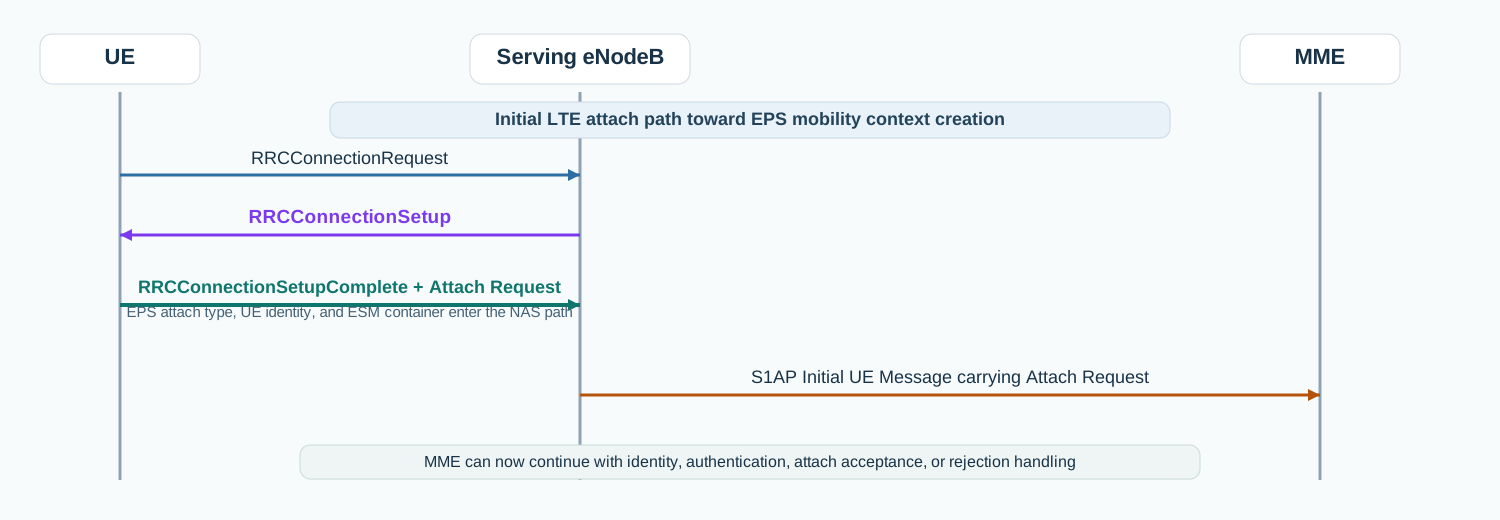
Initial LTE attach
In the initial LTE attach path, Attach Request is commonly carried inside RRCConnectionSetupComplete and then forwarded to the MME in Initial UE Message.
Call flow position: First NAS mobility-management message used after the UE has established the initial LTE access path.
Typical state: UE has radio access toward the eNodeB and is asking the EPC to create or refresh EPS registration context.
Preconditions:
The UE has completed the initial LTE RRC access step needed to carry NAS.
The UE needs EPS registration or re-registration.
Next likely message: Identity Request, Authentication Request, Attach Accept, or Attach Reject
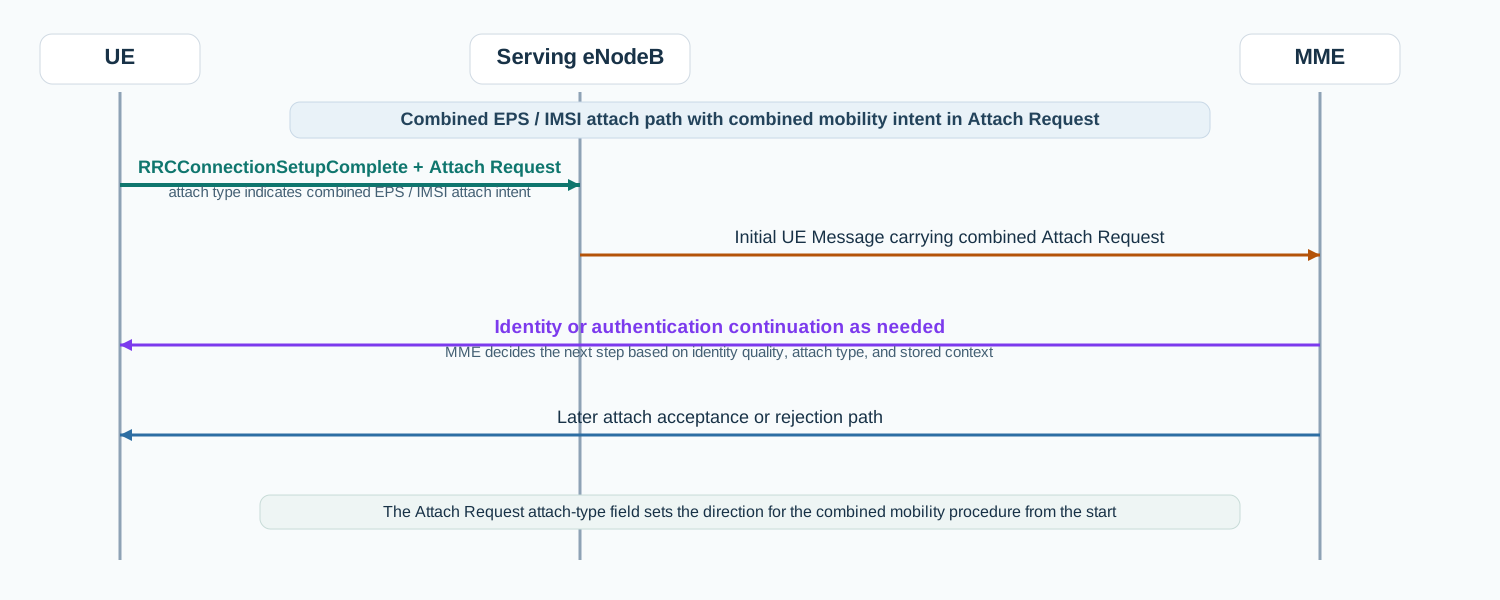
Combined EPS / IMSI attach
In a combined EPS / IMSI attach scenario, Attach Request carries the attach type and identity context that determine how the MME continues combined mobility handling.
Call flow position: Attach-start message used when the UE also needs combined mobility context rather than only a basic EPS attach.
Typical state: UE is entering the LTE/EPS network with attach-type information that shapes the later mobility procedure.
Preconditions:
The UE selected an attach type appropriate for the subscription and context state.
The MME can parse the UE identity and attach parameters.
Next likely message: Identity or authentication continuation
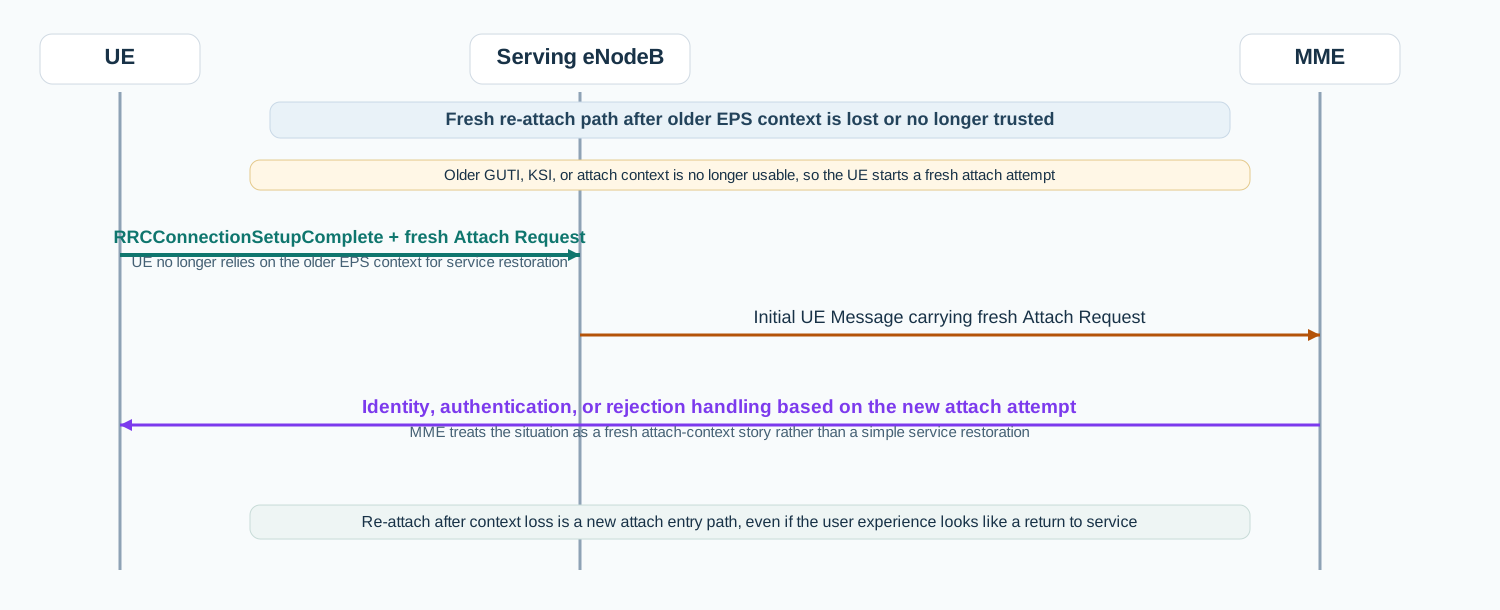
Re-attach after context loss
When older EPS context is no longer usable, the UE starts a fresh attach path with a new Attach Request instead of relying on service restoration.
Call flow position: Fresh attach-start message used when older EPS context is no longer usable.
Typical state: UE is rebuilding EPS mobility context instead of resuming an already healthy one.
Preconditions:
Previous EPS context is invalid, rejected, or unavailable.
The UE has restarted or otherwise needs a fresh attach attempt.
Next likely message: Attach continuation or rejection handling
Interface: N1 over LTE access / S1-MME control path
Domain: Core-side EPS mobility management signaling with strong dependency on LTE access establishment
Signaling bearer: NAS signaling
Logical channel: Commonly carried inside RRCConnectionSetupComplete during fresh access, or later inside UL Information Transfer when dedicated NAS transport already exists
Transport / encapsulation: EPS NAS message carried between UE and MME, usually forwarded by the eNodeB in Initial UE Message on S1AP
Security context: Often sent before EPS NAS security is fully activated during initial attach, so the exact protection state depends on the attach stage and existing context.
Message Structure Overview
Attach Request is an EPS mobility-management message rather than an ASN.1 LTE RRC structure.
The practical reading path starts with attach type, UE identity, and the embedded ESM container.
In most real traces, this message is the first useful NAS checkpoint after RRCConnectionSetupComplete.
ASN.1 Message Syntax for LTE Attach Request
Attach Request
  EPS attach type
  NAS key set identifier
  EPS mobile identity
  UE network capability
  ESM message container
  old P-TMSI signature                 OPTIONAL
  additional GUTI                      OPTIONAL
  last visited registered TAI          OPTIONAL
  DRX parameter                        OPTIONAL
  MS network capability                OPTIONAL
  old location area identification     OPTIONAL
  TMSI status                          OPTIONAL
  mobile station classmark 2           OPTIONAL
  mobile station classmark 3           OPTIONAL
  supported codec list                 OPTIONAL
  additional update type               OPTIONAL
  voice domain preference and UE's usage setting OPTIONAL
  device properties                    OPTIONAL
  old GUTI type                        OPTIONAL
  MS network feature support           OPTIONAL
  TMSI based NRI container             OPTIONAL
  T3324 value                          OPTIONAL
  T3412 extended value                 OPTIONAL
  extended DRX parameters              OPTIONAL
  UE additional security capability    OPTIONAL
  UE status                            OPTIONAL
  additional information requested     OPTIONAL
  N1 UE network capability             OPTIONAL
  UE radio capability ID availability  OPTIONAL
  requested WUS assistance information OPTIONAL
  N5GC indication                      OPTIONAL
How to read this message syntax
Attach Request is a NAS layer-3 message, not an ASN.1 LTE RRC message. Read this block as the NAS message field order defined in TS 24.301, starting with attach type, security context reference, identity, and the embedded ESM container.
LTE Attach Request - Example Dump
Attach Request
  Protocol discriminator: EPS mobility management
  Security header type: Plain NAS message
  Message type: Attach Request
  EPS attach type: EPS attach
  NAS key set identifier: 7
  EPS mobile identity: GUTI
  UE network capability: EEA0 EEA1 EEA2 EIA1 EIA2
  ESM message container: PDN Connectivity Request
  Old P-TMSI signature: 0x4a92ef10
  Last visited registered TAI: MCC 001 MNC 01 TAC 0x1001
How to read this dump
The first useful question is whether the attach type and UE identity match the scenario you think you are tracing.
The ESM message container is one of the highest-value fields because attach often starts mobility and session handling together.
If the attach path goes wrong later, this message is usually where the useful NAS story begins.
Important Information Elements
IE
Required
Description
EPS attach type
Yes
Tells the network what kind of EPS attach the UE is requesting.
NAS key set identifier
Yes
Identifies the stored NAS security context if one exists.
EPS mobile identity
Yes
Carries the UE identity context such as old GUTI or IMSI-based identity information.
UE network capability
Yes
Advertises the UE's capability context relevant to EPS network handling.
ESM message container
Yes
Carries the embedded session-management request that commonly starts default bearer or PDN-connectivity handling.
Old P-TMSI signature
Optional
Helps validate previous mobility identity context when an older temporary identity is used.
Last visited registered TAI
Optional
Gives the network the UE's last known tracking-area context.
DRX parameter
Optional
Provides UE DRX-related preference information during attach.
MS network capability
Optional
Adds legacy and mobility-related capability context used by the network.
Voice domain preference and UE's usage setting
Optional
Conveys voice-domain preference information when relevant to EPS handling.
Detailed field explanation
EPS attach type
Tells the network what kind of EPS attach the UE is requesting.
Presence: Required
In practice: In practice, compare this field with the original request and with any later release-dependent optional fields so you can see whether the network accepted the same service model the UE asked for.
NAS key set identifier
Identifies the stored NAS security context if one exists.
Presence: Required
In practice: In practice, compare this field with the original request and with any later release-dependent optional fields so you can see whether the network accepted the same service model the UE asked for.
EPS mobile identity
Carries the UE identity context such as old GUTI or IMSI-based identity information.
Presence: Required
In practice: In practice, compare this field with the original request and with any later release-dependent optional fields so you can see whether the network accepted the same service model the UE asked for.
UE network capability
Advertises the UE's capability context relevant to EPS network handling.
Presence: Required
In practice: In practice, compare this field with the original request and with any later release-dependent optional fields so you can see whether the network accepted the same service model the UE asked for.
ESM message container
Carries the embedded session-management request that commonly starts default bearer or PDN-connectivity handling.
Presence: Required
In practice: In practice, compare this field with the original request and with any later release-dependent optional fields so you can see whether the network accepted the same service model the UE asked for.
Old P-TMSI signature
Helps validate previous mobility identity context when an older temporary identity is used.
Presence: Optional
In practice: In practice, compare this field with the original request and with any later release-dependent optional fields so you can see whether the network accepted the same service model the UE asked for.
Last visited registered TAI
Gives the network the UE's last known tracking-area context.
Presence: Optional
In practice: In practice, compare this field with the original request and with any later release-dependent optional fields so you can see whether the network accepted the same service model the UE asked for.
DRX parameter
Provides UE DRX-related preference information during attach.
Presence: Optional
In practice: In practice, compare this field with the original request and with any later release-dependent optional fields so you can see whether the network accepted the same service model the UE asked for.
MS network capability
Adds legacy and mobility-related capability context used by the network.
Presence: Optional
In practice: In practice, compare this field with the original request and with any later release-dependent optional fields so you can see whether the network accepted the same service model the UE asked for.
Voice domain preference and UE's usage setting
Conveys voice-domain preference information when relevant to EPS handling.
Presence: Optional
In practice: In practice, compare this field with the original request and with any later release-dependent optional fields so you can see whether the network accepted the same service model the UE asked for.
What to check in logs and traces
Confirm the message is carried after the expected LTE access step, commonly RRCConnectionSetupComplete.
Check the selected EPS attach type first.
Inspect the UE identity form and whether old context such as GUTI is plausible.
Inspect the ESM message container because bearer or PDN setup often starts here.
Correlate the message with Identity Request, Authentication Request, Attach Accept, or Attach Reject.
Common Issues and Troubleshooting
The UE reaches LTE access but never progresses into a healthy attach procedure.
Likely cause: The Attach Request may carry identity, attach-type, or ESM-container content that does not match the expected network path.
What to inspect: Check attach type, UE identity, old context fields, and the embedded ESM container.
Next step: Compare the Attach Request against a known-good trace before treating the problem as only a later authentication or accept issue.
The network immediately asks for identity or authentication after attach start.
Likely cause: That can be a normal continuation when the MME needs stronger UE identification or subscriber verification.
What to inspect: Check whether the UE identity in Attach Request was temporary, stale, or otherwise insufficient for direct continuation.
Next step: Follow the trace into Identity Request or Authentication Request rather than stopping at attach start.
Attach behavior changes after UE restart or mobility reset.
Likely cause: The UE may no longer have valid older EPS context and therefore sends a different Attach Request identity or attach-type combination.
What to inspect: Compare the old and new Attach Request contents, especially UE identity, KSI, and old-context-related fields.
Next step: Treat it as a fresh attach-context story until the trace shows otherwise.
LTE / 5G / Variant Comparison
Compared with LTE NAS Service Request
Attach Request starts or rebuilds EPS registration context. Service Request uses already valid EPS context to restore active service.
Compared with LTE RRCConnectionSetupComplete
RRCConnectionSetupComplete opens the LTE dedicated signaling path. Attach Request is the NAS payload commonly carried inside it during initial attach.
Compared with Attach Accept
Attach Request is the UE's start of the attach procedure. Attach Accept is the network response when EPS attach is granted.
Compared with Attach Reject
Attach Request starts the procedure. Attach Reject is the network response when the request is not accepted.
FAQ
What is Attach Request in LTE?
It is the EPS NAS message the UE sends to start the attach procedure and ask the network to create or refresh EPS mobility context.
Where is Attach Request carried in LTE?
During fresh access it is commonly carried inside RRCConnectionSetupComplete and then forwarded by the eNodeB toward the MME.
What should I inspect first in Attach Request?
Start with EPS attach type, UE identity, and the ESM message container.
Why is Attach Request important in troubleshooting?
Because it shows the exact context the UE presented to the network at the start of the attach procedure.
Decode this message with the 3GPP Decoder, inspect the related message database, or open the matching call flow to see where this signaling step fits in the full procedure.