Error Indication is the F1AP message exchanged between the gNB-CU and gNB-DU to report protocol errors, invalid messages, missing context, or unsupported procedure handling.
Message Fact Sheet
Protocol
f1ap
Network
5g
Spec
3GPP TS 38.473
Spec Section
Error Indication procedure and F1AP error handling
Direction
gNB-CU <-> gNB-DU
Message Type
Error Handling / Interface Management Message
Full message name
Error Indication
Protocol
F1AP
Technology
5G
Direction
gNB-CU <-> gNB-DU
Interface
F1-C
Signaling bearer / channel
UE-associated or non-UE-associated F1AP signaling depending on the message that triggered the error / SCTP carried F1AP initiatingMessage
Typical trigger
A gNB-CU or gNB-DU receives an F1AP message and detects missing context, invalid or unsupported information, a semantic mismatch, or a message that is not compatible with the current procedure state.
Main purpose
Reports F1AP protocol errors, missing or unknown UE context, invalid or unsupported IE handling, failed procedure interpretation, and standardized error reporting without starting a new procedure or expecting a direct paired response.
Main specification
3GPP TS 38.473, Error Indication procedure and F1AP error handling
Error Indication is the F1AP message exchanged between the gNB-CU and gNB-DU to report protocol errors, invalid messages, missing context, or unsupported procedure handling.
Reports F1AP protocol errors, missing or unknown UE context, invalid or unsupported IE handling, failed procedure interpretation, and standardized error reporting without starting a new procedure or expecting a direct paired response.
Why this message matters
Error Indication means one F1 node could not process a message from the other side. Start with the previous message, then read Cause and Criticality Diagnostics.
Where this message appears in the call flow
UE-associated F1AP error reporting
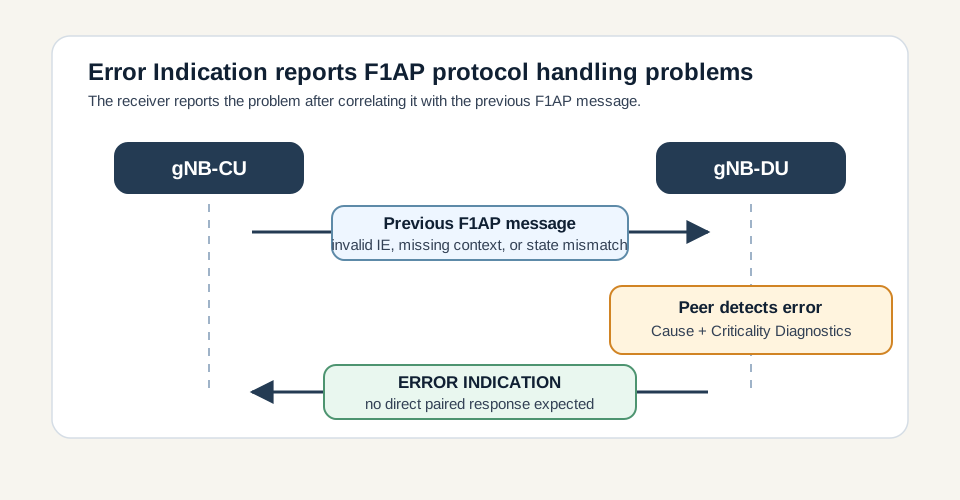
Protocol-error branch: the receiver reports the problem after correlating it with the immediately preceding F1AP message.
Call flow position: The peer sends Error Indication after a UE-associated F1AP message cannot be processed.
Typical state: The error relates to a specific UE context or UE procedure if valid UE F1AP IDs are present.
Preconditions:
A UE-associated F1AP message was received.
The receiver detected missing context, invalid state, or unusable IE content.
Cause or Criticality Diagnostics can describe the error.
Next likely message: UE context cleanup, retry, re-setup, or local recovery
Non-UE-associated F1AP error reporting
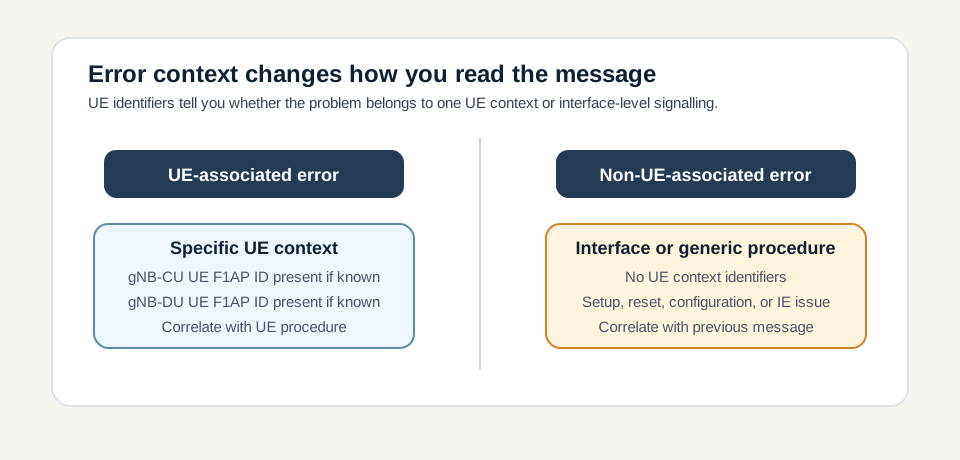
Context branch: UE IDs decide whether to troubleshoot one UE context or interface-level signalling.
Call flow position: The peer sends Error Indication after interface-level signalling cannot be processed.
Typical state: The error relates to setup, reset, configuration, or generic protocol handling rather than one UE context.
Preconditions:
The triggering message was non-UE-associated or no valid UE context could be trusted.
A procedure-specific failure message was not the correct reporting path.
Next likely message: Procedure retry, F1 Reset, configuration correction, or local recovery
Criticality diagnostics reporting
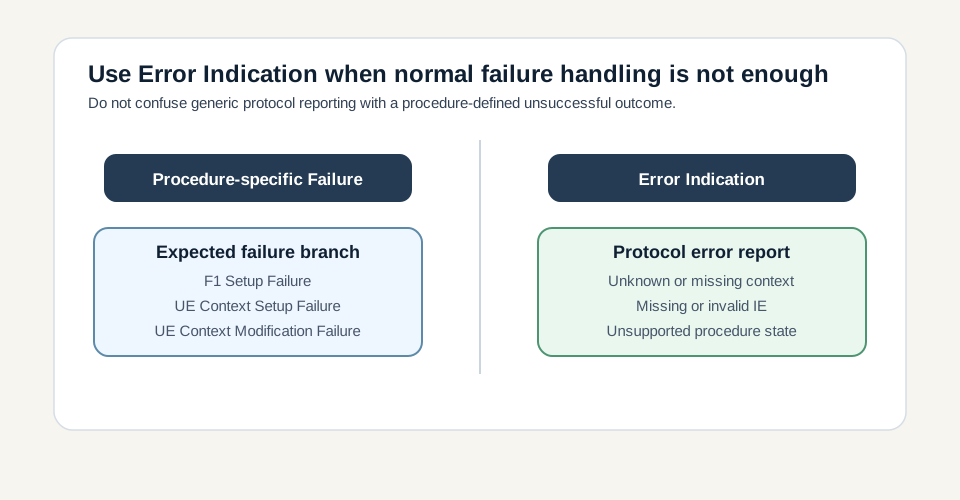
Failure distinction: use procedure-specific failures for expected unsuccessful outcomes and Error Indication for generic protocol handling problems.
Call flow position: The message uses Criticality Diagnostics to identify the procedure, triggering message, and IE-level problem.
Typical state: The receiver has detected missing, invalid, or not-understood information and needs to report precise protocol diagnostics.
Preconditions:
The triggering F1AP message was decoded enough to identify the problematic procedure or IE.
Detailed diagnostic reporting is useful or required by local error handling.
Next likely message: Correction of the triggering message or feature/procedure handling
Call flow position
Previous message(s): Triggering F1AP procedure cannot be processed, UE-associated signalling has unknown or inconsistent UE context, Non-UE-associated interface-management signalling has invalid IE or state
Transport / encapsulation: F1AP over SCTP/IP between gNB-CU and gNB-DU
Security context: Error Indication does not create or modify UE security. It reports that an F1AP message or procedure could not be processed correctly, optionally with UE identifiers when the error is tied to a specific UE context.
Message Structure Overview
Error Indication is a bidirectional F1AP initiatingMessage used for generic protocol error reporting.
Either the gNB-CU or gNB-DU can send it.
It may be UE-associated when UE F1AP IDs are present or non-UE-associated when the issue is interface-level.
Cause gives the error reason; Criticality Diagnostics gives procedure and IE-level detail.
There is no direct paired response, so the next trace step depends on local recovery, retry, release, reset, or correction.
The practical decode path is to identify whether UE F1AP IDs are present, then read Cause and Criticality Diagnostics. If UE IDs are absent, treat the report as non-UE-associated unless the receiver could not trust the UE identifiers from the triggering message.
Treat this as a teaching example based on the expected message structure, not as a captured network trace.
Always inspect the immediately preceding F1AP message before interpreting the Error Indication in isolation.
If UE IDs are present, correlate with the related UE Context or RRC transfer procedure.
If UE IDs are absent, focus on setup, reset, configuration, or generic procedure handling.
Important Information Elements
IE
Presence
Description
Message Type
Mandatory
Identifies the F1AP PDU as ERROR INDICATION.
Cause
Optional
Optional reason for the error, such as protocol error, missing context, unsupported procedure, invalid IE value, or receiver-state mismatch.
Criticality Diagnostics
Optional
Optional procedure and IE-level diagnostics for missing, invalid, or not-understood information.
gNB-CU UE F1AP ID
Optional
Optional CU-side UE context identifier when the error is UE-associated and the identity can be trusted.
gNB-DU UE F1AP ID
Optional
Optional DU-side UE context identifier when the error is UE-associated and the identity can be trusted.
Detailed field explanation
Message Type
Identifies the F1AP PDU as ERROR INDICATION.
Presence: Mandatory
In practice: In practice, compare this field with the original request and with any later release-dependent optional fields so you can see whether the network accepted the same service model the UE asked for.
Cause
Optional reason for the error, such as protocol error, missing context, unsupported procedure, invalid IE value, or receiver-state mismatch.
Presence: Optional
In practice: In practice, compare this field with the original request and with any later release-dependent optional fields so you can see whether the network accepted the same service model the UE asked for.
Criticality Diagnostics
Optional procedure and IE-level diagnostics for missing, invalid, or not-understood information.
Presence: Optional
In practice: In practice, compare this field with the original request and with any later release-dependent optional fields so you can see whether the network accepted the same service model the UE asked for.
gNB-CU UE F1AP ID
Optional CU-side UE context identifier when the error is UE-associated and the identity can be trusted.
Presence: Optional
In practice: In practice, compare this field with the original request and with any later release-dependent optional fields so you can see whether the network accepted the same service model the UE asked for.
gNB-DU UE F1AP ID
Optional DU-side UE context identifier when the error is UE-associated and the identity can be trusted.
Presence: Optional
In practice: In practice, compare this field with the original request and with any later release-dependent optional fields so you can see whether the network accepted the same service model the UE asked for.
What to check in logs and traces
Identify which side sent the Error Indication: gNB-CU or gNB-DU.
Check whether gNB-CU UE F1AP ID and gNB-DU UE F1AP ID are present.
Decode Cause before assigning the problem to a layer or procedure.
Inspect Criticality Diagnostics for procedure, triggering message, and problematic IE details.
Find the immediately preceding F1AP message that caused the report.
Check whether F1 Reset, UE Context Release, retry, or re-setup follows.
Verify that CU/DU context IDs match the expected state.
Common Issues and Troubleshooting
Error Indication appears after a UE Context or RRC transfer message.
Likely cause: The receiver may not have the expected UE context, or the incoming message may be incompatible with the current UE procedure state.
What to inspect: Check gNB-CU UE F1AP ID, gNB-DU UE F1AP ID, Cause, Criticality Diagnostics, and the immediately preceding UE-associated message.
Next step: Repair UE context correlation or repeat setup/release handling for the affected UE.
The message has no UE identifiers.
Likely cause: The error may be non-UE-associated, or the receiver could not trust the UE identifiers from the triggering message.
What to inspect: Correlate with setup, reset, configuration, or generic F1AP messages immediately before the error.
Next step: Treat it as interface-level until a valid UE context anchor appears.
Repeated Error Indications appear with similar Cause values.
Likely cause: A persistent CU/DU configuration mismatch, unsupported feature, or procedure-state bug may be causing repeated invalid messages.
What to inspect: Group errors by Cause, Criticality Diagnostics, triggering procedure, and node direction.
Next step: Fix the shared configuration or feature support mismatch instead of debugging each error as isolated.
Engineers expect a direct response to Error Indication.
Likely cause: Error Indication is a reporting message, not a request/acknowledge pair.
What to inspect: Check whether local recovery, retry, UE release, or F1 Reset follows rather than waiting for an Error Indication response.
Next step: Use the next procedure as recovery evidence, not a direct response.
LTE / 5G / Variant Comparison
UE-associated versus non-UE-associated
UE-associated Error Indication includes UE F1AP IDs when the error belongs to a specific UE context. Non-UE-associated Error Indication reports interface-level or generic procedure errors without UE anchors.
Compared with F1 Setup Failure
F1 Setup Failure is the defined unsuccessful outcome for rejected setup. Error Indication is generic protocol error reporting and should be correlated with the previous invalid message.
Compared with F1 Reset
Error Indication reports a protocol problem. F1 Reset performs broader recovery when F1AP state must be cleared or resynchronized.
FAQ
What is Error Indication in F1AP?
Error Indication is the F1AP message used between gNB-CU and gNB-DU to report protocol errors, invalid messages, missing context, or unsupported procedure handling.
Who sends Error Indication?
Either the gNB-CU or the gNB-DU can send Error Indication when it detects a problem in a received F1AP message.
Is Error Indication UE-associated?
It can be UE-associated or non-UE-associated. If UE F1AP IDs are present, correlate it with the affected UE context. If they are absent, treat it as interface-level or generic procedure handling.
What does the Cause IE mean?
Cause explains the reported error reason, such as protocol error, invalid message, missing context, unknown UE context, or receiver-state mismatch.
What is Criticality Diagnostics?
Criticality Diagnostics provides procedure and IE-level details, such as the triggering message and the IE that was missing, invalid, or not understood.
How is Error Indication different from F1 Setup Failure?
F1 Setup Failure is the defined unsuccessful outcome for rejected F1 setup. Error Indication is generic error reporting for protocol or procedure handling problems.
Can Error Indication trigger F1 Reset?
It can be followed by F1 Reset if the reported problem indicates severe or persistent F1AP state inconsistency, but Error Indication itself has no direct paired response.
How do you troubleshoot Error Indication?
Identify the sender, check UE IDs, decode Cause, inspect Criticality Diagnostics, correlate with the immediately preceding F1AP message, and watch for release, reset, retry, or re-setup behavior.
Decode this message with the 3GPP Decoder, inspect the related message database, or open the matching call flow to see where this signaling step fits in the full procedure.