The gNB-CU receives an F1 Setup Request from a gNB-DU but cannot accept the DU identity, served cells, configuration, supported parameters, or current setup conditions.
Main purpose
Rejects F1 setup, reports the setup failure reason, protects the gNB-CU from accepting invalid or unsupported DU configuration, may prevent repeated setup retries using Time to Wait, and helps engineers identify CU/DU configuration mismatch.
Main specification
3GPP TS 38.473, Clause 9.2.1.6, F1 Setup Failure
Release added
Release 15
Procedures where used
F1 Setup, F1 Interface Management, CU-DU onboarding, DU identity and served-cell validation, F1 setup troubleshooting
What is F1 Setup Failure in simple terms?
F1 Setup Failure is the F1AP unsuccessful outcome sent by the gNB-CU to the gNB-DU when the CU cannot accept an F1 Setup Request.
Rejects F1 setup, reports the setup failure reason, protects the gNB-CU from accepting invalid or unsupported DU configuration, may prevent repeated setup retries using Time to Wait, and helps engineers identify CU/DU configuration mismatch.
Why this message matters
F1 Setup Failure means the CU rejected DU onboarding. The F1 interface is not ready; read Cause first, then check whether Time to Wait tells the DU when it may retry.
Where this message appears in the call flow
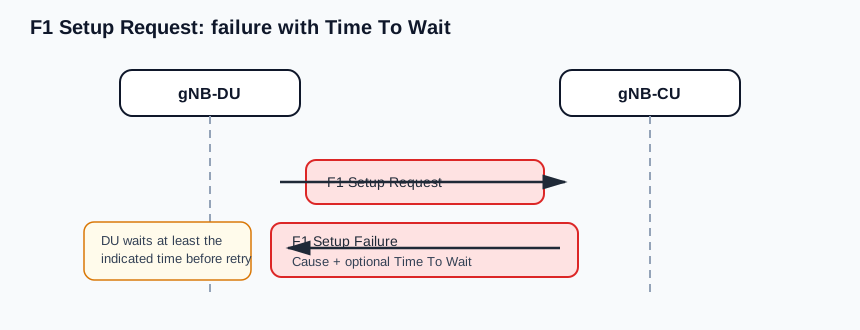
F1 Setup
Failure branch: the CU rejects the DU onboarding attempt and may tell the DU how long to wait before retrying.
Call flow position: The gNB-CU sends this unsuccessfulOutcome after receiving an F1 Setup Request it cannot accept.
Typical state: The F1 interface remains non-operational for this setup attempt.
Preconditions:
The gNB-DU has sent F1 Setup Request.
The gNB-CU has evaluated the DU identity, served cell inventory, and setup parameters.
The gNB-CU found a condition that prevents F1 interface acceptance.
Next likely message: Later F1 Setup Request retry after configuration correction or Time to Wait
F1 interface onboarding rejection
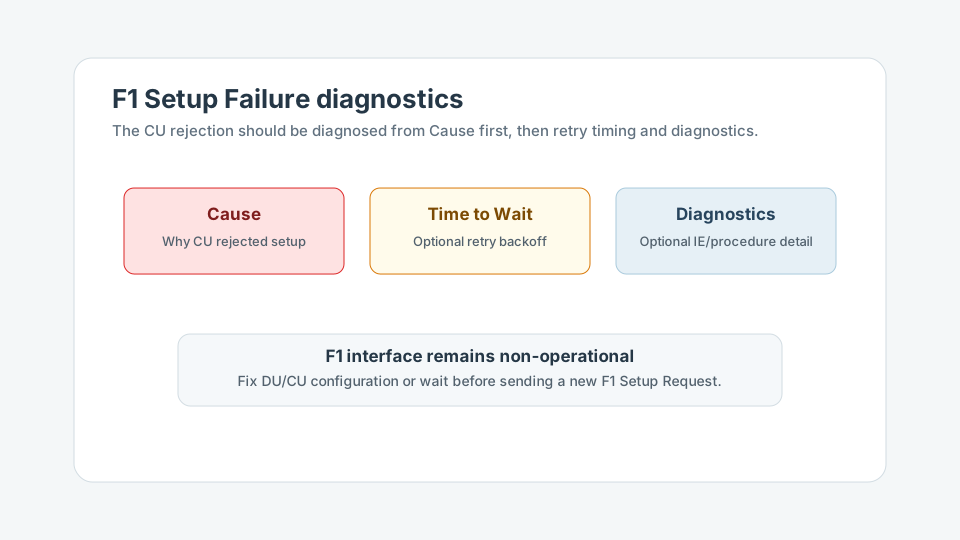
Troubleshooting branch: read Cause first, then use Time to Wait and Criticality Diagnostics to control retry and locate request problems.
Call flow position: The message prevents invalid DU onboarding from becoming operational CU-DU state.
Typical state: The DU should not treat the F1 interface as established and should not start normal F1AP traffic for that failed attempt.
Preconditions:
Cause explains the rejection domain.
Time to Wait may constrain retry behavior.
Next likely message: Configuration fix, delayed retry, or operator investigation
Setup versus post-setup configuration update
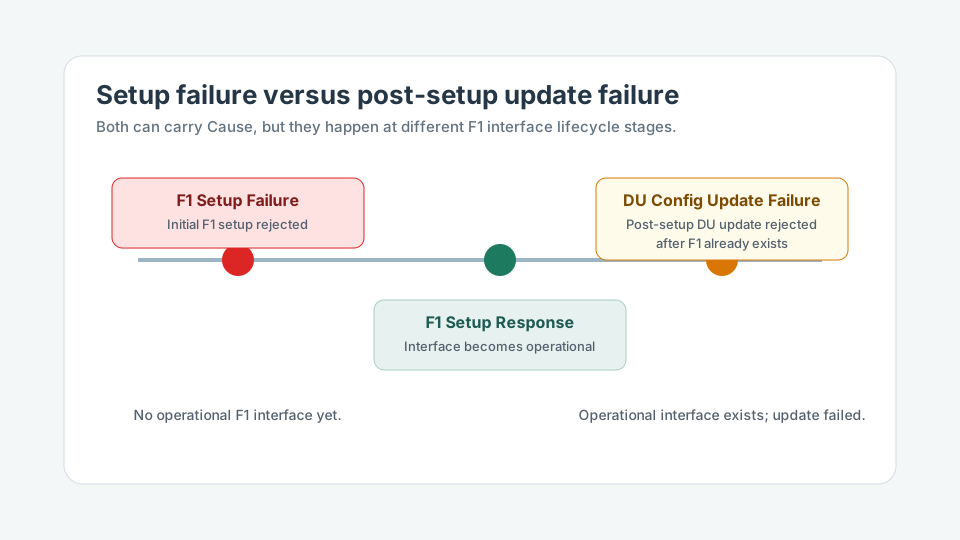
Lifecycle branch: F1 Setup Failure rejects initial interface establishment; gNB-DU Configuration Update Failure rejects a later update after setup already exists.
Call flow position: F1 Setup Failure belongs to initial F1 setup, not later DU configuration update handling.
Transport / encapsulation: F1AP over SCTP/IP between gNB-DU and gNB-CU
Security context: F1 Setup Failure does not establish a UE security context or make the F1 interface operational. It rejects node-level CU-DU onboarding and should be diagnosed from Cause, Time to Wait, and any Criticality Diagnostics.
Message Structure Overview
F1 Setup Failure is a gNB-CU-to-gNB-DU unsuccessfulOutcome in the F1 Setup procedure.
It follows a matching F1 Setup Request and means the F1 interface is not operational for that attempt.
Cause is the primary troubleshooting IE.
Time to Wait, when present, controls how quickly the DU should retry setup.
Criticality Diagnostics can identify problematic IEs or procedure-level handling issues.
ASN.1 for F1 Setup Failure
F1SetupFailure ::= SEQUENCE {
  protocolIEs ProtocolIE-Container { {F1SetupFailure-IEs} },
  ...
}

F1SetupFailure-IEs F1AP-PROTOCOL-IES ::= {
  { ID id-TransactionID           CRITICALITY reject TYPE TransactionID           PRESENCE mandatory } |
  { ID id-Cause                   CRITICALITY ignore TYPE Cause                   PRESENCE mandatory } |
  { ID id-TimeToWait              CRITICALITY ignore TYPE TimeToWait              PRESENCE optional  } |
  { ID id-CriticalityDiagnostics  CRITICALITY ignore TYPE CriticalityDiagnostics  PRESENCE optional  },
  ...
}
How to read this ASN.1
Decode Transaction ID first to match the failure with the original F1 Setup Request, then read Cause. Time to Wait affects retry behavior; Criticality Diagnostics can point to malformed, missing, or unacceptable request content.
Treat this as a teaching example based on the expected message structure, not as a captured network trace.
The interface is not operational after this unsuccessful outcome.
Cause is the first field to inspect for root-cause direction.
If Time to Wait is present, the DU should wait before retrying setup.
Important Information Elements
IE
Presence
Description
Message Type
Mandatory
Identifies the F1AP PDU as F1 SETUP FAILURE.
Transaction ID
Mandatory
Correlates the unsuccessful outcome with the original F1 Setup Request transaction.
Cause
Mandatory
Explains why the gNB-CU rejected the F1 setup attempt.
Time to Wait
Optional
Optional retry delay before the gNB-DU attempts F1 setup again toward the same gNB-CU.
Criticality Diagnostics
Optional
Optional protocol-level diagnostics for problematic IEs, procedure handling, or criticality behavior.
Detailed field explanation
Message Type
Identifies the F1AP PDU as F1 SETUP FAILURE.
Presence: Mandatory
In practice: In practice, compare this field with the original request and with any later release-dependent optional fields so you can see whether the network accepted the same service model the UE asked for.
Transaction ID
Correlates the unsuccessful outcome with the original F1 Setup Request transaction.
Presence: Mandatory
In practice: In practice, compare this field with the original request and with any later release-dependent optional fields so you can see whether the network accepted the same service model the UE asked for.
Cause
Explains why the gNB-CU rejected the F1 setup attempt.
Presence: Mandatory
In practice: In practice, compare this field with the original request and with any later release-dependent optional fields so you can see whether the network accepted the same service model the UE asked for.
Time to Wait
Optional retry delay before the gNB-DU attempts F1 setup again toward the same gNB-CU.
Presence: Optional
In practice: In practice, compare this field with the original request and with any later release-dependent optional fields so you can see whether the network accepted the same service model the UE asked for.
Criticality Diagnostics
Optional protocol-level diagnostics for problematic IEs, procedure handling, or criticality behavior.
Presence: Optional
In practice: In practice, compare this field with the original request and with any later release-dependent optional fields so you can see whether the network accepted the same service model the UE asked for.
What to check in logs and traces
Confirm F1 Setup Failure follows a matching F1 Setup Request.
Match the Transaction ID to the original setup attempt.
Verify gNB-DU identity and served cell information in the request.
Decode Cause before diagnosing surrounding symptoms.
Respect Time to Wait before retrying setup.
Check Criticality Diagnostics if present.
Confirm no F1 Setup Response exists for the same setup attempt.
Check whether the SCTP association remains stable or recovers cleanly.
Common Issues and Troubleshooting
The DU repeatedly retries setup and the CU keeps rejecting it.
Likely cause: The DU may be retrying before Time to Wait expires, or the underlying configuration problem has not been corrected.
What to inspect: Compare retry timestamps with Time to Wait and verify that the same Cause is repeated.
Next step: Enforce retry backoff and fix the DU identity, served cell, PLMN, TAC, slice, or transport configuration indicated by Cause.
The CU rejects setup immediately after receiving the request.
Likely cause: The F1 Setup Request may contain a duplicate DU identity, unsupported served cell configuration, or missing mandatory information.
What to inspect: Decode the original request and compare gNB-DU ID, served cells, PLMN, TAC, slices, and mandatory IEs against CU expectations.
Next step: Correct the request-side configuration before attempting another setup.
Engineers treat the failure as a UE-level problem.
Likely cause: F1 Setup is node-level interface management and does not involve a UE-associated context.
What to inspect: Confirm the F1AP PDU is an unsuccessfulOutcome for F1 Setup with no UE context identifiers.
Next step: Debug CU-DU onboarding and cell inventory rather than UE context setup or RRC signaling.
A later DU configuration update failure is mixed up with initial setup failure.
Likely cause: Both failures can carry Cause, but they occur at different lifecycle stages.
What to inspect: Check whether the failed procedure is F1 Setup or gNB-DU Configuration Update, and whether the F1 interface was already operational.
Next step: Use setup-failure analysis for initial onboarding and configuration-update analysis for post-setup changes.
LTE / 5G / Variant Comparison
Compared with F1 Setup Request
F1 Setup Request is the DU onboarding attempt. F1 Setup Failure is the CU rejection branch for that attempt.
Compared with F1 Setup Response
F1 Setup Response accepts setup and makes the F1 interface operational. F1 Setup Failure rejects setup and keeps the F1 interface non-operational.
Compared with gNB-DU Configuration Update Failure
F1 Setup Failure happens during initial F1 interface establishment. gNB-DU Configuration Update Failure happens after the F1 interface already exists and a DU configuration update is rejected.
FAQ
What is F1 Setup Failure in F1AP?
It is the gNB-CU-to-gNB-DU unsuccessful outcome used when the CU cannot accept an F1 Setup Request.
Who sends F1 Setup Failure?
The gNB-CU sends F1 Setup Failure to the gNB-DU.
What message triggers F1 Setup Failure?
F1 Setup Failure is triggered by an F1 Setup Request that the gNB-CU cannot accept.
Does F1 Setup Failure mean the F1 interface is operational?
No. F1 Setup Failure means the setup attempt was rejected and the F1 interface is not operational for that attempt.
What does the Cause IE indicate?
Cause indicates why the gNB-CU rejected setup, such as a configuration mismatch, unsupported parameter, duplicate identity, transport issue, or protocol problem.
What is Time to Wait used for?
Time to Wait tells the gNB-DU how long to wait before retrying F1 setup, helping prevent repeated unsuccessful setup attempts.
How is this different from F1 Setup Response?
F1 Setup Response accepts setup and makes the interface operational. F1 Setup Failure rejects setup and provides a failure reason.
How is this different from gNB-DU Configuration Update Failure?
F1 Setup Failure happens during initial F1 interface establishment. gNB-DU Configuration Update Failure happens after the interface already exists and a DU configuration update is rejected.
How do you troubleshoot F1 Setup Failure?
Match it to the F1 Setup Request, decode Cause first, validate DU identity and served cells, respect Time to Wait, check Criticality Diagnostics if present, and confirm no F1 Setup Response exists for the same attempt.
Decode this message with the 3GPP Decoder, inspect the related message database, or open the matching call flow to see where this signaling step fits in the full procedure.