F1 Setup Response is the successful outcome the gNB-CU returns after accepting F1 Setup, making the F1 interface operational and optionally instructing the gNB-DU which cells to activate, which PLMNs or SNPN IDs to broadcast, and which CU-owned system information or IAB-related data to store.
Message Fact Sheet
Protocol
f1ap
Network
5g
Spec
3GPP TS 38.473
Spec Section
Section 8.2.3 and sections 9.2.1.4 to 9.2.1.6 (Release 18 baseline)
The gNB-CU has accepted the F1 Setup Request from the gNB-DU and must provide any CU-owned system information, activation guidance, naming, broadcast restrictions, or optional transport and IAB details needed to make the F1 interface operational.
Main purpose
Confirms that the gNB-CU accepted the F1 interface setup, returns CU-owned application data, and provides any immediate operational instructions the gNB-DU must apply before the F1 interface starts carrying normal traffic.
Main specification
3GPP TS 38.473, Section 8.2.3 and sections 9.2.1.4 to 9.2.1.6 (Release 18 baseline)
Release added
Release 15
Procedures where used
Initial F1 interface bring-up, DU onboarding acceptance, Post-setup cell activation control, CU-owned system information transfer, Broadcast PLMN or SNPN restriction after setup, IAB bootstrap
What is F1 Setup Response in simple terms?
F1 Setup Response is the successful outcome the gNB-CU returns after accepting F1 Setup, making the F1 interface operational and optionally instructing the gNB-DU which cells to activate, which PLMNs or SNPN IDs to broadcast, and which CU-owned system information or IAB-related data to store.
Confirms that the gNB-CU accepted the F1 interface setup, returns CU-owned application data, and provides any immediate operational instructions the gNB-DU must apply before the F1 interface starts carrying normal traffic.
Why this message matters
F1 Setup Response is the CU’s acceptance message that makes the F1 interface operational and tells the DU what CU-owned system information, cell-activation, and broadcast constraints apply after setup.
Where this message appears in the call flow
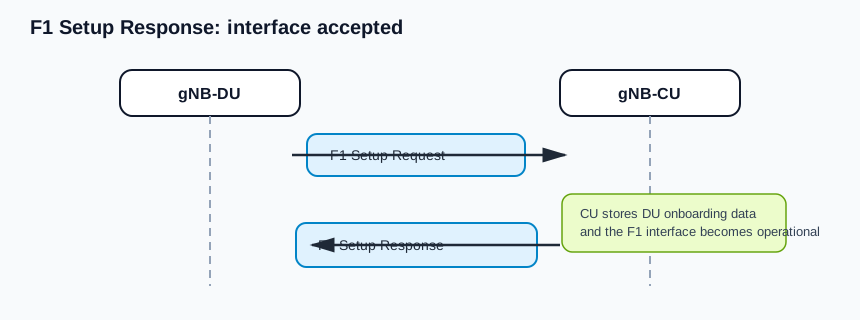
CU accepts the F1 interface
Acceptance branch: the CU accepts the DU onboarding and the F1 interface becomes operational for normal traffic.
Call flow position: The gNB-CU received a valid F1 Setup Request, accepted the DU onboarding, and now returns the successful outcome that makes the interface operational.
Typical state: The transport association is already up and the application-level CU-DU relationship is being finalized.
Preconditions:
The gNB-CU accepted the DU identity and served-cell advertisement.
The transaction is still matched to the original F1 Setup Request by Transaction ID.
The gNB-CU is ready to let normal F1 messages flow afterward.
Next likely message: Any normal operational F1AP procedure, often UE Context Setup Request or later DU configuration changes
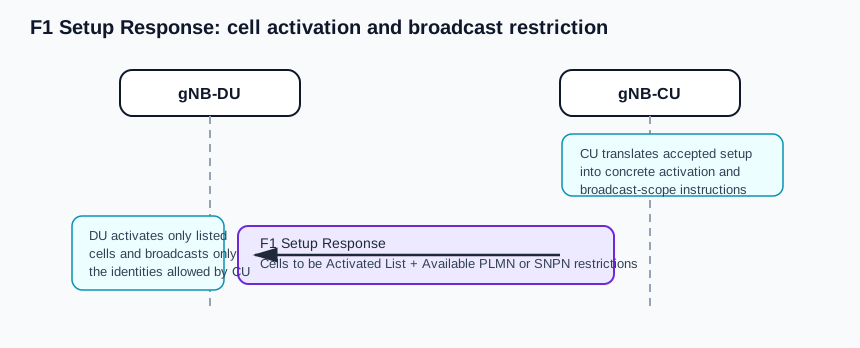
CU-controlled post-setup cell activation
Operational branch: the CU activates selected cells and can narrow the PLMN or SNPN identities the DU actually broadcasts.
Call flow position: The gNB-CU returns a Cells to be Activated List to tell the gNB-DU which advertised cells should be activated immediately and optionally what NR PCI values to apply.
Typical state: The interface is accepted, but the CU still controls the first activation state of cells on the DU.
Preconditions:
The gNB-DU advertised one or more served cells in F1 Setup Request.
The gNB-CU decided to include activation guidance in the response.
Next likely message: Normal radio operation begins for the activated cells
Broadcast-scope restriction after setup
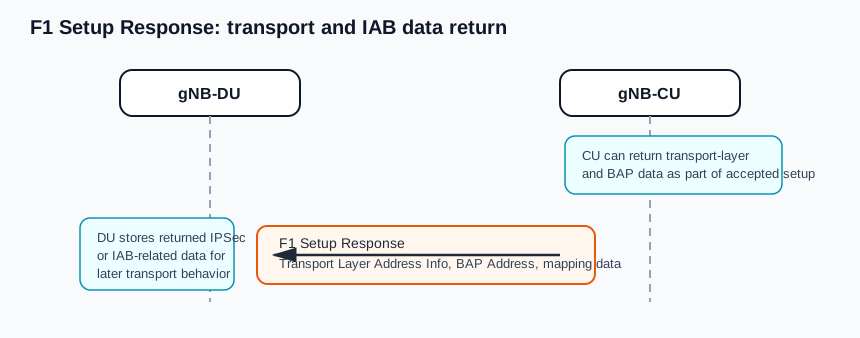
Transport and IAB branch: the response can return IPSec-related transport information and BAP-address data the DU stores for later behavior.
Call flow position: The gNB-CU returns Available PLMN List, Extended Available PLMN List, or Available SNPN ID List because the DU must broadcast a narrower available identity set than it advertised in the request.
Typical state: The DU’s original served-cell advertisement was accepted, but the CU is constraining what the DU shall actually broadcast.
Preconditions:
The gNB-CU determined that the available PLMN or SNPN set differs from the DU-advertised values.
The response is successful, so the DU must apply the restriction rather than retrying setup.
Next likely message: Subsequent F1 traffic using the accepted broadcast scope
Transport / encapsulation: F1AP over SCTP/IP between gNB-CU and gNB-DU
Security context: F1 Setup Response does not create a UE security context. It finalizes node-level CU-DU bootstrap, confirms that application-level configuration has been accepted, and can return transport and IAB data that the DU must store for subsequent operation.
Message Structure Overview
F1 Setup Response is the successfulOutcome of F1 Setup and marks the point at which the F1 interface becomes operational.
The message is anchored by Transaction ID and mandatory gNB-CU RRC version, then adds only the operational instructions the CU wants the DU to apply.
Cells to be Activated List is the most important response-side control IE because it turns accepted setup into concrete DU activation work.
gNB-CU System Information carries CU-owned SIB update content, including SIB type, SIB message, value tag, and optional area-scope attributes.
Available PLMN List, Extended Available PLMN List, and Available SNPN ID List can narrow what the DU broadcasts after setup even though the setup itself succeeded.
Optional transport and BAP-address IEs make the response relevant not only for radio bring-up but also for IPSec and IAB-related operation.
The response does not repeat the DU inventory. Instead it selectively returns the CU-owned data and operational constraints that matter after acceptance. The response can be minimal, but when present, Cells to be Activated List and gNB-CU System Information often define the first real DU actions after setup completes.
Start with Transaction ID, then check whether the response is pure acceptance or includes activation and broadcast-control instructions.
If Available SNPN ID List is present in a Cells to be Activated item, ignore the Available PLMN List and Extended Available PLMN List in that same item.
Treat gNB-CU System Information as CU-owned SIB update content rather than generic metadata.
Important Information Elements
IE
Presence
Description
Transaction ID
Mandatory
Mandatory transaction correlate used to match the successful outcome with the original F1 Setup Request.
gNB-CU Name
Optional
Optional printable human-readable CU name. If Extended gNB-CU Name is present, the DU may ignore this IE for display purposes.
Cells to be Activated List
Optional
Optional list of DU cells the gNB-CU requests to activate immediately after setup acceptance. Each item can also carry an NR PCI value and gNB-CU-owned system-information restrictions for that cell.
NR CGI
Mandatory
Mandatory cell identity inside each Cells to be Activated item so the DU can map the CU’s instruction to one advertised served cell.
NR PCI
Optional
Optional physical cell ID in a Cells to be Activated item. If present, the gNB-DU shall reconfigure the indicated cell to that PCI.
gNB-CU System Information
Optional
Optional CU-owned system-information container. For NG-RAN operation, the gNB-CU shall include this IE in the successful setup response.
Available PLMN List
Optional
Optional list of PLMNs the DU shall actually broadcast if the CU wants to restrict the DU advertisement to a narrower available set than the request carried.
Extended Available PLMN List
Optional
Optional extension used when more than six available PLMNs need to be signalled in the response.
Available SNPN ID List
Optional
Optional list of available SNPN IDs. If present in a Cells to be Activated item, the Available PLMN List and Extended Available PLMN List in that item are ignored.
gNB-CU RRC version
Mandatory
Mandatory CU RRC version information. The latest enhanced RRC version is required in both request and response.
Transport Layer Address Info
Optional
Optional signalling TNL configuration information for IPSec tunnel handling over which GTP traffic is transmitted.
Uplink BH Non-UP Traffic Mapping
Optional
Optional backhaul mapping information the DU shall consider, if supported, for non-user-plane uplink traffic.
BAP Address
Optional
Optional BAP address returned for IAB-related operation. If sent to an IAB-donor-DU case, the DU stores it and uses it for later behavior defined in the IAB stack.
Extended gNB-CU Name
Optional
Extended human-readable CU name using visible or UTF-8 strings. If present, the gNB-DU may use it and ignore gNB-CU Name for display purposes.
NCGI to be Updated List
Optional
Optional list used mainly in mobile IAB cases to tell the gNB-DU to replace an old NCGI with a new NCGI for a cell.
Detailed field explanation
Transaction ID
Mandatory transaction correlate used to match the successful outcome with the original F1 Setup Request.
Presence: Mandatory
In practice: In practice, compare this field with the original request and with any later release-dependent optional fields so you can see whether the network accepted the same service model the UE asked for.
gNB-CU Name
Optional printable human-readable CU name. If Extended gNB-CU Name is present, the DU may ignore this IE for display purposes.
Presence: Optional
In practice: In practice, compare this field with the original request and with any later release-dependent optional fields so you can see whether the network accepted the same service model the UE asked for.
Cells to be Activated List
Optional list of DU cells the gNB-CU requests to activate immediately after setup acceptance. Each item can also carry an NR PCI value and gNB-CU-owned system-information restrictions for that cell.
Presence: Optional
In practice: In practice, compare this field with the original request and with any later release-dependent optional fields so you can see whether the network accepted the same service model the UE asked for.
NR CGI
Mandatory cell identity inside each Cells to be Activated item so the DU can map the CU’s instruction to one advertised served cell.
Presence: Mandatory
In practice: In practice, compare this field with the original request and with any later release-dependent optional fields so you can see whether the network accepted the same service model the UE asked for.
NR PCI
Optional physical cell ID in a Cells to be Activated item. If present, the gNB-DU shall reconfigure the indicated cell to that PCI.
Presence: Optional
In practice: In practice, compare this field with the original request and with any later release-dependent optional fields so you can see whether the network accepted the same service model the UE asked for.
gNB-CU System Information
Optional CU-owned system-information container. For NG-RAN operation, the gNB-CU shall include this IE in the successful setup response.
Presence: Optional
In practice: In practice, compare this field with the original request and with any later release-dependent optional fields so you can see whether the network accepted the same service model the UE asked for.
Available PLMN List
Optional list of PLMNs the DU shall actually broadcast if the CU wants to restrict the DU advertisement to a narrower available set than the request carried.
Presence: Optional
In practice: In practice, compare this field with the original request and with any later release-dependent optional fields so you can see whether the network accepted the same service model the UE asked for.
Extended Available PLMN List
Optional extension used when more than six available PLMNs need to be signalled in the response.
Presence: Optional
In practice: In practice, compare this field with the original request and with any later release-dependent optional fields so you can see whether the network accepted the same service model the UE asked for.
Available SNPN ID List
Optional list of available SNPN IDs. If present in a Cells to be Activated item, the Available PLMN List and Extended Available PLMN List in that item are ignored.
Presence: Optional
In practice: In practice, compare this field with the original request and with any later release-dependent optional fields so you can see whether the network accepted the same service model the UE asked for.
gNB-CU RRC version
Mandatory CU RRC version information. The latest enhanced RRC version is required in both request and response.
Presence: Mandatory
In practice: In practice, compare this field with the original request and with any later release-dependent optional fields so you can see whether the network accepted the same service model the UE asked for.
Transport Layer Address Info
Optional signalling TNL configuration information for IPSec tunnel handling over which GTP traffic is transmitted.
Presence: Optional
In practice: In practice, compare this field with the original request and with any later release-dependent optional fields so you can see whether the network accepted the same service model the UE asked for.
Uplink BH Non-UP Traffic Mapping
Optional backhaul mapping information the DU shall consider, if supported, for non-user-plane uplink traffic.
Presence: Optional
In practice: In practice, compare this field with the original request and with any later release-dependent optional fields so you can see whether the network accepted the same service model the UE asked for.
BAP Address
Optional BAP address returned for IAB-related operation. If sent to an IAB-donor-DU case, the DU stores it and uses it for later behavior defined in the IAB stack.
Presence: Optional
In practice: In practice, compare this field with the original request and with any later release-dependent optional fields so you can see whether the network accepted the same service model the UE asked for.
Extended gNB-CU Name
Extended human-readable CU name using visible or UTF-8 strings. If present, the gNB-DU may use it and ignore gNB-CU Name for display purposes.
Presence: Optional
In practice: In practice, compare this field with the original request and with any later release-dependent optional fields so you can see whether the network accepted the same service model the UE asked for.
NCGI to be Updated List
Optional list used mainly in mobile IAB cases to tell the gNB-DU to replace an old NCGI with a new NCGI for a cell.
Presence: Optional
In practice: In practice, compare this field with the original request and with any later release-dependent optional fields so you can see whether the network accepted the same service model the UE asked for.
What to check in logs and traces
Match the response to the original F1 Setup Request by Transaction ID first.
Check whether Cells to be Activated List is present and map each item to a DU-advertised served cell by NR CGI.
If NR PCI is present in a cell-activation item, verify the DU reconfigured that cell accordingly.
Inspect gNB-CU System Information to see whether the CU changed any SIB content or value-tag state the DU must use.
Compare any Available PLMN List or Available SNPN ID List with the DU-advertised request values to understand what the DU is now allowed to broadcast.
Common Issues and Troubleshooting
The interface comes up, but some DU-advertised cells never begin service.
Likely cause: The gNB-CU may have accepted setup but returned a selective Cells to be Activated List rather than activating every cell the DU advertised.
What to inspect: Compare the served-cell inventory in F1 Setup Request with the specific NR CGI entries returned in Cells to be Activated List.
Next step: Treat activation as response-driven. Only assume cells are live if they were activated or later enabled through another CU-DU procedure.
The DU broadcasts fewer PLMNs or different SNPN identities than it originally advertised.
Likely cause: The gNB-CU may have returned Available PLMN List, Extended Available PLMN List, or Available SNPN ID List in the response, narrowing the DU broadcast scope.
What to inspect: Read the per-cell response item and compare the available identity list with the DU-advertised served-cell information from the request.
Next step: Debug the CU policy and broadcast constraints, not the DU advertisement alone.
The setup succeeded, but later IAB or IPSec-related behavior looks inconsistent.
Likely cause: The response may have carried BAP Address or Transport Layer Address Info that the DU was expected to store and apply for subsequent operation.
What to inspect: Check whether those optional IEs were present and whether the DU persisted them after setup.
Next step: Correlate later IAB or IPSec behavior with the exact setup-response payload instead of treating them as independently configured.
LTE / 5G / Variant Comparison
Compared with F1 Setup Request
F1 Setup Request advertises DU identity and served cells. F1 Setup Response accepts that inventory, returns CU-owned system information, and can impose immediate activation or broadcast constraints.
Compared with F1 Setup Failure
F1 Setup Response makes the interface operational. F1 Setup Failure keeps the interface non-operational and carries backoff guidance instead of activation data.
Cell activation versus later configuration update
Cells to be Activated List is an immediate post-setup instruction tied to acceptance of the interface. Later CU-DU changes belong to dedicated configuration-update procedures rather than the initial setup response.
FAQ
What is F1 Setup Response in 5G F1AP?
It is the successful outcome the gNB-CU sends after accepting F1 Setup Request from the gNB-DU. Once it is sent, the F1 interface is operational and normal F1 messages may be exchanged.
What is mandatory in F1 Setup Response?
Transaction ID and gNB-CU RRC version are mandatory. Other IEs such as gNB-CU naming, Cells to be Activated List, transport-layer information, and IAB-related data are optional.
What does Cells to be Activated List do?
It tells the gNB-DU which cells to activate after setup acceptance. If an item includes NR PCI, the DU shall reconfigure that cell to the indicated PCI.
Can the CU restrict what the DU broadcasts after setup?
Yes. The response may include Available PLMN List, Extended Available PLMN List, or Available SNPN ID List. The DU shall then only broadcast the identities returned by the CU for the affected cell.
Does F1 Setup Response carry CU-owned system information?
Yes. For NG-RAN, the gNB-CU shall include gNB-CU System Information in the successful response.
Decode this message with the 3GPP Decoder, inspect the related message database, or open the matching call flow to see where this signaling step fits in the full procedure.