gNB-DU Configuration Update is the F1AP message sent by the gNB-DU to the gNB-CU to update DU-side configuration, served cells, cell status, system information, and resource information after F1 setup.
Message Fact Sheet
Protocol
f1ap
Network
5g
Spec
3GPP TS 38.473
Spec Section
gNB-DU Configuration Update procedure and message
Direction
gNB-DU -> gNB-CU
Message Type
gNB-DU Configuration / F1 Interface Management Message
Full message name
gNB-DU Configuration Update
Protocol
F1AP
Technology
5G
Direction
gNB-DU -> gNB-CU
Interface
F1-C
Signaling bearer / channel
Non-UE-associated F1AP signaling / SCTP carried F1AP initiatingMessage followed by successfulOutcome or unsuccessfulOutcome
Typical trigger
The F1 interface is already established and the gNB-DU adds, modifies, deletes, refreshes, or reports status for DU-side configuration, served cells, system information, resource information, or TNL associations.
Main purpose
Updates the CU-side view of DU configuration, reports changes to served cell information, supports cell activation, deactivation, or configuration refresh, may carry updated system information or resource configuration, and keeps CU and DU synchronized after initial F1 setup.
Main specification
3GPP TS 38.473, gNB-DU Configuration Update procedure and message
Release added
Release 15
Procedures where used
DU-side configuration synchronization, Served cell add modify delete handling, Cell status reporting, TNL association update, Post-F1-setup configuration refresh
What is gNB-DU Configuration Update in simple terms?
gNB-DU Configuration Update is the F1AP message sent by the gNB-DU to the gNB-CU to update DU-side configuration, served cells, cell status, system information, and resource information after F1 setup.
Updates the CU-side view of DU configuration, reports changes to served cell information, supports cell activation, deactivation, or configuration refresh, may carry updated system information or resource configuration, and keeps CU and DU synchronized after initial F1 setup.
Why this message matters
gNB-DU Configuration Update is how the DU tells the CU that DU-side cell, status, resource, or transport information changed after F1 setup. Start with Transaction ID, then inspect the served-cell lists and the CU response.
Where this message appears in the call flow
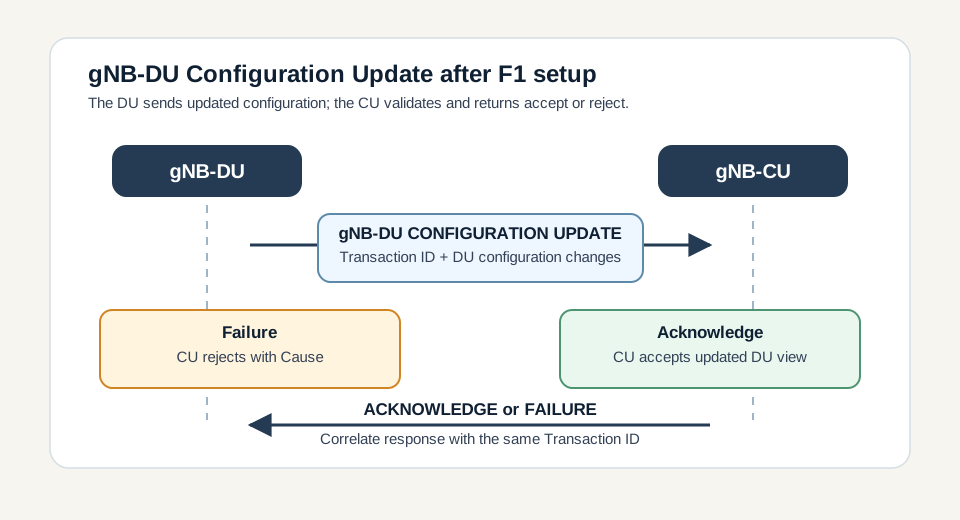
gNB-DU Configuration Update
Procedure pair: the DU sends the update and the CU accepts or rejects it with the same Transaction ID.
Call flow position: The gNB-DU sends updated DU-side configuration after the F1 interface is established.
Typical state: The gNB-CU validates the new DU configuration and returns either Acknowledge or Failure.
Preconditions:
F1 setup has completed successfully.
The DU has configuration, served-cell, cell-status, resource, or TNL association information to update.
The update is non-UE-associated and is correlated by Transaction ID.
Next likely message: gNB-DU Configuration Update Acknowledge or gNB-DU Configuration Update Failure
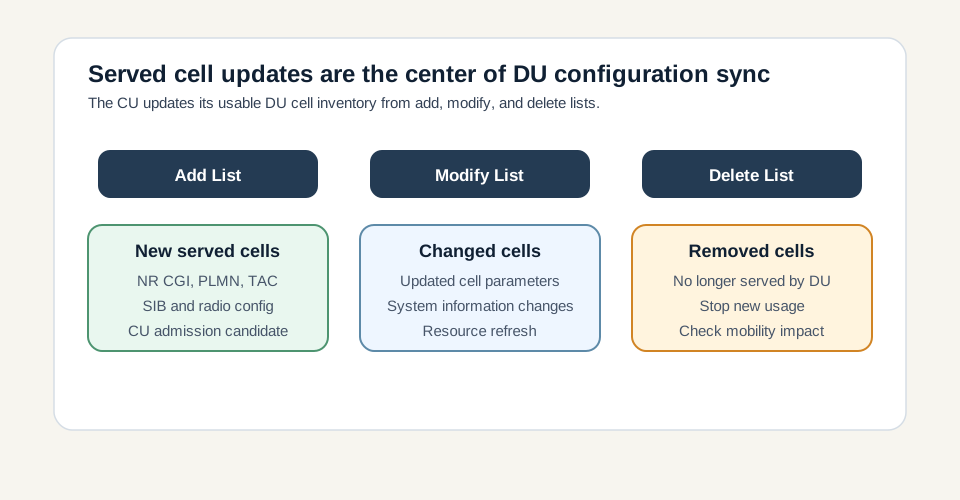
Served cell update handling
Cell inventory branch: add, modify, and delete lists are the central DU-to-CU synchronization mechanism.
Call flow position: The message can add, modify, or delete served cells in the CU-side DU inventory.
Typical state: The CU must reconcile the DU's advertised served cells with admission, mobility, and RRC coordination logic.
Preconditions:
The DU has changed its served cell list or cell-specific configuration.
The update lists contain enough cell identity and configuration information for CU validation.
Next likely message: Acknowledge if accepted, or Failure with Cause if the cell update is rejected
Cell status and TNL association update
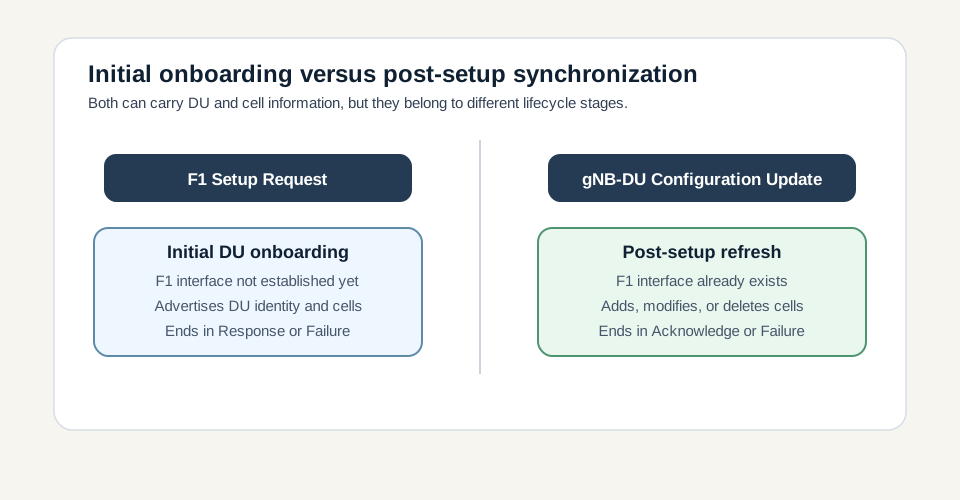
Lifecycle distinction: setup onboards the DU; configuration update refreshes DU information after setup.
Call flow position: The message can report cell availability and update transport network layer associations.
Typical state: The CU adjusts operational use of cells and transport associations according to the accepted update.
Preconditions:
Cell operational state, resource information, or transport association information has changed.
The CU needs an updated DU-side view before using affected cells or paths.
Next likely message: Acknowledge followed by normal F1AP/RRC operation
Call flow position
Previous message(s):F1 Setup Response has established the F1 interface, DU-side cell, resource, status, or transport configuration changes, DU restart, maintenance, OAM change, or configuration refresh occurs
Logical channel: SCTP carried F1AP initiatingMessage followed by successfulOutcome or unsuccessfulOutcome
Transport / encapsulation: F1AP over SCTP/IP between gNB-DU and gNB-CU
Security context: gNB-DU Configuration Update does not establish a UE security context. It is a non-UE-associated interface-management message that updates the CU view of DU-side cell, status, resource, and transport information.
Message Structure Overview
gNB-DU Configuration Update is a non-UE-associated initiatingMessage from gNB-DU to gNB-CU.
Transaction ID is mandatory and links the update to the Acknowledge or Failure.
Served Cells to Add, Modify, and Delete lists update the CU-side DU cell inventory.
Cells Status List reports operational or availability state for cells.
TNL association lists update DU transport connectivity information.
The CU either accepts the update with Acknowledge or rejects it with Failure and Cause.
ASN.1 for gNB-DU Configuration Update
GNBDUConfigurationUpdate ::= SEQUENCE {
  protocolIEs ProtocolIE-Container { {GNBDUConfigurationUpdate-IEs} },
  ...
}

GNBDUConfigurationUpdate-IEs F1AP-PROTOCOL-IES ::= {
  { Message Type, mandatory } |
  { Transaction ID, mandatory } |
  { Served Cells to Add List, optional } |
  { Served Cells to Modify List, optional } |
  { Served Cells to Delete List, optional } |
  { Cells Status List, optional } |
  { gNB-DU TNL Association to Add List, optional } |
  { gNB-DU TNL Association to Remove List, optional } |
  { gNB-DU TNL Association to Update List, optional },
  ...
}

GNBDUConfigurationUpdateAcknowledge ::= SEQUENCE {
  protocolIEs ProtocolIE-Container { {GNBDUConfigurationUpdateAcknowledge-IEs} },
  ...
}

GNBDUConfigurationUpdateFailure ::= SEQUENCE {
  protocolIEs ProtocolIE-Container { {GNBDUConfigurationUpdateFailure-IEs} },
  ...
}
How to read this ASN.1
Read this as a teaching-oriented ASN.1 summary of the practical fields to inspect. The decode path is Transaction ID first, then served-cell add/modify/delete lists, cell status, TNL association updates, and finally the paired Acknowledge or Failure.
Treat this as a teaching example based on the expected message structure, not as a captured network trace.
The message does not need to carry every optional list. Inspect which list appears and what lifecycle change it represents.
Transaction ID must match the later Acknowledge or Failure.
If served-cell information is rejected, troubleshoot cell identity, PLMN, TAC, slice, and radio resource consistency before chasing UE-level symptoms.
Important Information Elements
IE
Presence
Description
Message Type
Mandatory
Identifies the F1AP PDU as gNB-DU CONFIGURATION UPDATE.
Transaction ID
Mandatory
Correlates the update request with the later gNB-DU Configuration Update Acknowledge or Failure.
Served Cells to Add List
Optional
Optional list of cells newly added or advertised by the gNB-DU.
Served Cells to Modify List
Optional
Optional list of existing served cells whose configuration is changing.
Served Cells to Delete List
Optional
Optional list of served cells removed from DU service.
Cells Status List
Optional
Optional list reporting cell operational state, availability, or status.
gNB-DU TNL Association to Add List
Optional
Optional list of DU transport network associations to add.
gNB-DU TNL Association to Remove List
Optional
Optional list of DU transport network associations to remove.
gNB-DU TNL Association to Update List
Optional
Optional list of DU transport network associations to update.
Detailed field explanation
Message Type
Identifies the F1AP PDU as gNB-DU CONFIGURATION UPDATE.
Presence: Mandatory
In practice: In practice, compare this field with the original request and with any later release-dependent optional fields so you can see whether the network accepted the same service model the UE asked for.
Transaction ID
Correlates the update request with the later gNB-DU Configuration Update Acknowledge or Failure.
Presence: Mandatory
In practice: In practice, compare this field with the original request and with any later release-dependent optional fields so you can see whether the network accepted the same service model the UE asked for.
Served Cells to Add List
Optional list of cells newly added or advertised by the gNB-DU.
Presence: Optional
In practice: In practice, compare this field with the original request and with any later release-dependent optional fields so you can see whether the network accepted the same service model the UE asked for.
Served Cells to Modify List
Optional list of existing served cells whose configuration is changing.
Presence: Optional
In practice: In practice, compare this field with the original request and with any later release-dependent optional fields so you can see whether the network accepted the same service model the UE asked for.
Served Cells to Delete List
Optional list of served cells removed from DU service.
Presence: Optional
In practice: In practice, compare this field with the original request and with any later release-dependent optional fields so you can see whether the network accepted the same service model the UE asked for.
Cells Status List
Optional list reporting cell operational state, availability, or status.
Presence: Optional
In practice: In practice, compare this field with the original request and with any later release-dependent optional fields so you can see whether the network accepted the same service model the UE asked for.
gNB-DU TNL Association to Add List
Optional list of DU transport network associations to add.
Presence: Optional
In practice: In practice, compare this field with the original request and with any later release-dependent optional fields so you can see whether the network accepted the same service model the UE asked for.
gNB-DU TNL Association to Remove List
Optional list of DU transport network associations to remove.
Presence: Optional
In practice: In practice, compare this field with the original request and with any later release-dependent optional fields so you can see whether the network accepted the same service model the UE asked for.
gNB-DU TNL Association to Update List
Optional list of DU transport network associations to update.
Presence: Optional
In practice: In practice, compare this field with the original request and with any later release-dependent optional fields so you can see whether the network accepted the same service model the UE asked for.
What to check in logs and traces
Confirm the direction is gNB-DU to gNB-CU.
Check Transaction ID and match it with the Acknowledge or Failure.
Decode Served Cells to Add, Modify, and Delete lists.
Verify NR CGI, PLMN, TAC, and cell identity values against OAM expectations.
Check Cells Status List for operational or availability changes.
Validate TNL association add, remove, or update information.
Confirm the CU responds with Acknowledge or Failure.
Check for repeated update loops after rejection or incomplete acknowledgement.
Common Issues and Troubleshooting
The CU rejects a gNB-DU Configuration Update.
Likely cause: The served cell, status, resource, or transport update may be unsupported, malformed, duplicated, or inconsistent with CU configuration.
What to inspect: Read the Failure Cause, Transaction ID, served-cell list contents, PLMN, TAC, NR CGI, and TNL association fields.
Next step: Correct the DU or CU configuration mismatch and retry the update after the affected cell or transport data is clean.
No Acknowledge or Failure appears after the update.
Likely cause: The procedure may be incomplete, the SCTP association may be unstable, or the CU may have discarded the update due to protocol handling problems.
What to inspect: Check Transaction ID, SCTP continuity, CU logs, Error Indication, and any reset around the same time.
Next step: Treat the DU configuration view as unconfirmed until a matching response appears.
New cells do not become usable after the update.
Likely cause: The Served Cells to Add List may not have been accepted, or the cell status may still prevent use for admission or mobility.
What to inspect: Check the Acknowledge or Failure, Cells Status List, cell identity, PLMN/TAC, and later CU admission or mobility decisions.
Next step: Validate both the structural cell configuration and the operational status before debugging UE procedures.
The same DU repeatedly sends configuration updates.
Likely cause: A persistent configuration mismatch, rejected list item, stale TNL association, or OAM retry loop may be present.
What to inspect: Group updates by Transaction ID, repeated list entries, Failure Cause, and timing after OAM changes.
Next step: Fix the repeated configuration delta rather than treating each update as a new independent event.
LTE / 5G / Variant Comparison
Served cell add, modify, and delete
Add introduces new served cells, modify changes existing cell configuration, and delete removes cells from DU service.
Compared with F1 Setup Request
F1 Setup Request onboards the DU before the F1 interface is operational. gNB-DU Configuration Update changes or refreshes DU configuration after setup.
Compared with gNB-CU Configuration Update
gNB-DU Configuration Update is DU-to-CU and describes DU-side cells/resources. gNB-CU Configuration Update is CU-to-DU and describes CU-side configuration or CU-controlled parameters.
FAQ
What is gNB-DU Configuration Update in F1AP?
gNB-DU Configuration Update is the F1AP message sent by the gNB-DU to the gNB-CU to update DU-side configuration after the F1 interface has been established.
Who sends gNB-DU Configuration Update?
The gNB-DU sends it to the gNB-CU.
When is this message used?
It is used after F1 setup when the DU needs to add, modify, delete, refresh, or report status for served cells, resource information, system information, or TNL associations.
What does Transaction ID do?
Transaction ID correlates the configuration update with the later gNB-DU Configuration Update Acknowledge or Failure.
What are Served Cells to Add, Modify, and Delete lists?
They describe the DU's served-cell changes: Add introduces new cells, Modify changes existing cell configuration, and Delete removes cells from DU service.
What is Cells Status List?
Cells Status List reports current cell state or availability, which helps the CU decide whether a cell can be used for admission, mobility, or other radio coordination.
How is this different from F1 Setup Request?
F1 Setup Request is used for initial DU onboarding before the F1 interface is operational. gNB-DU Configuration Update is used after setup to change or refresh DU configuration.
How is this different from gNB-CU Configuration Update?
gNB-DU Configuration Update is DU-to-CU and describes DU-side cells and resources. gNB-CU Configuration Update is CU-to-DU and describes CU-side configuration or CU-controlled parameters.
How do you troubleshoot gNB-DU Configuration Update failures?
Check direction, Transaction ID, Failure Cause, served-cell add/modify/delete contents, cell status, TNL association fields, and whether the CU response matches the DU update.
Decode this message with the 3GPP Decoder, inspect the related message database, or open the matching call flow to see where this signaling step fits in the full procedure.