gNB-CU Configuration Update is the F1AP message sent by the gNB-CU to the gNB-DU to update CU-side configuration after the F1 interface is established.
Message Fact Sheet
Protocol
f1ap
Network
5g
Spec
3GPP TS 38.473
Spec Section
gNB-CU Configuration Update procedure and message
Direction
gNB-CU -> gNB-DU
Message Type
gNB-CU Configuration / F1 Interface Management Message
Full message name
gNB-CU Configuration Update
Protocol
F1AP
Technology
5G
Direction
gNB-CU -> gNB-DU
Interface
F1-C
Signaling bearer / channel
Non-UE-associated F1AP signaling / SCTP carried F1AP initiatingMessage followed by successfulOutcome or unsuccessfulOutcome
Typical trigger
The F1 interface is already established and the gNB-CU changes, refreshes, or advertises CU-side configuration, CU name, transport endpoint information, or gNB-CU TNL associations.
Main purpose
Updates the DU-side view of CU configuration, synchronizes CU-controlled interface information, supports changes after initial F1 setup, helps maintain CU/DU operational consistency, and allows the DU to accept or reject the update explicitly.
Main specification
3GPP TS 38.473, gNB-CU Configuration Update procedure and message
Release added
Release 15
Procedures where used
CU-side configuration synchronization, gNB-CU TNL association update, CU transport endpoint refresh, Post-F1-setup configuration refresh, Transaction ID correlation
What is gNB-CU Configuration Update in simple terms?
gNB-CU Configuration Update is the F1AP message sent by the gNB-CU to the gNB-DU to update CU-side configuration after the F1 interface is established.
Updates the DU-side view of CU configuration, synchronizes CU-controlled interface information, supports changes after initial F1 setup, helps maintain CU/DU operational consistency, and allows the DU to accept or reject the update explicitly.
Why this message matters
gNB-CU Configuration Update is how the CU tells the DU that CU-side configuration or transport information changed after F1 setup. Match Transaction ID, then inspect CU TNL association and transport endpoint fields.
Where this message appears in the call flow
gNB-CU Configuration Update
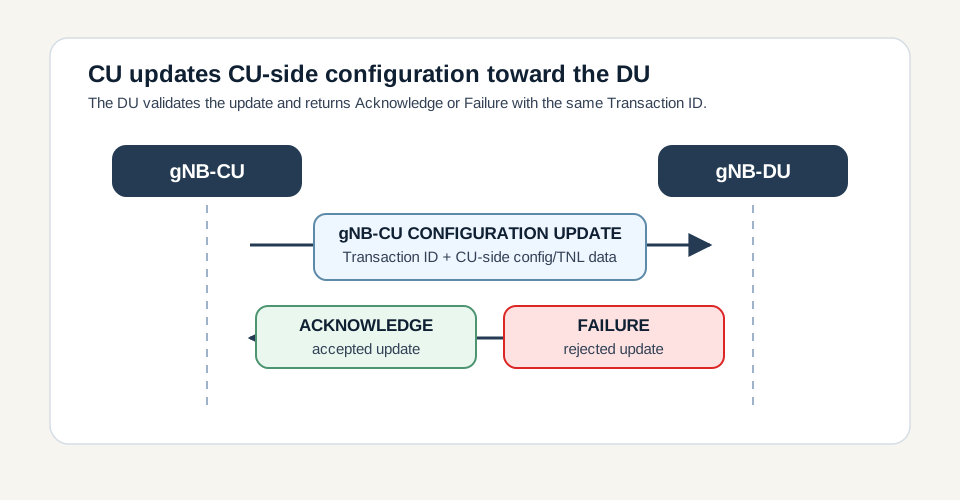
Procedure pair: the CU sends the update and the DU accepts or rejects it with the same Transaction ID.
Call flow position: The gNB-CU sends updated CU-side configuration after the F1 interface is established.
Typical state: The gNB-DU validates the new CU configuration and returns either Acknowledge or Failure.
Preconditions:
F1 setup has completed successfully.
The CU has configuration, name, transport endpoint, or TNL association information to update.
The update is non-UE-associated and is correlated by Transaction ID.
Next likely message: DU sends acceptance or rejection for the same Transaction ID
CU-side TNL association update
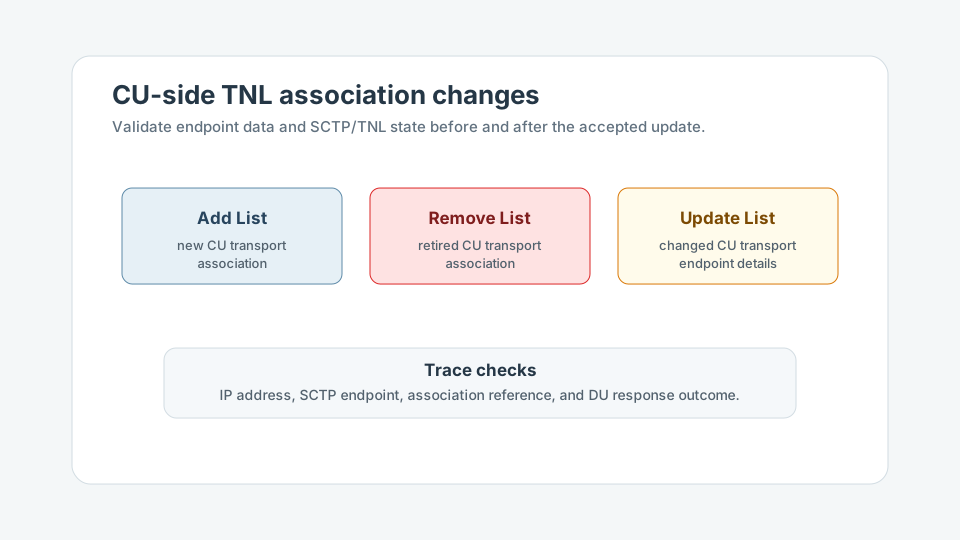
Transport branch: CU TNL add, remove, and update lists keep the DU synchronized with CU-side transport information.
Call flow position: The message can add, remove, or update gNB-CU transport network layer associations known by the DU.
Typical state: The DU applies accepted transport changes consistently with the CU-side interface state.
Preconditions:
CU transport endpoint or association information has changed.
The DU must validate the new transport information before treating it as accepted.
Next likely message: DU acceptance, or rejection with Cause if not accepted
CU update versus DU update
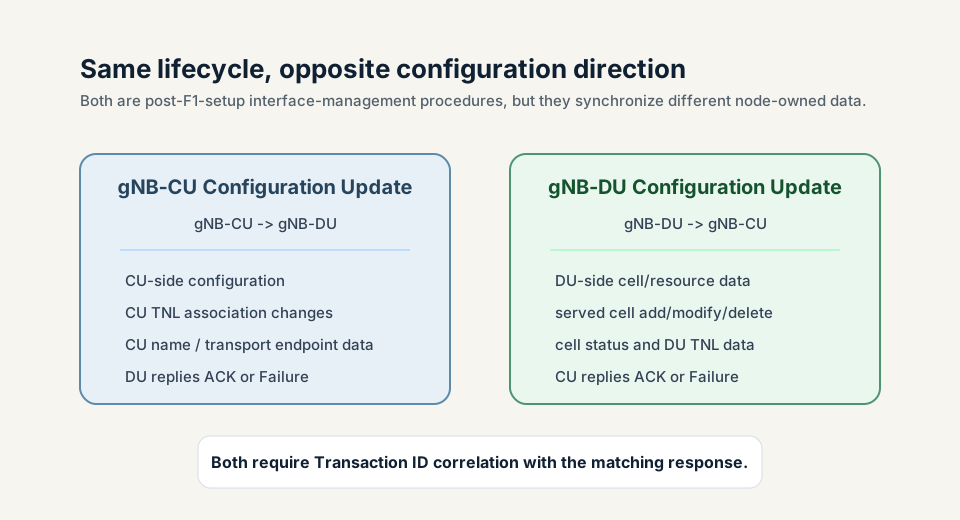
Direction distinction: CU update is CU-to-DU; DU update is DU-to-CU.
Call flow position: This procedure is the CU-to-DU counterpart to gNB-DU Configuration Update.
Typical state: Trace analysis separates CU-owned configuration from DU-owned cell and resource updates.
Preconditions:
The sender direction is confirmed.
The updated data belongs to the CU-side configuration domain.
Next likely message: Correct direction and lifecycle interpretation
Logical channel: SCTP carried F1AP initiatingMessage followed by successfulOutcome or unsuccessfulOutcome
Transport / encapsulation: F1AP over SCTP/IP between gNB-CU and gNB-DU
Security context: gNB-CU Configuration Update does not establish a UE security context. It is a non-UE-associated interface-management message used after F1 setup to synchronize CU-side configuration toward the DU.
Message Structure Overview
gNB-CU Configuration Update is a non-UE-associated initiatingMessage from gNB-CU to gNB-DU.
Transaction ID is mandatory and links the update to the Acknowledge or Failure.
gNB-CU Name may identify or refresh the CU name known by the DU.
gNB-CU TNL Association lists add, remove, or update CU transport connectivity information.
Transport Layer Address Info may provide updated CU endpoint information.
The DU either accepts the update with Acknowledge or rejects it with Failure and Cause.
Read this as a teaching-oriented ASN.1 summary of the practical fields to inspect. Decode Transaction ID first, then CU name, CU TNL association add/remove/update lists, transport endpoint information, and finally the paired Acknowledge or Failure.
Treat this as a teaching example based on the expected message structure, not as a captured network trace.
The message does not need to carry every optional CU-side field.
Transaction ID must match the later Acknowledge or Failure.
TNL association changes should be correlated with IP reachability, SCTP endpoint state, and transport maintenance windows.
Important Information Elements
IE
Presence
Description
Message Type
Mandatory
Identifies the F1AP PDU as gNB-CU CONFIGURATION UPDATE.
Transaction ID
Mandatory
Correlates the update request with the later gNB-CU Configuration Update Acknowledge or Failure.
gNB-CU Name
Optional
Optional updated CU name or identity information known by the DU.
gNB-CU TNL Association to Add List
Optional
Optional list of CU transport network associations to add.
gNB-CU TNL Association to Remove List
Optional
Optional list of CU transport network associations to remove.
gNB-CU TNL Association to Update List
Optional
Optional list of CU transport network associations to update.
Transport Layer Address Info
Optional
Optional CU transport endpoint information used by the DU for CU communication.
Detailed field explanation
Message Type
Identifies the F1AP PDU as gNB-CU CONFIGURATION UPDATE.
Presence: Mandatory
In practice: In practice, compare this field with the original request and with any later release-dependent optional fields so you can see whether the network accepted the same service model the UE asked for.
Transaction ID
Correlates the update request with the later gNB-CU Configuration Update Acknowledge or Failure.
Presence: Mandatory
In practice: In practice, compare this field with the original request and with any later release-dependent optional fields so you can see whether the network accepted the same service model the UE asked for.
gNB-CU Name
Optional updated CU name or identity information known by the DU.
Presence: Optional
In practice: In practice, compare this field with the original request and with any later release-dependent optional fields so you can see whether the network accepted the same service model the UE asked for.
gNB-CU TNL Association to Add List
Optional list of CU transport network associations to add.
Presence: Optional
In practice: In practice, compare this field with the original request and with any later release-dependent optional fields so you can see whether the network accepted the same service model the UE asked for.
gNB-CU TNL Association to Remove List
Optional list of CU transport network associations to remove.
Presence: Optional
In practice: In practice, compare this field with the original request and with any later release-dependent optional fields so you can see whether the network accepted the same service model the UE asked for.
gNB-CU TNL Association to Update List
Optional list of CU transport network associations to update.
Presence: Optional
In practice: In practice, compare this field with the original request and with any later release-dependent optional fields so you can see whether the network accepted the same service model the UE asked for.
Transport Layer Address Info
Optional CU transport endpoint information used by the DU for CU communication.
Presence: Optional
In practice: In practice, compare this field with the original request and with any later release-dependent optional fields so you can see whether the network accepted the same service model the UE asked for.
What to check in logs and traces
Confirm the direction is gNB-CU to gNB-DU.
Check Transaction ID and match it with the Acknowledge or Failure.
Decode gNB-CU Name if present.
Decode gNB-CU TNL Association to Add, Remove, and Update lists.
Validate transport layer address information and endpoint reachability.
Confirm the DU responds with Acknowledge or Failure.
Check for repeated update or failure loops.
Verify the F1 interface remains stable after the accepted update.
Common Issues and Troubleshooting
The DU rejects a gNB-CU Configuration Update.
Likely cause: The CU-side transport, association, name, or endpoint information may be unsupported, malformed, stale, or inconsistent with DU configuration.
What to inspect: Read the Failure Cause, Transaction ID, gNB-CU TNL Association lists, CU name, transport addresses, and DU logs.
Next step: Correct the CU/DU configuration mismatch and retry the update after the transport data is valid.
No Acknowledge or Failure appears after the update.
Likely cause: The procedure may be incomplete, SCTP may be unstable, or the DU may have hit a protocol handling issue.
What to inspect: Check Transaction ID, SCTP continuity, DU logs, Error Indication, and any reset around the same time.
Next step: Treat the CU configuration view at the DU as unconfirmed until a matching response appears.
Transport issues appear after the update.
Likely cause: The accepted CU TNL association changes may point to unreachable, stale, duplicated, or incorrectly referenced transport endpoints.
What to inspect: Check IP address reachability, SCTP endpoint state, association references, and any remove/update list ordering.
Next step: Validate the transport path and correct the association data before chasing UE-level procedures.
Engineers confuse this with gNB-DU Configuration Update.
Likely cause: Both procedures are post-setup configuration updates, but the ownership and direction are opposite.
What to inspect: Check sender, procedureCode, and whether the payload describes CU-side transport/configuration or DU-side cells/resources.
Next step: Use CU-update analysis for CU-originated transport/configuration changes and DU-update analysis for served-cell/resource changes.
LTE / 5G / Variant Comparison
TNL association add, remove, and update
Add introduces CU transport associations, remove retires them, and update changes existing CU transport endpoint details.
Compared with gNB-DU Configuration Update
gNB-CU Configuration Update is CU-to-DU and describes CU-side configuration or transport information. gNB-DU Configuration Update is DU-to-CU and describes DU-side cells/resources/status.
Compared with F1 Setup Request
F1 Setup Request establishes the F1 interface. gNB-CU Configuration Update changes or refreshes CU-side configuration after setup.
FAQ
What is gNB-CU Configuration Update in F1AP?
gNB-CU Configuration Update is the F1AP message sent by the gNB-CU to the gNB-DU to update CU-side configuration after the F1 interface has been established.
Who sends gNB-CU Configuration Update?
The gNB-CU sends it to the gNB-DU.
When is this message used?
It is used after F1 setup when the CU needs to update or refresh CU-side configuration, CU name, transport endpoint information, or CU TNL associations.
What does Transaction ID do?
Transaction ID correlates the configuration update with the later gNB-CU Configuration Update Acknowledge or Failure.
What are gNB-CU TNL Association lists?
They describe CU transport network layer associations to add, remove, or update so the DU can maintain the correct CU transport view.
How is this different from gNB-DU Configuration Update?
gNB-CU Configuration Update is CU-to-DU and describes CU-side configuration or transport information. gNB-DU Configuration Update is DU-to-CU and describes DU-side cells, resources, status, and transport data.
How is this different from F1 Setup Request?
F1 Setup Request is used for initial F1 interface establishment. gNB-CU Configuration Update is used after setup to refresh or change CU-side configuration.
What is the response to gNB-CU Configuration Update?
The gNB-DU responds with gNB-CU Configuration Update Acknowledge if it accepts the update or gNB-CU Configuration Update Failure if it rejects the update.
How do you troubleshoot gNB-CU Configuration Update failures?
Match Transaction ID, decode the Failure Cause, inspect CU TNL association lists and transport addresses, check DU logs and SCTP state, and correct CU/DU configuration mismatches before retry.
Decode this message with the 3GPP Decoder, inspect the related message database, or open the matching call flow to see where this signaling step fits in the full procedure.