gNB-CU Configuration Update Failure is the F1AP unsuccessful outcome sent by the gNB-DU to the gNB-CU when the DU cannot accept a CU configuration update.
Message Fact Sheet
Protocol
f1ap
Network
5g
Spec
3GPP TS 38.473
Spec Section
gNB-CU Configuration Update Failure message and gNB-CU Configuration Update procedure
Direction
gNB-DU -> gNB-CU
Message Type
gNB-CU Configuration / F1 Interface Management Message
The gNB-DU receives a gNB-CU Configuration Update but rejects CU-side configuration, TNL association changes, transport endpoint information, or other CU-owned interface-management data.
Main purpose
Rejects a CU configuration update, reports the failure reason using Cause, may prevent repeated retries using Time to Wait, keeps CU/DU configuration consistent, and helps engineers identify transport, TNL association, protocol, or configuration mismatches.
CU-side configuration synchronization, gNB-CU Configuration Update unsuccessful outcome, CU TNL association troubleshooting, Transport endpoint rejection, Transaction ID and Cause correlation
What is gNB-CU Configuration Update Failure in simple terms?
gNB-CU Configuration Update Failure is the F1AP unsuccessful outcome sent by the gNB-DU to the gNB-CU when the DU cannot accept a CU configuration update.
Rejects a CU configuration update, reports the failure reason using Cause, may prevent repeated retries using Time to Wait, keeps CU/DU configuration consistent, and helps engineers identify transport, TNL association, protocol, or configuration mismatches.
Why this message matters
gNB-CU Configuration Update Failure means the DU rejected a CU-side configuration change after F1 setup. Match Transaction ID, read Cause first, and respect Time to Wait before retry.
Where this message appears in the call flow
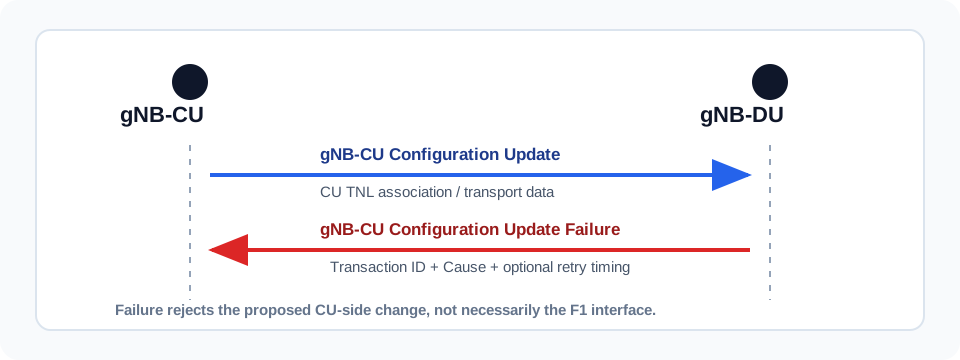
gNB-CU Configuration Update
Failure branch: the DU rejects the CU configuration update and returns Cause, optional Time to Wait, and diagnostics.
Call flow position: The gNB-DU sends Failure after receiving a gNB-CU Configuration Update it cannot accept.
Typical state: The proposed CU configuration change is rejected and is not applied as an accepted change.
Preconditions:
The F1 interface is already established.
The CU sent gNB-CU Configuration Update.
The DU found a condition that prevents accepting the proposed CU-side data.
Next likely message: Configuration correction or delayed retry after Time to Wait
CU transport rejection diagnostics
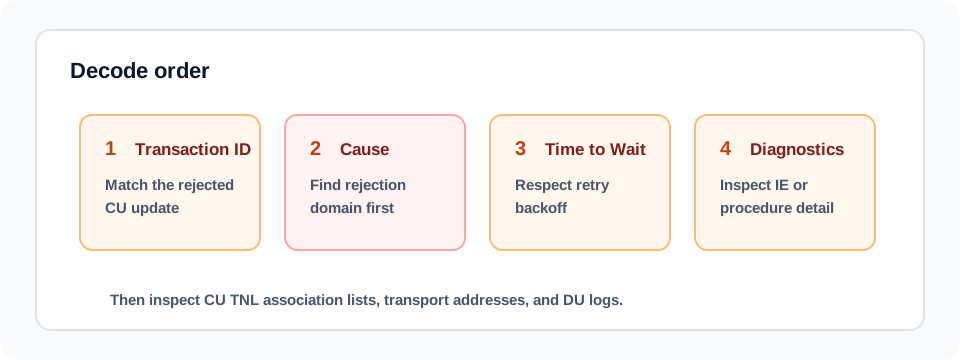
Decode order: match Transaction ID, read Cause, then apply retry timing and diagnostics when present.
Call flow position: Transaction ID identifies the rejected CU change; Cause identifies the rejection domain.
Typical state: Trace analysis should inspect the original CU TNL association and transport endpoint content.
Preconditions:
Transaction ID is present in the request and failure.
Cause is decoded by the analyzer.
Criticality Diagnostics may be present for IE-level detail.
Next likely message: Corrected CU-side configuration change
CU failure versus DU failure
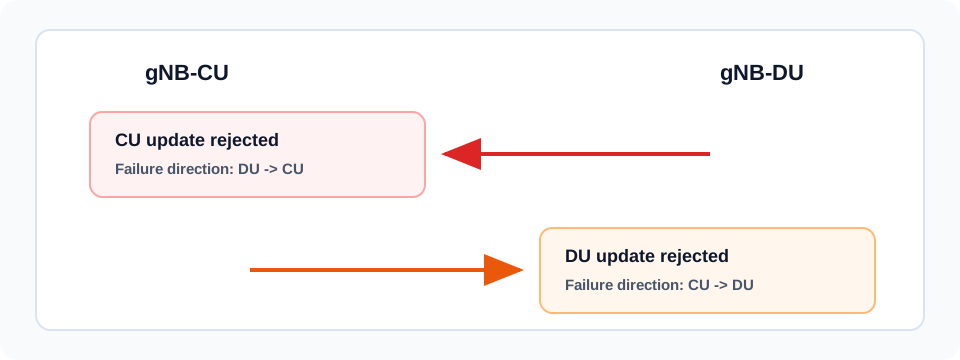
Direction distinction: CU update failure is DU-to-CU; DU update failure is CU-to-DU.
Call flow position: This failure is the DU-to-CU rejection of CU-owned configuration changes.
Typical state: The engineer should not treat it as the CU rejecting a DU-owned configuration change.
Preconditions:
The sender direction is confirmed.
The original request was gNB-CU Configuration Update.
Next likely message: Correct direction and configuration ownership interpretation
Next message(s): CU corrects configuration or waits before retry, Previous accepted F1 configuration may remain in use, Later CU-side change after correction
Message direction and transport
Sender and receiver: gNB-DU -> gNB-CU
Interface: F1-C
Domain: F1 interface management and CU-side configuration synchronization
Transport / encapsulation: F1AP over SCTP/IP between gNB-DU and gNB-CU
Security context: gNB-CU Configuration Update Failure does not establish a UE security context. It is a non-UE-associated unsuccessful outcome rejecting CU-side configuration information after F1 setup.
Message Structure Overview
gNB-CU Configuration Update Failure is the unsuccessfulOutcome for the CU configuration update procedure.
It is sent from gNB-DU to gNB-CU after a matching gNB-CU Configuration Update.
Transaction ID ties the failure to the exact CU update attempt.
Cause is mandatory and is the main troubleshooting field.
Time to Wait and Criticality Diagnostics are optional but important when present.
ASN.1 for gNB-CU Configuration Update Failure
GNBCUConfigurationUpdateFailure ::= SEQUENCE {
  protocolIEs ProtocolIE-Container { {GNBCUConfigurationUpdateFailure-IEs} },
  ...
}

GNBCUConfigurationUpdateFailure-IEs F1AP-PROTOCOL-IES ::= {
  { ID id-TransactionID           CRITICALITY reject TYPE TransactionID           PRESENCE mandatory } |
  { ID id-Cause                   CRITICALITY ignore TYPE Cause                   PRESENCE mandatory } |
  { ID id-TimeToWait              CRITICALITY ignore TYPE TimeToWait              PRESENCE optional  } |
  { ID id-CriticalityDiagnostics  CRITICALITY ignore TYPE CriticalityDiagnostics  PRESENCE optional  },
  ...
}
How to read this ASN.1
Decode Transaction ID first to match the rejected CU update, then read Cause. Time to Wait controls retry behavior when present, and Criticality Diagnostics can point to a problematic IE or procedure condition.
gNB-CU Configuration Update Failure - Example Dump
Treat this as a teaching example based on the expected message structure, not as a captured network trace.
Failure means the CU-side configuration change was rejected by the DU.
Always correlate Transaction ID with the original gNB-CU Configuration Update.
If Time to Wait is present, the CU should not retry before the indicated delay.
Important Information Elements
IE
Presence
Description
Message Type
Mandatory
Identifies the F1AP PDU as gNB-CU CONFIGURATION UPDATE FAILURE.
Transaction ID
Mandatory
Correlates the failure with the original gNB-CU Configuration Update request.
Cause
Mandatory
Explains why the gNB-DU rejected the CU configuration update.
Time to Wait
Optional
Optional retry delay before the gNB-CU sends another configuration update.
Criticality Diagnostics
Optional
Optional protocol-level diagnostics for problematic IEs, procedure handling, or criticality behavior.
Detailed field explanation
Message Type
Identifies the F1AP PDU as gNB-CU CONFIGURATION UPDATE FAILURE.
Presence: Mandatory
In practice: In practice, compare this field with the original request and with any later release-dependent optional fields so you can see whether the network accepted the same service model the UE asked for.
Transaction ID
Correlates the failure with the original gNB-CU Configuration Update request.
Presence: Mandatory
In practice: In practice, compare this field with the original request and with any later release-dependent optional fields so you can see whether the network accepted the same service model the UE asked for.
Cause
Explains why the gNB-DU rejected the CU configuration update.
Presence: Mandatory
In practice: In practice, compare this field with the original request and with any later release-dependent optional fields so you can see whether the network accepted the same service model the UE asked for.
Time to Wait
Optional retry delay before the gNB-CU sends another configuration update.
Presence: Optional
In practice: In practice, compare this field with the original request and with any later release-dependent optional fields so you can see whether the network accepted the same service model the UE asked for.
Criticality Diagnostics
Optional protocol-level diagnostics for problematic IEs, procedure handling, or criticality behavior.
Presence: Optional
In practice: In practice, compare this field with the original request and with any later release-dependent optional fields so you can see whether the network accepted the same service model the UE asked for.
What to check in logs and traces
Confirm Failure follows a matching gNB-CU Configuration Update.
Check that Transaction ID matches the original update.
Decode Cause before diagnosing surrounding symptoms.
Verify Time to Wait is respected before retry.
Decode Criticality Diagnostics if present.
Validate CU-side TNL Association to Add, Remove, and Update lists in the original update.
Validate transport addresses and endpoint reachability.
Confirm previous accepted configuration remains consistent after rejection.
Common Issues and Troubleshooting
The CU repeatedly sends the same change and receives Failure.
Likely cause: The CU may be retrying before Time to Wait expires or resending an unchanged invalid CU-side configuration.
What to inspect: Compare Transaction ID sequence, retry timestamps, repeated Cause values, and original CU TNL association content.
Next step: Respect retry backoff and correct the transport, TNL association, or IE problem indicated by Cause.
The failure points to transport or TNL association.
Likely cause: The original update may contain an invalid CU transport address, stale association reference, unsupported association operation, or unreachable endpoint.
What to inspect: Decode gNB-CU TNL Association to Add/Remove/Update lists, transport layer address information, SCTP state, and DU logs.
Next step: Correct CU-side transport data and confirm the DU can accept the association state.
The F1 interface remains up after the failure.
Likely cause: This is a post-setup configuration rejection, not necessarily an interface-establishment failure.
What to inspect: Check whether F1 Reset, SCTP restart, or F1 Setup follows. If not, previous accepted configuration may still be active.
Next step: Troubleshoot the rejected change without assuming total F1 setup loss.
Engineers confuse this with gNB-DU Configuration Update Failure.
Likely cause: Both messages are unsuccessful outcomes, but the original request direction and configuration ownership are opposite.
What to inspect: Check sender, procedureCode, and whether the original request was gNB-CU Configuration Update or gNB-DU Configuration Update.
Next step: Use this page for DU rejection of CU-originated changes; use DU Configuration Update Failure analysis for CU rejection of DU-originated changes.
LTE / 5G / Variant Comparison
Compared with Acknowledge
Acknowledge accepts the CU update procedure. Failure rejects the update procedure and carries Cause.
Compared with gNB-DU Configuration Update Failure
gNB-CU Configuration Update Failure is DU-to-CU and rejects CU-owned changes. gNB-DU Configuration Update Failure is CU-to-DU and rejects DU-owned changes.
Compared with F1 Setup Failure
F1 Setup Failure rejects initial F1 setup. gNB-CU Configuration Update Failure rejects a later CU-side change after the F1 interface already exists.
FAQ
What is gNB-CU Configuration Update Failure in F1AP?
It is the F1AP unsuccessful outcome sent by the gNB-DU to the gNB-CU when the DU rejects a CU configuration update.
Who sends this message?
The gNB-DU sends gNB-CU Configuration Update Failure to the gNB-CU.
What message triggers it?
It is triggered by a gNB-CU Configuration Update that the gNB-DU cannot accept.
What does the Cause IE mean?
Cause explains why the DU rejected the update, such as invalid CU transport address, unsupported TNL association change, protocol semantic error, or another unsupported condition.
What is Time to Wait used for?
Time to Wait tells the CU how long to wait before retrying the configuration update, helping avoid repeated failed attempts.
Does this failure mean the F1 interface is down?
Not necessarily. It rejects the proposed CU-side change, but the F1 interface may remain established using the previous accepted configuration.
How is this different from gNB-DU Configuration Update Failure?
gNB-CU Configuration Update Failure is sent by the DU to reject CU-owned changes. gNB-DU Configuration Update Failure is sent by the CU to reject DU-owned changes.
How is this different from F1 Setup Failure?
F1 Setup Failure rejects initial F1 interface establishment. gNB-CU Configuration Update Failure rejects a later CU-side configuration change after setup exists.
How do you troubleshoot repeated CU configuration update failures?
Match Transaction ID, decode Cause first, inspect CU TNL association and transport fields in the original update, respect Time to Wait, check Criticality Diagnostics if present, and correct CU-side configuration before retry.
Decode this message with the 3GPP Decoder, inspect the related message database, or open the matching call flow to see where this signaling step fits in the full procedure.